Odoo 20 Shop Floor: Features & Improvements

Discover Odoo 20 Shop Floor improvements for work order management, real-time production tracking, operator efficiency, and manufacturing workflows.

This post walks through the 3 new features in the Odoo 20 Shop Floor application. Each one comes with a feature overview, an operational path and a screenshot placeholder.

Article Overview

  • 1. HTML Note Field on Manufacturing Orders
  • 2. Instruction Updates (Pre-Filled Editor)
  • 3. Work Center Barcode Selection
  • 4. Conclusion
  • 5. Frequently Asked Questions
Feature 1

HTML Note Field on Manufacturing Orders

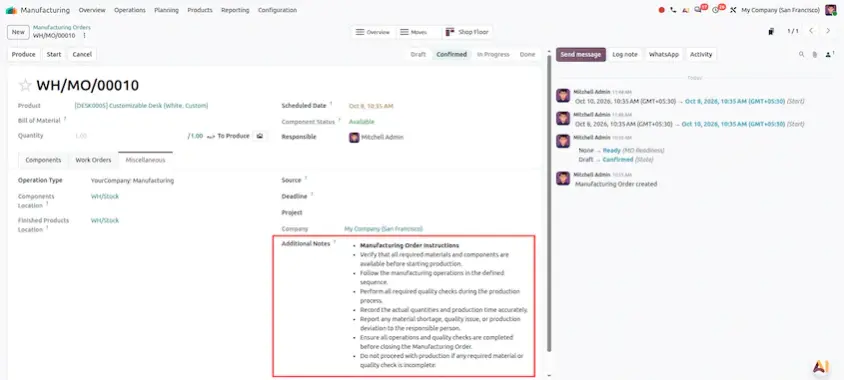
Feature Overview: The note field on Manufacturing Orders is now a full HTML rich text field in both the Manufacturing backend and the Shop Floor app. This allows managers to format instructions using bolding, lists, colored text, links, and embedded images.
Operational Path
Manufacturing App ▸ Manufacturing Orders ▸ Create / Open MO ▸ Navigate to Miscellaneous / Notes tab ▸ Use HTML Editor to format rich text instructions ▸ Save ▸ Open Shop Floor App ▸ Select MO Card ▸ Formatted HTML note renders directly on the operator's card.
Feature 2

Instruction Updates (Pre-Filled Editor)

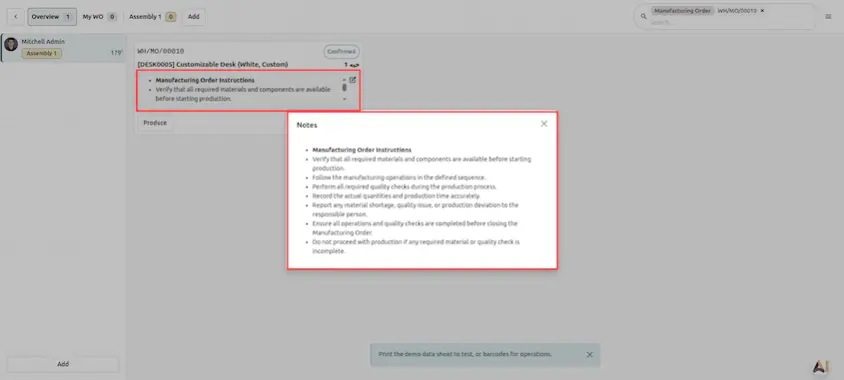
Feature Overview: When modifying work instructions on active operations or workorders, the editor modal automatically pre-fills with the existing instruction text, making quick adjustments and small corrections effortless.
Operational Path
Manufacturing App / Shop Floor ▸ Open Work Order / Operation Step ▸ Click Update Instruction / Edit Icon ▸ Instruction modal opens with current text pre-filled ▸ Edit text ▸ Click Save.
Feature 3

Work Center Barcode Selection

Feature Overview: Operators can scan a physical Work Center barcode using a Bluetooth/USB handheld scanner or tablet camera to instantly select and filter that Work Center in the Shop Floor app.

Operational Path
Open Shop Floor App ▸ Point Barcode Scanner at Work Center Barcode Sticker ▸ Scan Barcode ▸ Shop Floor view automatically switches and filters to the scanned Work Center.

Odoo 20 Shop Floor makes it quicker to give operators clear instructions and to get them to the right work center. Managers can write richly formatted notes, small instruction corrections take seconds and a single scan moves the view to the correct work center.

The main takeaways:

  • Clearer instructions: rich text notes with formatting, links and images appear on the operator's card.
  • Faster corrections: the instruction editor opens with the existing text pre-filled.
  • Quicker navigation: scan a Work Center barcode to select and filter it instantly.

A good way to start is by moving one frequently used instruction into the new rich text note, then adding barcode stickers at your work centers. Replace the screenshot placeholders with captures from your own environment to build training material.

Frequently Asked Questions

Odoo 20 adds three features: an HTML rich text note field on Manufacturing Orders, a pre-filled editor for instruction updates and Work Center selection by barcode scan.

The note is now a full HTML rich text field in both the Manufacturing backend and the Shop Floor app. You can use bolding, lists, colored text, links and embedded images to format instructions.

Open the Manufacturing Order under Manufacturing App ▸ Manufacturing Orders, go to the Miscellaneous / Notes tab, format the text with the HTML editor and save. In the Shop Floor app, select the MO card and the formatted note renders directly on the operator's card.

Open the work order or operation step and click Update Instruction or the edit icon. The modal opens with the current instruction text already filled in, so you only edit what needs changing and click Save.

Point a Bluetooth or USB handheld scanner, or a tablet camera, at the Work Center barcode sticker and scan it. The Shop Floor view switches automatically and filters to that Work Center.
ODOO 20 MIGRATION & IMPLEMENTATION

Ready to Move to Odoo 20?

Build a smarter, more scalable Odoo experience for your business.

Whether you are planning an Odoo 20 migration, launching a new eCommerce website, or need customization, integrations, or ongoing support, our Odoo experts can help you plan and implement the right solution for your business.

Optimize Your Manufacturing with Odoo

Discover how Odoo manufacturing solutions can help streamline production workflows, improve work order visibility, and support shop floor operations.

Contact Our Odoo Experts

Get GritXi's Expertise

Sign in to leave a comment
Oct 19, 2026

Odoo 20 Documents: New Features and Updates

This article is the definitive operational manual for the Odoo 20 Documents Application (documents, ai_documents, documents_hr, documents_spreadsheet, documents_account). It details feature deep-dives...
Oct 16, 2026

Odoo 20 Inventory: New Features and Updates

Managing inventory is more than just keeping products in stock. Businesses need to know when to order more products, how to ship goods, where products are stored, and how much their stock is worth. Od...
Oct 16, 2026

Odoo 20 Point of Sale: New Features and Updates

Odoo 20 Point of Sale introduces improvements across retail checkout, restaurant self-ordering, payment handling, inventory visibility, accounting, and receipt printing. This guide explores the POS up...