This article is the definitive operational manual for the Odoo 20 Documents Application (documents, ai_documents, documents_hr, documents_spreadsheet, documents_account). It details feature deep-dives, operational navigation paths, enterprise workflows, screenshot placement instructions, and testing procedures.
Article Overview
- 1. Executive Summary: Landmark Advancements in Odoo 20 Documents
- 2. Feature Deep-Dives & Operational Navigation
- 3. Conclusion
- 4. Frequently Asked Questions
Executive Summary: Landmark Advancements in Odoo 20 Documents
| # | Feature Name | Module / Technical Anchor | Core Capability & Business Impact |
|---|---|---|---|
| 1 | AI Automatic File Renaming | ai_documents (_ai_action_rename_file) | Scans document text via LLMs to automatically generate clean, standardized, descriptive file titles upon upload. |
| 2 | AI Smart Folder Auto-Sorting | ai_documents | Configurable LLM folder prompts automatically classify and route incoming documents into targeted sub-folders based on content. |
| 3 | Group-Based Access Rights Security | documents (documents.access) | Enterprise access control enabling read, write, or admin permissions assigned directly to Odoo security groups (res.group.functional). |
| 4 | Virtual Drive Workspace Navigation | documents (user_root) | Unified workspace views (Company, My Drive, Shared With Me, Trash) powered by high-performance recursive SQL queries. |
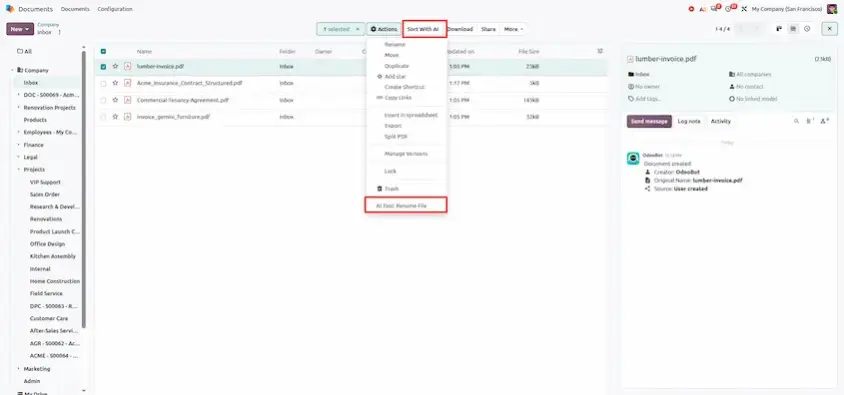
AI Automatic File Renaming (ai_documents)
Feature Overview: Uploaded files often have non-descriptive names (e.g. SCAN_9918.pdf or photo_1.png). Odoo 20 leverages AI document intelligence (_ai_action_rename_file). Upon uploading, Odoo scans the document body and suggests or applies a clean title automatically.
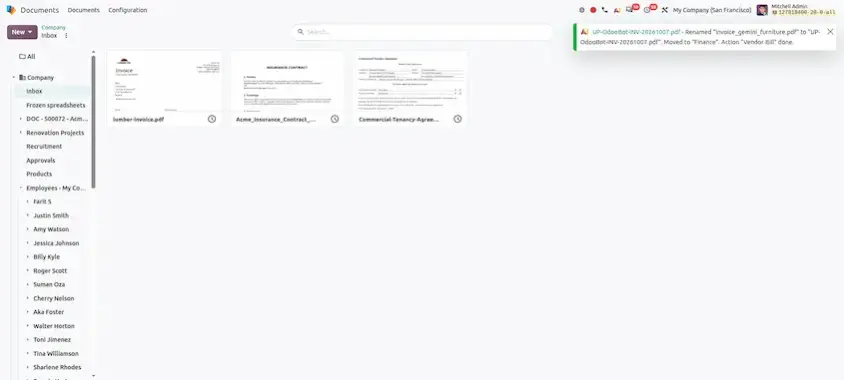
AI Smart Folder Auto-Sorting
Feature Overview: Folders can be configured with custom LLM prompts . When unorganized documents land in an inbox folder, Odoo's AI evaluates the prompt and automatically routes files into appropriate sub-folders (e.g. Invoices, Contracts, Tax Documents).
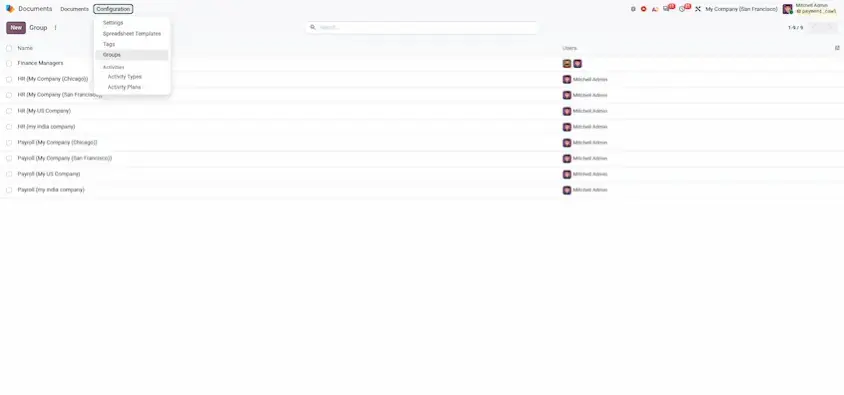
Group-Based Access Rights Security (documents.access)
Feature Overview: Workspace access management is upgraded via the documents.access model. Administrators can assign read, write, or full admin permissions for specific workspaces to security groups (group_id). Added group members automatically inherit workspace access.
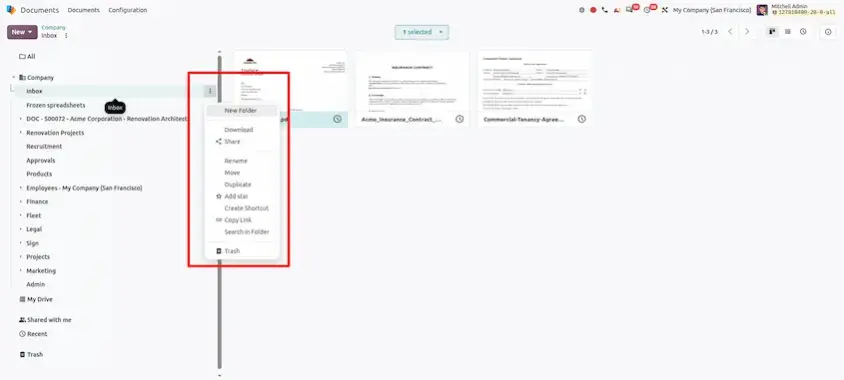
Virtual Drive Workspace Navigation
Feature Overview: Documents introduces intuitive cloud drive navigation split into Company, My Drive, Shared With Me, and Trash. High-performance recursive SQL CTE queries optimize browsing speeds across large folder hierarchies.
Odoo 20 turns Documents from a place where files are stored into one that organizes them for you. Files rename and sort themselves, requests collect several documents through a single link, access follows security groups and PDFs, spreadsheets and downstream actions are all one click away.
The main takeaways:
- Less manual filing: AI renaming and folder auto-sorting handle the naming and placement of incoming files.
- Simpler collection and security: one request wizard for multiple documents, plus group-based access rights for workspaces.
- Fewer external tools: inline PDF tools, spreadsheet conversion and cross-app actions keep work inside Odoo.
A good way to start is with the workflows described in this guide, AI ingestion and employee onboarding, and then run the three verification tests to confirm everything works in your environment. Use the screenshot placement notes to build your own training material.
Odoo 20 Documents: New Features and Updates