Effective rental management requires more than simply recording bookings. Rental teams need flexible orders, accurate pricing, and clear availability rules to keep products booked, picked up, and returned smoothly.
In Odoo 20 Rental, several improvements make it easier to organize rental operations. Rental products can now be added to regular sales orders, working schedules replace Unavailability days to guide pickup and return times, and prices on existing order lines update automatically when the pricelist or rental period changes. Sales, Subscription, and Rental prices are unified in a single Prices tab, strikethrough pricing displays discounts clearly in the shop, and a new dashboard provides a summary of rental activity.
In this article, we will explore the six key improvements in Odoo 20 Rental:
Rental Products on Regular Sales Orders
Add rental products directly to a regular sales order.
Working Schedules Replace Unavailability Days
Pickup and return times follow your real opening hours.
Automatic Price Update on Sales Order Lines
Order line prices follow the pricelist and rental period.
Simplified and Unified Price Lists
Sales, Subscription and Rental prices in one Prices tab.
Strikethrough Pricing in the Shop
Discounts are shown clearly next to the original price.
A New Rental Orders Dashboard
A summary of rental activity with quick status filters.
Rental Products on Regular Sales Orders
Odoo 20 allows rental products to be added directly to a regular sales order, so renting no longer needs a separate order of its own.
This is more than a small convenience. The sales order becomes a single workspace where teams can quote rental products, add regular products, set the rental period and confirm everything together.
In earlier versions, a rental usually started as its own rental order in the Rental app, so a business that sold and rented products had to handle two different documents.
Each rental product has a Rental section on its product form, where the rental prices (per hour, day or week) and the default pickup and return times are maintained.
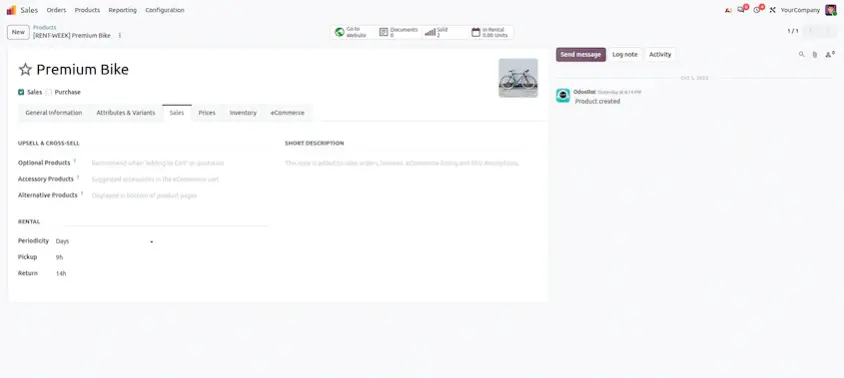
The Rental section on the product form holds the rental prices and the pickup and return details
To rent a product out, a user creates a quotation, selects the customer and adds the rental product from the Order Lines tab. The order line carries its own rental period, showing when the item is picked up and when it is returned.
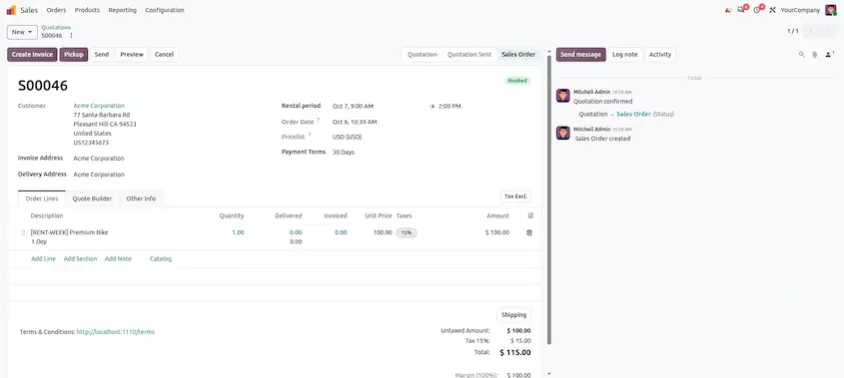
A regular sales order displaying a rental product line with its rental period
Adding a rental product to a sales order automatically adds a Rental period field to the order line. The rental start and return dates determine whether the order retains its rental period. To convert a rental order into a regular sales order, simply remove the rental start and return dates.
Because this is an ordinary sales order, it can also include products that are sold outright, and it is confirmed in the usual way. The Sales and Rental apps both need to be installed for this to work.
Business Value
Rental products on regular sales orders help organizations:
- Sell and rent from a single order
- Quote rental and non-rental items together
- Work in an order screen the team already knows
- Avoid creating a separate rental order for every request
Working Schedules Replace Unavailability Days
Odoo 20 introduces working schedules to decide when pickups and returns can happen, replacing the earlier Unavailability days setting.
A working schedule is more than a replacement for a list of closed days. It is a weekly timetable of the days and hours a business is open, for example Monday to Friday from 9:00 to 18:00 and Saturday from 9:00 to 13:00, and any day without working hours is treated as a closed day.
In previous versions, the Rental settings asked businesses to select Unavailability days, such as Sunday, on which pickups and returns could not be scheduled. This was a separate list that had to be kept in line with the real opening hours.
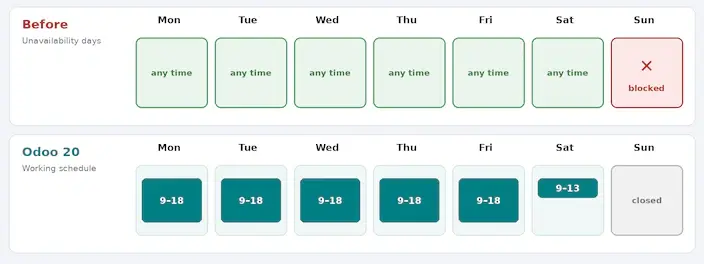
Unavailability days are replaced by a working schedule that reflects the real opening hours
Choose the Working Schedule
The working schedule is selected in the Rental settings, under Availabilities. A business can pick an existing schedule or create one that matches its opening hours.
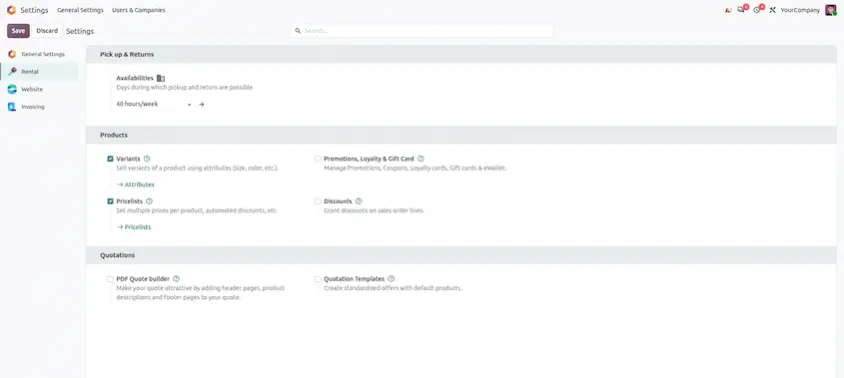
The Availabilities option in the Rental settings is where the working schedule is selected
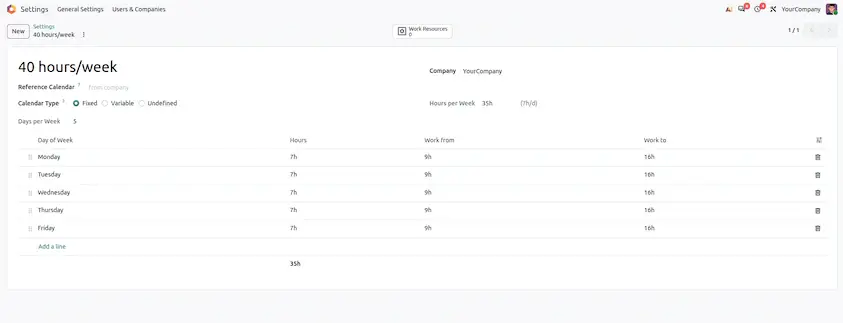
A working schedule, such as 40 hours/week, lists the days and hours the business is open
Businesses that used Unavailability days earlier can set the same days as days off in the schedule, so those days continue to be treated as closed.
Rental Dates for Customers
The same rental period selection appears when customers order through the website shop, where they choose the dates on the product page and review them in the order summary.
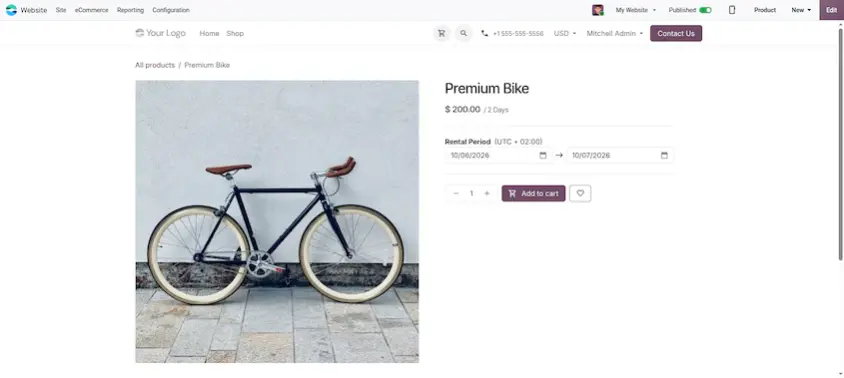
The website shop product page lets customers choose a rental period
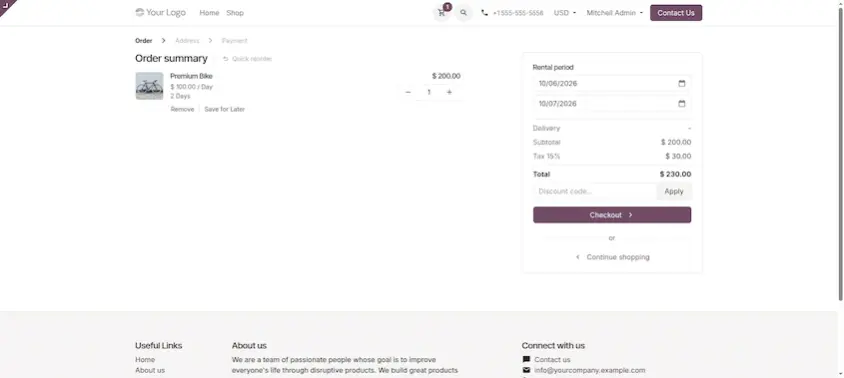
The order summary displays the selected rental period before checkout
Before vs. Odoo 20
The difference can be understood as follows:
A separate list of blocked Unavailability days, maintained alongside the real opening hours.
A working schedule that defines the days and hours when pickups and returns can happen.
Pickup and return times are checked against this schedule, and a change in opening hours only needs to be updated once.
Business Value
Working schedules help organizations:
- Match rental availability to real opening hours
- Maintain one schedule instead of a list of blocked days
- Update opening hours in a single place
- Treat closed days automatically
Automatic Price Update on Sales Order Lines
Odoo 20 introduces automatic price updates on sales orders. When the pricelist or the rental period of an order is changed, the prices on the existing order lines are updated automatically.
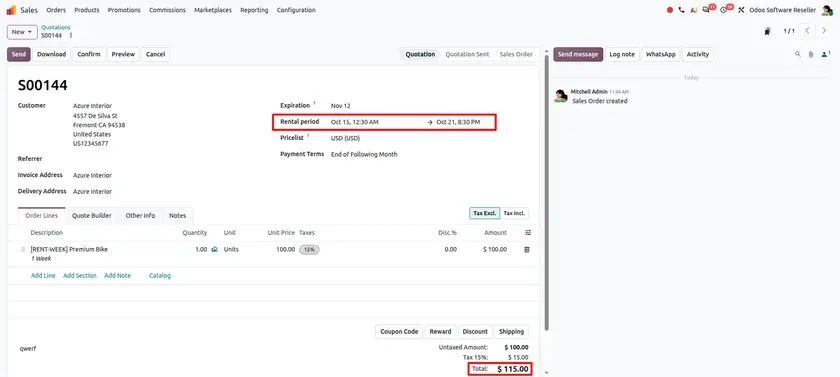
Order with a one-week rental period
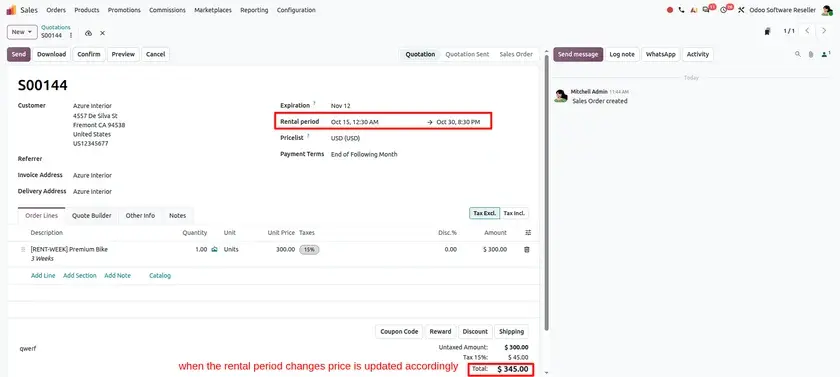
When the rental period changes, the price is updated accordingly
This is more than a convenience. The order always shows prices based on the current pricelist and rental period, so teams can adjust an order without removing and re-adding the products.
Business Value
Automatic price updates help organizations:
- Keep order line prices in step with the pricelist
- Reflect a changed rental period in the price straight away
- Reduce manual corrections on quotations
- Lower the chance of quoting an outdated price
Simplified and Unified Price Lists
Odoo 20 simplifies pricing by bringing Sales, Subscription and Rental prices together in a single Prices tab, all powered by the standard pricelist engine.
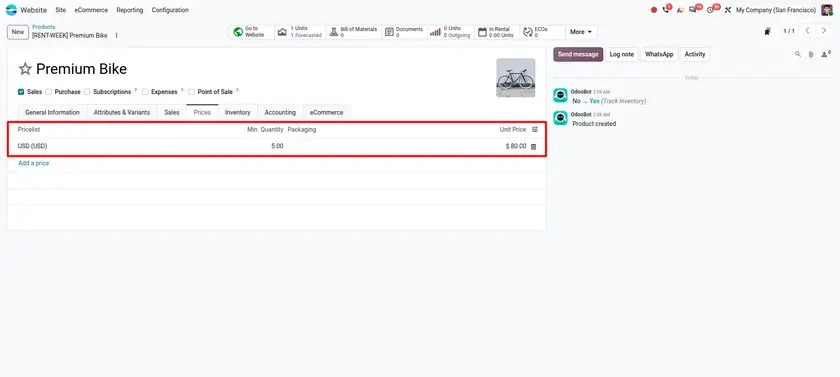
The Prices tab on the product form
Pricing is no longer split across separate places. It becomes A unified Prices tab for managing Sales, Subscription, and Rental pricing, with rental prices following the same pricelist rules as the rest of the catalogue.
Business Value
Unified price lists help organizations:
- Manage sales, subscription and rental prices in one tab
- Use the standard pricelist engine for rentals
- Avoid maintaining separate rental price rules
- Make pricing easier to review and explain to the team
Strikethrough Pricing in the Shop
Odoo 20 makes discounts easier to notice with strikethrough pricing. When a pricelist-based discount applies to a rental product, the Shop and product pages show the original price crossed out next to the new discounted price.
Pricelist price set on the product
Customers do not have to guess how much they are saving. They see the regular price and the discounted price together, which makes pricelist-based offers easier to understand.
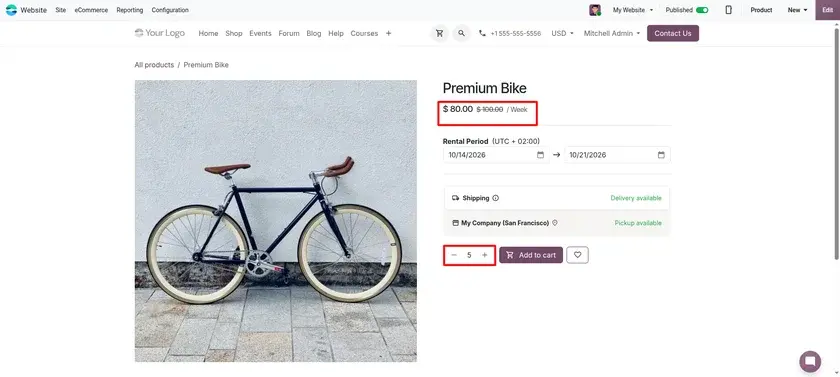
The original price crossed out beside the discounted price on the product page
Business Value
Strikethrough pricing helps organizations:
- Show the value of a discount clearly to customers
- Present the original and the discounted price side by side
- Make pricelist-based offers more visible on the website
A New Rental Orders Dashboard
Odoo 20 adds a dashboard at the top of the list and Kanban views of rental orders, giving a quick summary of rental activity.
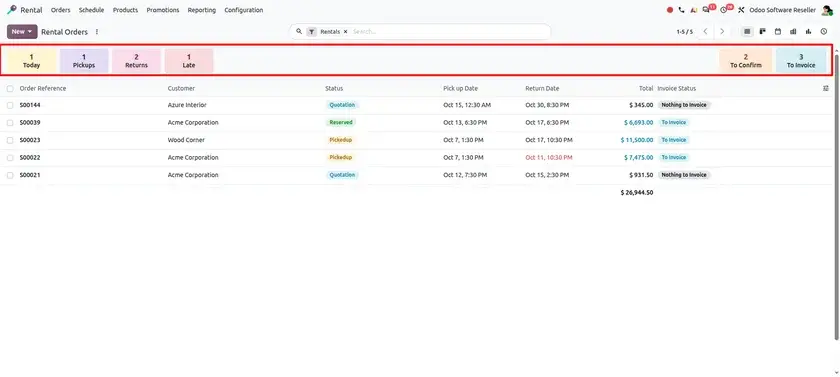
The Rental orders dashboard
The dashboard is not only a set of figures. It also works as a quick filter, allowing teams to narrow the list of rental orders down by status with ease.
Business Value
The Rental orders dashboard helps organizations:
- See a summary of rental activity at a glance
- Filter rental orders by status quickly
- Follow rental activity from both list and Kanban views
Business Benefits
Rentals Within Everyday Sales
Rental products on regular sales orders let teams quote, sell and rent from one familiar order.
Availability That Matches Reality
Working schedules keep pickup and return times in line with the hours the business is really open.
Automatic Rental Price Updates
Automatic price updates keep order lines in step with the pricelist and the rental period.
One Place for Pricing
Unified price lists bring sales, subscription and rental prices into a single Prices tab.
Clearer Offers for Customers
Strikethrough pricing shows the original price beside the discounted price in the shop.
Better Rental Visibility
The Rental orders dashboard summarizes rental activity and filters orders by status.
Together, these improvements make rentals simpler to create, easier to price and easier to follow, from order creation to scheduling and tracking.
Odoo 20 Rental Improvements at a Glance
Odoo 20 Rental introduces focused improvements that make renting simpler, more flexible and easier to manage.
Rental products on regular sales orders let rentals and regular sales live on the same order, and working schedules keep pickup and return times aligned with the hours the business is open. Automatic price updates, unified price lists and strikethrough pricing make pricing accurate and clear, while the Rental orders dashboard summarizes rental activity at a glance.
Add → Schedule → Price → Track
Together, these improvements help businesses manage rentals with the same ease as any other sale, with availability that follows their real working hours and prices that stay correct.
Odoo 20 Rental: New Features and Updates