Odoo 20 PLM & Quality: New Features and Improvements

Discover the latest Odoo 20 PLM & Quality features, including improved BoM comparison, ECO version control, product version tracking, quality checks, and vendor quality management.

This post is the definitive operational manual for Odoo 20 PLM (Product Lifecycle Management) (mrp_plm) and Quality Control (quality, quality_control). It details feature deep-dives, operational UI navigation paths, enterprise workflows, and explicit screenshot placement instructions.

Executive Summary: The 8 Landmark Advancements in Odoo 20 PLM & Quality

Feature Name App / Module Core Capability & Business Impact
Apply ECO Without Forcing a New Version mrp_plm Apply minor engineering adjustments (text, documents, minor component notes) directly to active BoMs without cluttering version history.
Unified BoM Change & Cost Difference Report mrp_plm A single consolidated report displays every added/removed component, routing step update, and exact financial cost delta side-by-side.
Quality Admin Transfer Validation Bypass quality_control Quality Managers (quality.group_quality_manager) can validate stock transfers directly when non-critical quality checks are pending.
Automated Quarantine via Failure Location Routing quality Assign dedicated Failure Locations (failure_location_ids) so failed quality checks automatically route products to Quarantine stock bins.
Dynamic ECO Approval Matrices & Delegations mrp_plm Configure multi-tier engineering approval paths with automated substitute approver delegation during absences.
Automated Quality Alert Triggers & IoT Integration quality_control_iot Automatically trigger Quality Alerts on out-of-spec measurements received directly from connected IoT devices (calipers, scales).
Inline BoM Revision Diffing mrp_plm Visual color-coded diff highlights (green additions / red deletions) directly inside the BoM editor during ECO drafting.
Mobile Inspection Tablets & Worksheets quality_control_worksheet Mobile-optimized quality check wizard supporting touch signature capture, photo attachments, and dynamic custom worksheets.

Feature Deep-Dives & Screenshot Instructions

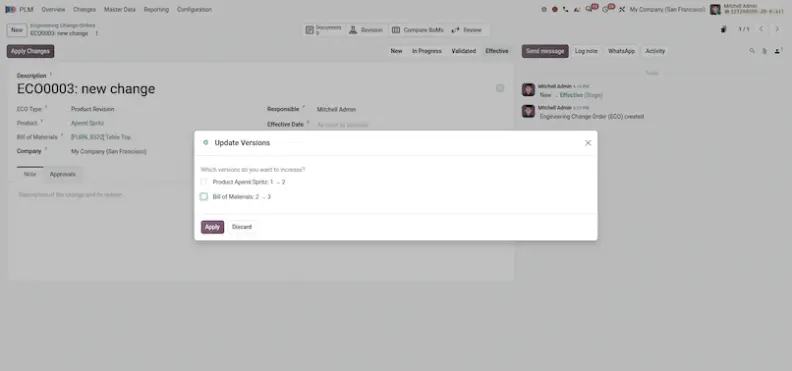
1. Apply an Engineering Change Without Forcing a New Version (mrp_plm)

Feature Overview: Previously, approving an Engineering Change Order (ECO) always forced a new BoM version increment (e.g. v1.1 -> v1.2). In Odoo 20, engineers can apply minor revisions directly to the active version of a Bill of Materials without cluttering version history.

Operational Path: PLM ▸ Engineering Change Orders ▸ [Select ECO] ▸ Apply Changes ▸ Select "Apply to Current Version".
2. Unified BoM Change & Cost Difference Report (mrp_plm)

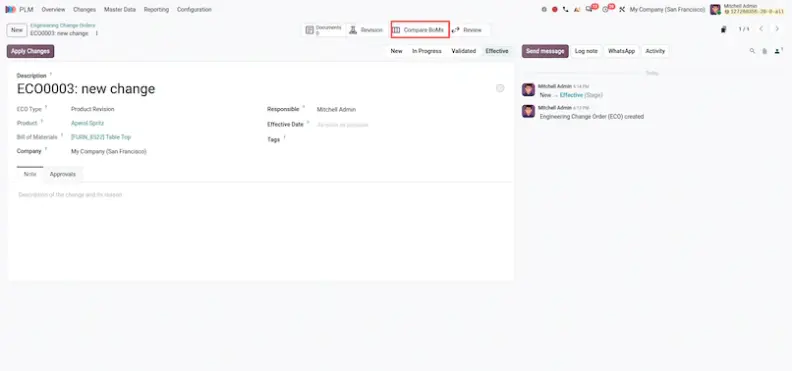
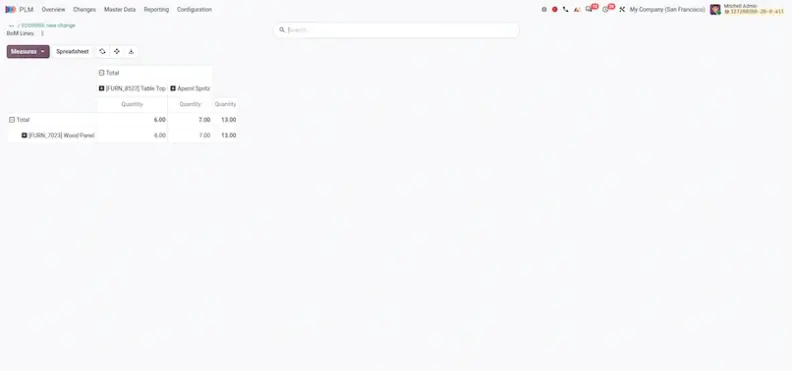
Feature Overview: Inspecting the financial impact of an engineering change previously required separate revision diff and cost structure reports. Odoo 20 unifies component revision diffs and financial cost deltas into a single side-by-side report.

Operational Path: PLM ▸ Engineering Change Orders ▸ [Select ECO] ▸ Smart Button "BoM Changes & Cost Impact".
3. Quality Admin Transfer Validation Bypass (quality_control)

Feature Overview: If a non-blocking quality check was pending on an incoming shipment, warehouse operators were previously blocked from validating the stock transfer. In Odoo 20, Quality Managers (quality.group_quality_manager) can bypass pending checks and validate transfers directly.
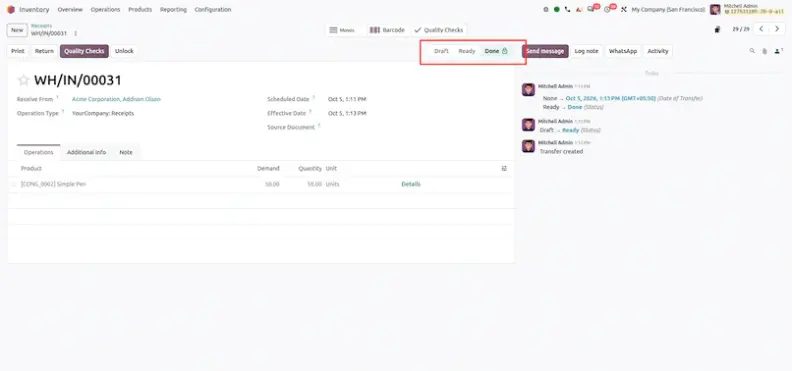
Operational Path: Inventory / Barcode ▸ Transfers / Receipts ▸ Select Transfer ▸ [Logged in as Quality Manager] ▸ Click "Validate" ▸ Confirm Admin Override.

4. Set a Failure Location When a Quality Check Fails (quality)

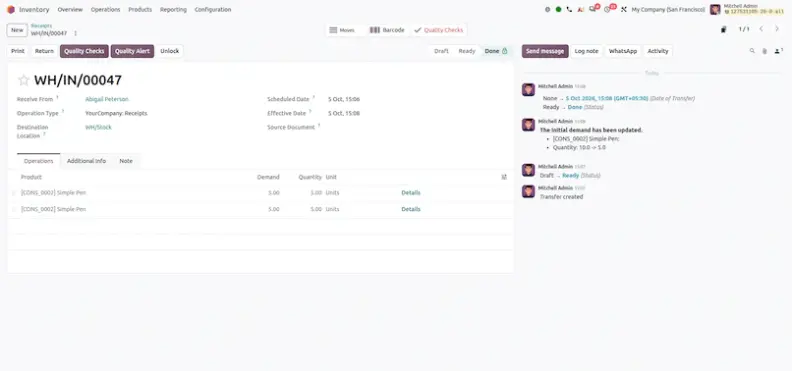
Feature Overview: Quality Control Points now feature dedicated Failure Locations (failure_location_ids). When an inspection check fails, Odoo 20 automatically updates the destination location of the failed stock item to the designated Quarantine bin.

Additionally, after confirmation, no backorder is created for the failed quantity, unlike in previous versions.

Operational Path: Quality ▸ Quality Control Points ▸ [Select Point] ▸ Set "Failure Location" (e.g. WH/Output/Quarantine) ▸ Run Quality Check ▸ Select "Fail".
Real-World Processes

Enterprise Operational Workflows

Workflow: Minor Engineering Documentation Update (No Version Bump)

  1. Navigate to PLM ▸ Engineering Change Orders ▸ New.
  2. Select ECO Type = Minor Documentation / Spec Fix.
  3. Select the target Bill of Materials (e.g., BoM-00102 - Desk Chair).
  4. Update the component assembly document attachment or text instruction under the BoM Changes tab.
  5. Move the ECO stage to Approved.
  6. Click Apply Changes.
  7. In the popup, select Apply to Current Version.
Result: Active BoM BoM-00102 is updated immediately without incrementing to a new version number.

Workflow: Defective Goods Quarantine Routing

  1. Navigate to Quality ▸ Quality Control Points ▸ New.
  2. Set Title = Incoming Goods Structural Inspection.
  3. Set Operation Type = Receipts.
  4. Under Failure Location, select WH/Output/Quarantine.
  5. Save the Control Point.
  6. When an incoming shipment arrives, open Inventory ▸ Receipts ▸ Perform Quality Check.
  7. Tap Fail on the inspection dialog.
Result: Odoo 20 automatically updates the stock move line destination to WH/Output/Quarantine, isolating the failed items from active inventory.

Conclusion

Odoo 20 makes engineering change and quality control faster and safer. Engineers no longer have to bump a version number for every small edit, they can see cost and component differences in one report, and failed inspections move stock to quarantine without manual handling.

The main takeaways:

PLM adds version-free minor ECOs, a unified change and cost report, flexible approval matrices with delegation and inline revision diffing.

Quality adds a manager validation bypass, failure location routing to quarantine, IoT-triggered alerts and mobile inspections with worksheets.

Workflows for minor documentation updates and defective goods quarantine give teams a repeatable, step-by-step starting point.

A good way to start is with one of the two workflows described in this post, then expand to approvals, IoT alerts and mobile inspections. Use the screenshot placement notes to build your own training material as you roll each feature out.

Frequently Asked Questions

Yes. Engineers can apply minor revisions, such as text, documents or minor component notes, directly to the active version of a Bill of Materials. Open the ECO and go to Apply Changes ▸ Select "Apply to Current Version". Previously, approving an ECO always forced a version increment such as v1.1 to v1.2.

Open the ECO and click the BoM Changes & Cost Impact smart button. A single side-by-side report shows every added or removed component, routing step updates and the exact financial cost difference, instead of separate revision diff and cost structure reports.

Quality Managers (quality.group_quality_manager) can bypass pending non-critical quality checks. Log in as a Quality Manager, open the transfer, click Validate and confirm the admin override.

Quality Control Points have a Failure Location field (failure_location_ids). When an inspection fails, Odoo automatically updates the destination of the failed stock to the designated location, such as WH/Output/Quarantine, so failed items are isolated from active inventory.

Create a Quality Control Point with the Receipts operation type, set the Failure Location to your quarantine bin and save. When a receipt arrives, perform the quality check and tap Fail. The Enterprise Operational Workflows section above lists every step.

Yes. You can configure multi-tier engineering approval paths with automated substitute approver delegation during absences.

Yes. Quality Alerts can be triggered automatically when out-of-spec measurements arrive from connected IoT devices such as calipers and scales.

Yes. Inline BoM revision diffing shows color-coded highlights, with green for additions and red for deletions, directly inside the BoM editor.

Yes. The mobile-optimized quality check wizard supports touch signature capture, photo attachments and dynamic custom worksheets.
ODOO 20 MIGRATION & IMPLEMENTATION

Ready to Move to Odoo 20?

Planning to migrate your existing ERP or eCommerce platform to Odoo 20?

Our Odoo experts can help you plan and manage the complete migration, configure your Website and eCommerce platform, integrate business workflows, and optimize your online customer experience. Whether you need Odoo 20 migration, a new eCommerce website, ERP implementation, customization, integration, or ongoing support, share your requirements with us. Fill out the form below and contact our team to discuss your project and find the right Odoo solution for your business.

Need Help Implementing Odoo 20 PLM & Quality?

Planning to upgrade or implement Odoo 20 PLM and Quality features? Our Odoo experts can help you configure product lifecycle management, engineering change orders, BoM revisions, quality checks, manufacturing workflows, and vendor quality processes. Whether you need Odoo 20 migration, customization, manufacturing implementation, integration, or ongoing support, share your requirements with our team and find the right solution for your business.

Talk to Our Odoo Experts

Get GritXi's Expertise

Sign in to leave a comment
Oct 6, 2026

Odoo 20 Helpdesk: New Features & Improvements

Odoo 20 brings a number of important improvements to Helpdesk, making it easier for support teams to identify unanswered tickets, manage SLA deadlines, automate ticket closure, organize ticket informa...
Oct 2, 2026

How to Install Odoo 20 on Ubuntu: Complete Step-by-Step Setup Guide

This guide explains how to install Odoo 20 Community Edition from source on an Ubuntu or Debian server. You will install Python 3.12, PostgreSQL 16, Odoo's own dependencies, set up a systemd service, ...
Oct 2, 2026

Odoo 20 CRM: New Features & Complete Guide

A CRM should do more than store customer information. It should actively help sales teams move deals forward, and that is the direction Odoo 20 CRM takes. This release brings a unified lead generation...