Odoo 20 brings a number of important improvements to Helpdesk, making it easier for support teams to identify unanswered tickets, manage SLA deadlines, automate ticket closure, organize ticket information, and connect customer support with sales, inventory, accounting, and field service operations.
For businesses using Odoo Helpdesk as their central support platform, these changes can help reduce manual follow-ups and give support agents more visibility into the complete ticket lifecycle.
In this guide, we explore the key Odoo 20 Helpdesk features, updated workflows, and operational improvements that support teams should know about.
Filter Tickets by Unanswered Customer Messages
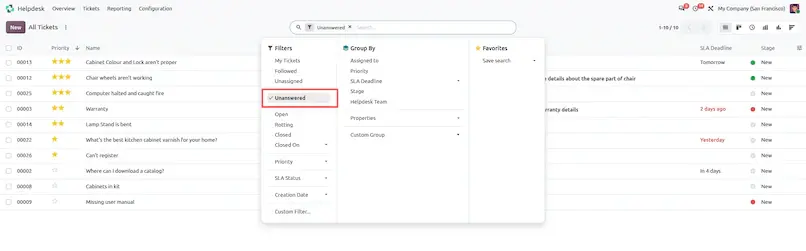
One of the most useful improvements for support teams is the dedicated Unanswered filter.
Instead of manually reviewing the ticket chatter to determine which customers are waiting for a response, support agents can use the filter to identify tickets where the latest incoming message requires attention.
Why it matters: For support teams managing a large ticket volume, unanswered conversations can easily get buried among active and completed tickets. The Unanswered filter provides a quick way to focus on tickets that require agent attention.
Feature Overview
Odoo 20 introduces a dedicated Unanswered Filter ([('unanswered', '=', True)]). This filter isolates tickets where the most recent chatter message was sent by the customer, ensuring support reps can immediately identify tickets awaiting agent response.
Operational Instructions
- Navigation Path: Helpdesk ▸ Tickets ▸ All Tickets (or My Tickets).
- In the Search bar, click Filters ▸ Unanswered.
- The list/kanban view filters to show only tickets where the last incoming message has not yet been answered by a team member.
Automated Auto-Close Ticket Reminders (auto_close_ticket_reminder)
Feature Overview
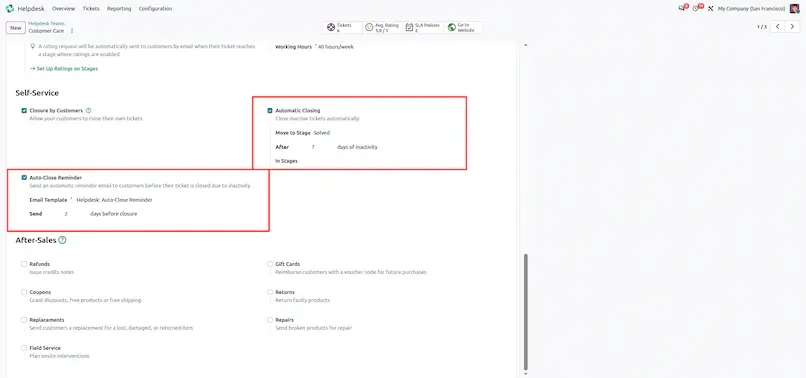
When Automatic Closing is enabled on a Helpdesk Team (auto_close_ticket), Odoo 20 adds an Auto-Close Reminder feature (auto_close_ticket_reminder). Before a ticket automatically closes due to inactivity, the system sends an automated email reminder (auto_close_reminder_email_template) to the customer after a configurable delay (auto_close_reminder_delay).
Why it matters:- Automatic closing can keep the Helpdesk pipeline clean while still giving customers an opportunity to respond before their ticket is closed.
Operational Instructions
- Navigation Path: Helpdesk ▸ Configuration ▸ Helpdesk Teams ▸ [Select Team].
- Scroll to the Automatic Closing section:
- Enable Automatic Closing (
auto_close_ticket = True) and set Inactive Period (days) (e.g. 7 days). - Enable Auto-Close Reminder (
auto_close_ticket_reminder = True). - Set Inactive delay period (days) (e.g. 5 days).
- Enable Automatic Closing (
- Workflow: After 5 days of inactivity, an email reminder is sent to the customer. If no reply is received by day 7, the ticket automatically moves to the closed stage.
AI-Powered Similar Ticket Detection
Odoo 20 introduces AI-powered similar ticket detection to help support teams identify related Helpdesk tickets and use suggested answers when responding to customers.
Why it matters
This can make SLA measurements more representative of actual agent-controlled time, particularly for workflows where support teams depend on customer responses.
Operational Instructions
- Navigation Path: Helpdesk ▸ Tickets ▸ All Tickets ▸ [Open Ticket].
- In the chatter box, click Send message. The AI suggestions panel displays recommended answers derived from similar resolved tickets.
SLA Workflow: Excluding Stages
Feature Overview
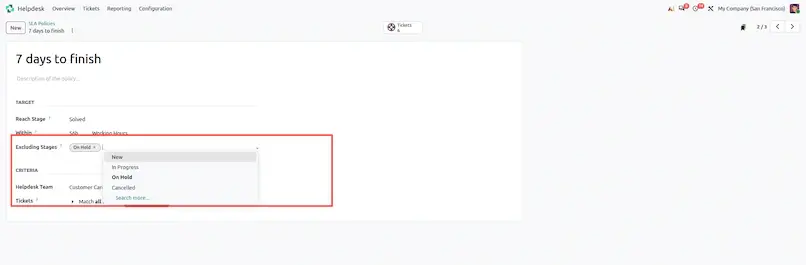
Odoo 20 continues to support SLA policies with Excluding Stages, allowing businesses to exclude customer-waiting or other configured stages from SLA deadline calculations.
Operational Instructions
- Navigation Path: Helpdesk ▸ Configuration ▸ SLA Policies.
- Click New or open an existing SLA policy record.
- In the Excluding Stages field (
exclude_stage_ids), select all stages where the SLA clock should pause.
Flexible Ticket Properties (widget="properties")
Feature Overview
Odoo Helpdesk supports flexible Ticket Properties that allow teams to store structured information directly on support tickets. These properties can be useful for organizing ticket-specific business information without creating custom fields for every use case.
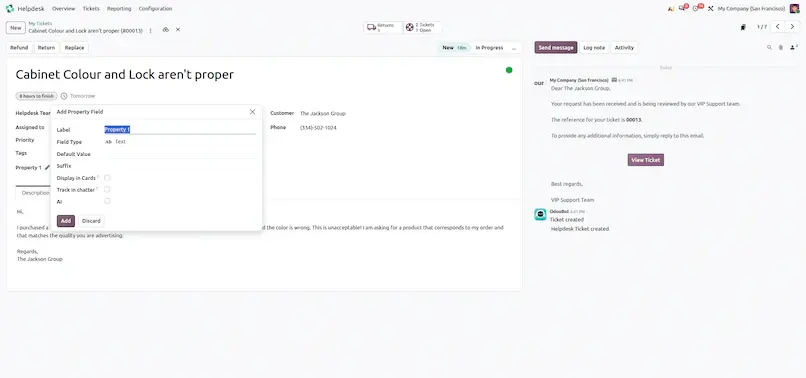
Custom typed fields (Ticket Properties) can be defined directly on Helpdesk Tickets without writing python code or installing custom modules (widget="properties").
Operational Instructions
- Navigation Path: Helpdesk ▸ Tickets ▸ All Tickets ▸ [Open Ticket].
- Under the Ticket Properties section above notebook tabs, click Add a Property.
- Select field type (Text, Selection, Date, Monetary, Checkbox, Many2one) and enter value.
Odoo 20 Helpdesk Workflow Improvements
| Improvement | Benefit | |
|---|---|---|
| Unanswered Ticket Filter | Quickly identify tickets waiting for an agent response | |
| Auto-Close Reminder | Give customers an opportunity to respond before closure | |
| AI Similar Ticket Detection | Help agents find relevant answers faster | |
| Knowledge Integration | Improve customer self-service | |
| After-Sales Actions | Handle returns, refunds, repairs and Field Service workflows |
How These Features Change the Helpdesk Workflow
The overall direction of Odoo 20 Helpdesk is toward a more connected and automated support process.
A modern support workflow can look like this:
Customer contacts support
A ticket is created through the configured support channel.
Agent identifies pending conversations
The Unanswered filter helps agents locate tickets requiring attention.
Agent investigates the issue
Ticket properties and existing customer information provide structured context.
SLA is tracked
The SLA policy monitors the ticket while excluding configured waiting stages.
Agent resolves the request
AI-assisted information, Knowledge content, or previous support information can help the agent find an appropriate solution.
Additional business action is required
The agent can initiate a quotation, return, refund, or field service workflow when applicable.
Customer stops responding
An automated reminder can be sent before the ticket reaches its configured automatic-closing period.
Ticket is closed
Once the issue is resolved and the configured conditions are met, the ticket can move to its final stage.
Odoo 20 Helpdesk: New Features & Improvements