Enterprise software doesn't transform overnight—but when it does, the impact can reshape how businesses operate. Odoo 20 is expected to be one of those milestone releases.
Building on the announcements from Odoo Partner Days and the latest product roadmap, Odoo 20 is set to go beyond routine feature updates. From autonomous AI agents that can automate repetitive business tasks to a redesigned mobile experience, simplified payroll, and smarter accounting workflows, this release is focused on helping businesses work faster, smarter, and more efficiently.
Whether you're an existing Odoo user, planning to upgrade from an earlier version, or evaluating ERP solutions for your organization, understanding what's new in Odoo 20 can help you make informed decisions and prepare for the next generation of business automation.
In this guide, we'll explore the expected Odoo 20 release date, its most anticipated features, AI innovations, upgrade considerations, and how it compares with Odoo 19—so you know exactly what to expect before the official launch.
Quick Summary
Short on time? Here's a quick overview of what Odoo 20 is expected to bring:
Agentic AI Shift
Moving from basic assistance to autonomous AI that executes complete business processes natively.
Rebuilt Mobile App
A fluid, faster interface rebuilt for performance and optimized heavily for field/on-the-go teams.
Smarter Financials
Automated transaction anomaly detection along with a simplified, direct payroll workflow engine.
CRM & Sales Pipelines
Advanced lead filtering and qualification controls matched with faster quotation cycles.
Operations & Retail
Tighter real-time inventory synchronization and a highly accelerated, lag-free Point of Sale interface.
Website & Marketing Tools
AI-assisted content creation and smarter campaign automation.
Odoo 20 Release Date
Although Odoo hasn't officially released Version 20 yet, the current roadmap indicates that it will be unveiled during Odoo Experience 2026, scheduled for 24–26 September 2026 in Brussels, Belgium.
Following Odoo's usual release cycle, the stable production version is expected to become available within a few weeks after the event.
Expected Timeline
How Odoo Has Evolved From Version 17 to Version 20
Each annual Odoo release has focused on solving different business challenges.
While previous versions focused on improving productivity, Odoo 20 shifts toward intelligent automation—allowing the system to complete repetitive tasks with minimal human intervention.
Odoo 20 AI Features: From Assistant to Autonomous Business Partner
Artificial Intelligence is expected to be the biggest highlight of Odoo 20, transforming the platform from a smart assistant into a proactive business partner.
While previous versions introduced AI to help users generate content, answer questions, and simplify everyday tasks, Odoo 20 takes a significant leap forward with the introduction of Agentic AI. These intelligent AI agents are designed to understand user requests, make decisions within predefined business rules, and execute tasks with minimal human intervention.
Rather than simply recommending the next step, Odoo 20 can automate repetitive business processes, streamline workflows, and help teams complete routine operations faster—allowing employees to focus on strategic work instead of manual administration.
Let's explore some of the most impactful AI capabilities expected in Odoo 20 and how they can improve day-to-day business operations.
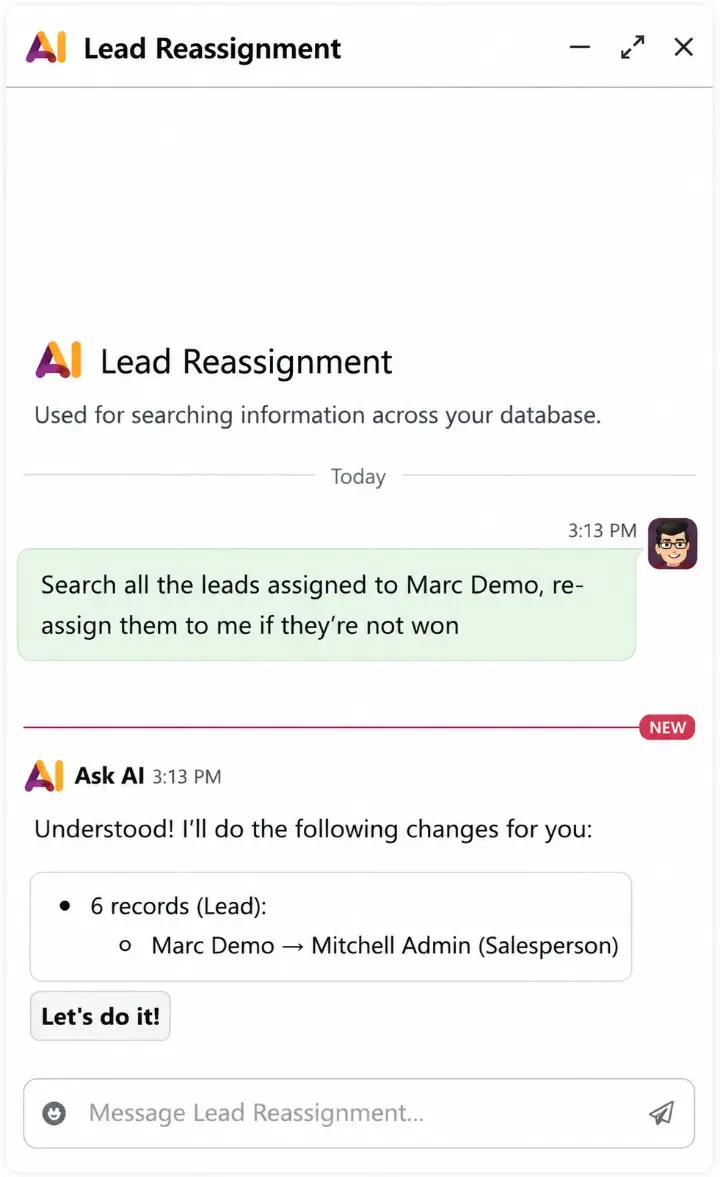
Natural Language Commands
One of the most exciting capabilities of Odoo 20 is the ability to interact with the system using everyday language. Instead of navigating through multiple menus or manually updating records, users can simply describe what they want to accomplish.
For example, a sales manager could ask Odoo to "Reassign all inactive leads from last month to the Enterprise Sales team." The AI agent would then identify the relevant records, apply the necessary changes based on predefined business rules, and complete the task automatically—eliminating the need for repetitive manual updates.
By turning simple conversations into automated actions, Odoo 20 makes everyday business operations faster, more intuitive, and significantly more efficient.
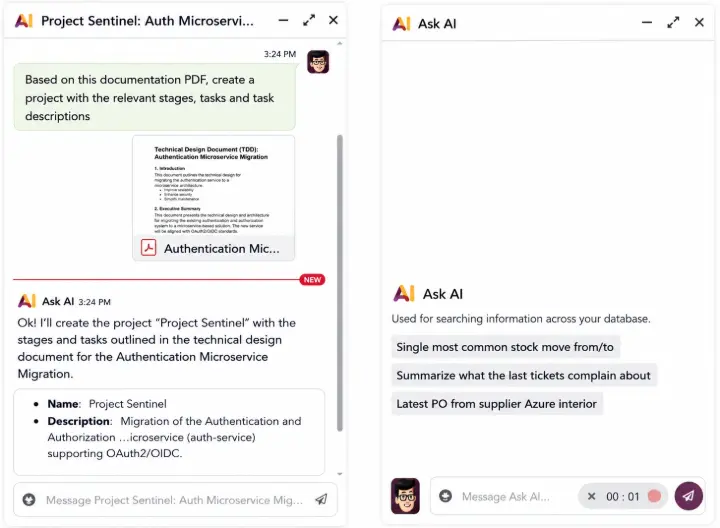
Intelligent Project Creation
Setting up a new project often involves creating tasks, defining milestones, assigning team members, and organizing workflows—a process that can be both repetitive and time-consuming.
With Odoo 20, project managers are expected to simply upload a proposal, statement of work (SOW), or technical design document (PDF), and let AI do the heavy lifting. The system can automatically generate a project structure, including tasks, milestones, workflow stages, descriptions, and even initial team assignments based on the uploaded document.
By transforming project documentation into a ready-to-use project plan within minutes, Odoo 20 can significantly reduce project setup time, improve planning accuracy, and allow implementation and service teams to focus on execution rather than administrative tasks.
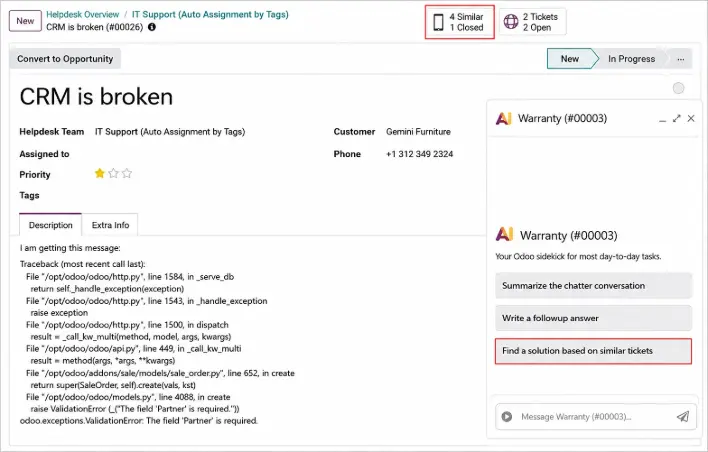
AI-Assisted Helpdesk
Customer support teams are expected to benefit from AI that analyzes historical tickets and recommends accurate responses based on previous resolutions. Benefits include:
→ Faster ticket resolution
→ Consistent customer support
→ Reduced response time
→ Improved knowledge reuse
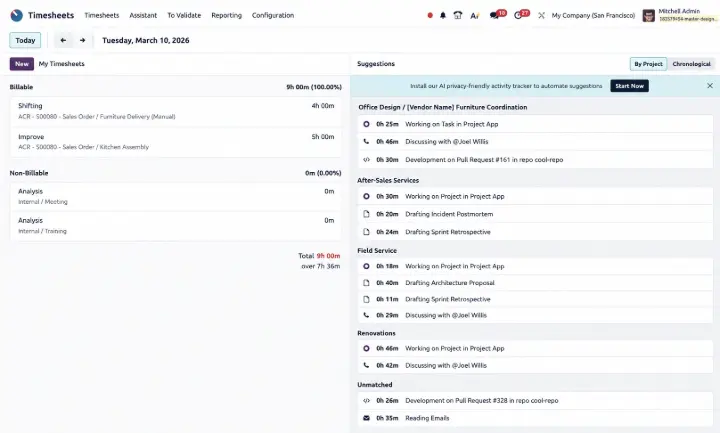
Automated Timesheet Suggestions
Accurate time tracking is essential for project planning, billing, and reporting, but manually logging hours can be tedious and often inaccurate.
Odoo 20 is expected to use AI to analyze work activities such as project updates and completed tasks, then suggest timesheet entries automatically. Employees can simply review and approve the suggestions instead of starting from scratch.
This can reduce manual effort, improve time-tracking accuracy, and give managers a clearer view of team productivity.
Smarter Financial Monitoring
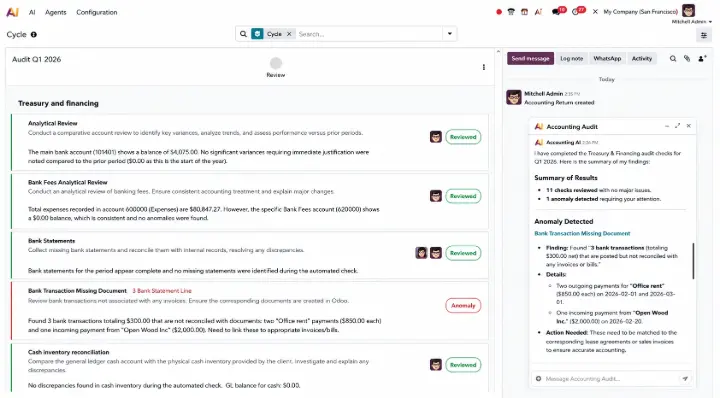
Understanding financial data can be challenging, especially for business owners without an accounting background. With its "Accounting for Non-CFOs" approach, Odoo 20 aims to simplify financial monitoring using AI.
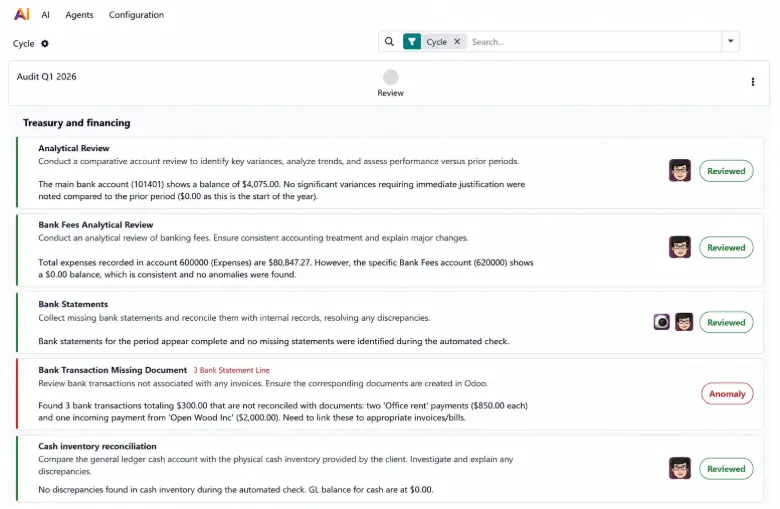
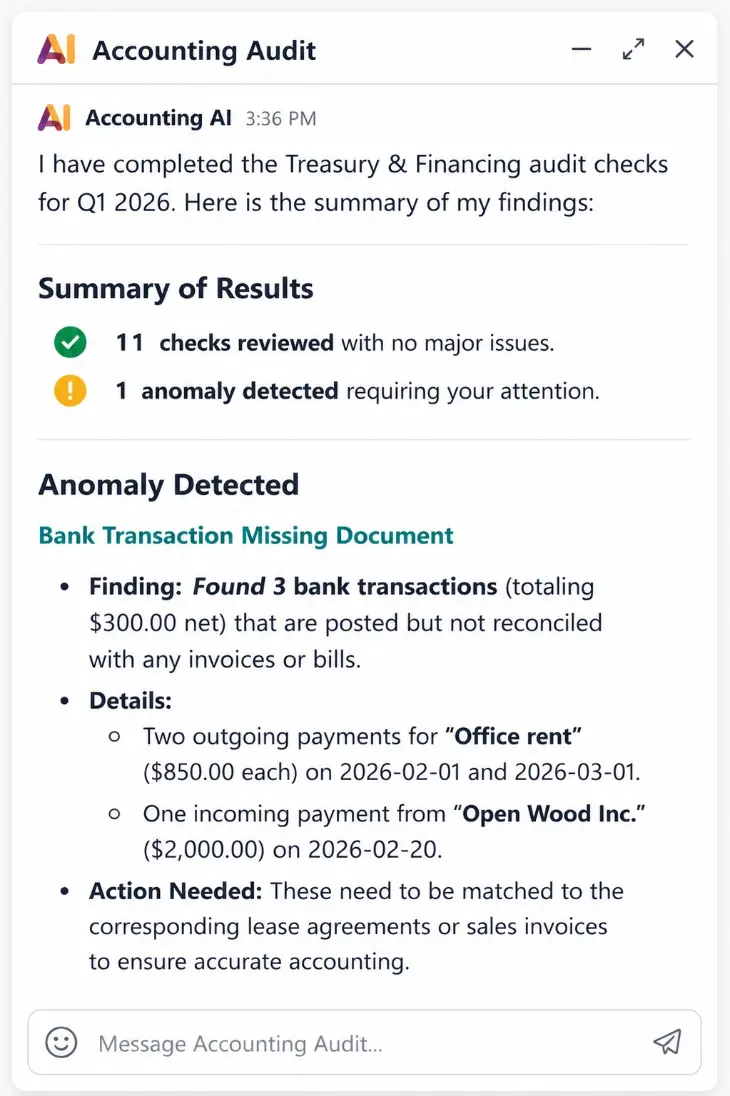
The AI can review treasury and financial data, detect unusual transactions, identify issues such as duplicate entries or unreconciled payments, and summarize its findings in clear, actionable insights. This helps finance teams resolve issues faster while giving business leaders a better understanding of their financial health.
By reducing manual analysis and making financial data easier to interpret, Odoo 20 enables organizations to make faster, more informed business decisions.
Why These AI Improvements Matter
For most businesses, the biggest advantage isn't simply having AI—it's reducing repetitive work. By automating everyday administrative processes, Odoo 20 allows employees to spend more time on activities that create value, such as customer relationships, business growth, strategic planning, and decision-making.
A Redesigned Mobile Experience
For many businesses, work no longer happens only at a desk. Sales teams travel, warehouse staff move across facilities, managers approve requests remotely, and field engineers need instant access to business information. Recognizing this shift, Odoo 20 is expected to introduce one of its most significant mobile application upgrades to date.
Instead of offering a simplified version of the desktop interface, the new mobile experience is designed to provide faster navigation, cleaner layouts, and smoother performance across everyday business operations.
Expected Mobile Improvements
→ Faster application performance with reduced loading times
→ A redesigned UI optimized for smartphones and tablets
→ Improved offline capabilities for selected workflows
→ More consistent navigation across Odoo applications
→ Better support for push notifications and approvals
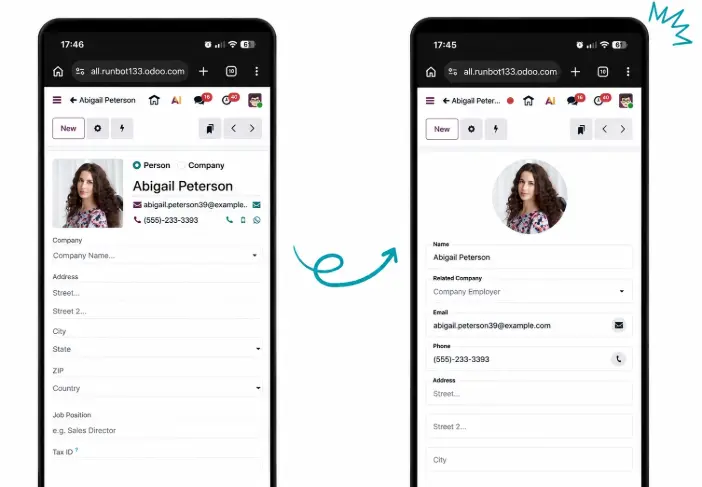
Remote and hybrid work have become the norm for many organizations. A reliable mobile ERP allows decision-makers to respond faster, approve critical requests instantly, and keep projects moving regardless of their location.
Smarter Payroll with a Simplified Workflow
Payroll is one of the most sensitive business processes. Even small errors can impact employee satisfaction, compliance, and operational efficiency.
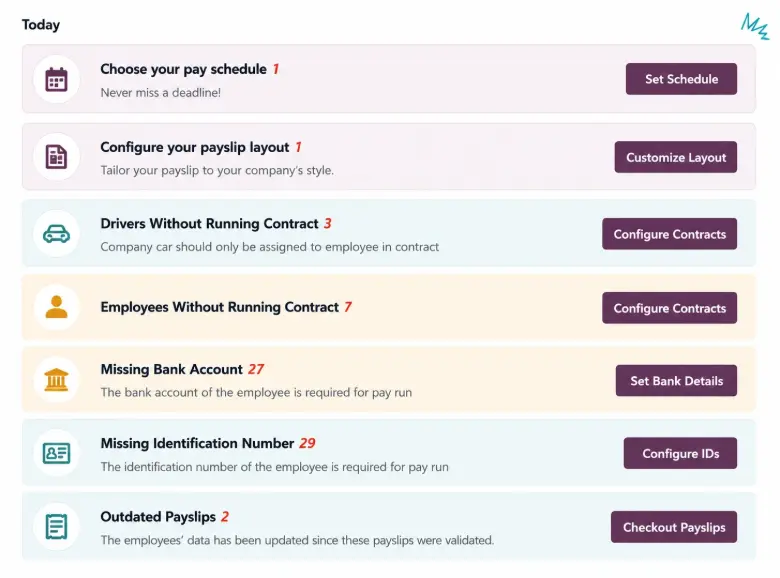
Odoo 20 is expected to simplify payroll management by removing the traditional Work Entries mechanism that many payroll administrators found time-consuming and unnecessarily complex. Instead, payroll calculations are likely to become more direct, reducing manual intervention while maintaining flexibility for different payroll structures.
Expected Payroll Enhancements
→ Simplified payroll processing
→ Fewer manual validation steps
→ Easier salary calculations
→ Better handling of employee contracts
→ Improved payroll reporting
Benefits for HR Teams
→ Process salaries more efficiently
→ Reduce payroll errors
→ Simplify employee record management
→ Save administrative time every month
→ Improve compliance with payroll policies
Odoo 20 POS: Faster Checkout, Better Customer Experience
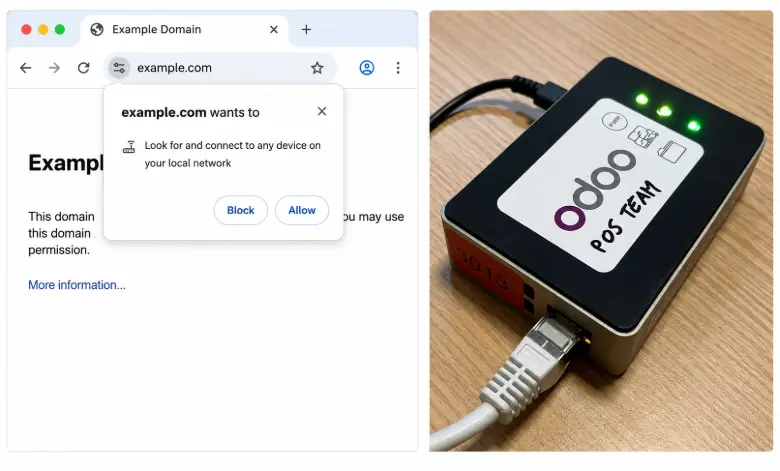
Point of Sale systems play a crucial role in retail, restaurants, and hospitality businesses, where every second at checkout affects customer satisfaction. Odoo 20 is expected to enhance the POS experience with faster performance, improved usability, and tighter integration with inventory and accounting modules.
Expected POS Features
→ Faster billing and checkout
→ Improved product search
→ Better barcode scanning support
→ More responsive POS interface
→ Enhanced inventory synchronization
→ Improved offline reliability
A faster POS system doesn't just improve employee productivity—it also creates a better customer experience. Reduced waiting times, accurate stock synchronization, and smoother payment processing can directly contribute to higher customer satisfaction and increased sales.
Smarter Accounting with AI-Powered Insights
Accounting is becoming increasingly data-driven, and Odoo 20 is expected to reflect this trend by introducing more intelligent financial management capabilities. Instead of relying solely on manual bookkeeping and periodic reviews, finance teams may benefit from AI-assisted monitoring that continuously analyzes accounting data and highlights potential issues before they become costly mistakes.
Expected Accounting Improvements
→ AI-assisted anomaly detection
→ Improved bank reconciliation
→ Faster invoice processing
→ Smarter expense categorization
→ Enhanced financial reporting
→ Better forecasting capabilities
Smarter CRM for Faster Sales Conversions
A CRM should do more than store customer information—it should actively help sales teams close deals faster. That's exactly the direction Odoo 20 is expected to take.
Building on the AI capabilities introduced in previous versions, Odoo 20 aims to make customer relationship management more intelligent by reducing manual data entry, improving lead prioritization, and helping sales representatives focus on opportunities that matter most.
Expected CRM Improvements
→ AI-powered lead qualification
→ Automated follow-up reminders
→ Improved opportunity tracking
→ Smarter sales forecasting
→ Better customer activity timelines
→ Faster quote generation
Website Builder, Marketing & Communication
Website Builder
Odoo 20 is expected to make website creation even more accessible for teams without technical expertise. The updated Website Builder is likely to offer a smoother editing experience, additional design flexibility, and better AI-assisted content creation.
Expected Website Builder Improvements
→ Enhanced drag-and-drop editing
→ Improved page templates
→ AI-assisted content generation
→ Better SEO controls
→ Faster page loading
→ Improved mobile responsiveness

Marketing Automation
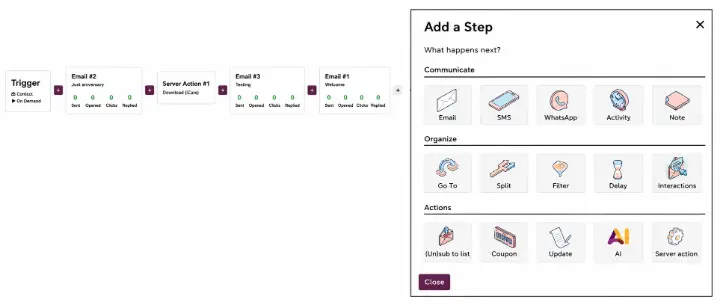
Odoo 20 is expected to strengthen its marketing automation capabilities by making campaign management more intelligent and easier to personalize. Instead of manually managing every interaction, businesses will be able to automate customer journeys based on user behavior and engagement.
→ Smarter email campaign automation
→ AI-assisted email content suggestions
→ Improved audience segmentation
→ Better campaign analytics
→ Automated lead nurturing workflows
→ Enhanced personalization options
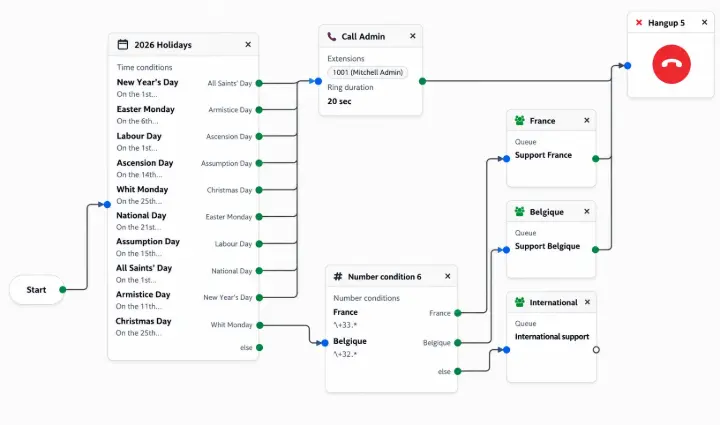
Phone Integration
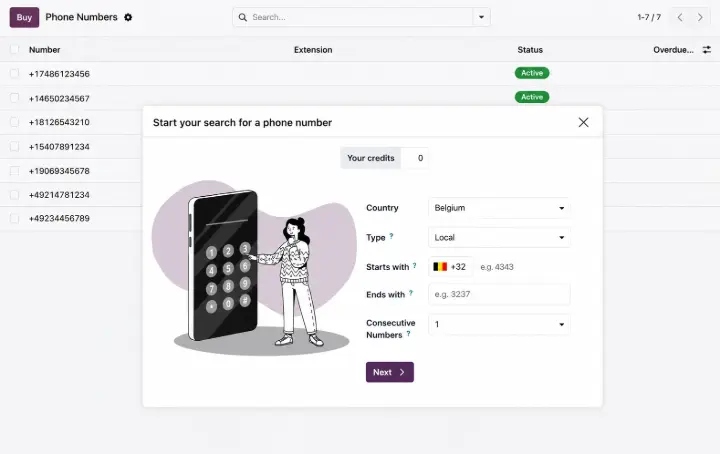
Odoo 20 is expected to improve phone integration by making communication more seamless across different business applications.
→ Improved VoIP integration
→ Click-to-call functionality
→ Automatic call logging
→ Better call history management
→ Customer information displayed during calls
→ Faster follow-up creation
Calendar Enhancements
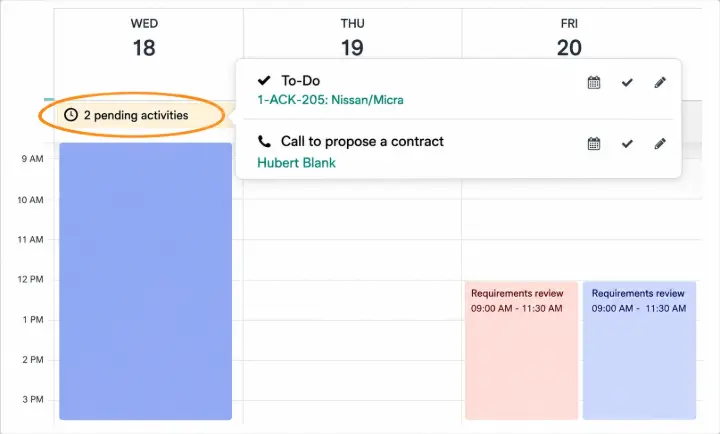
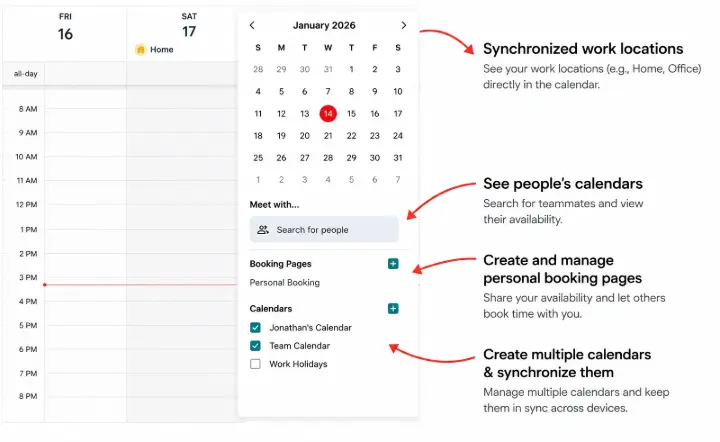
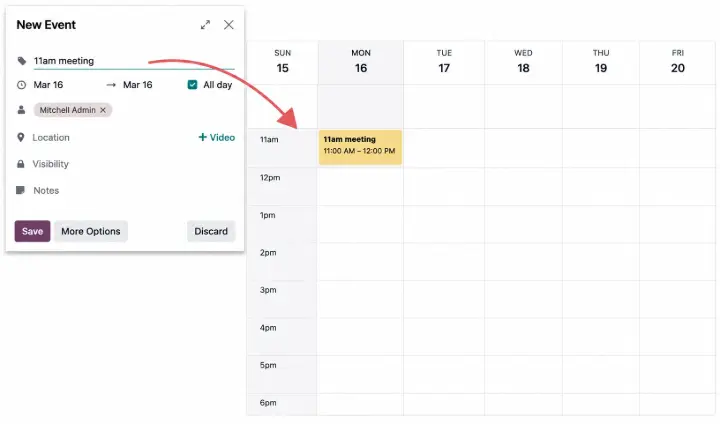
Odoo 20 is expected to improve calendar management by making scheduling more collaborative, flexible, and integrated with other business processes.
→ Smarter meeting scheduling
→ Better availability management
→ Improved recurring event handling
→ Enhanced synchronization with external calendars
→ Better integration with CRM and Projects
Inventory Management & Odoo Sign
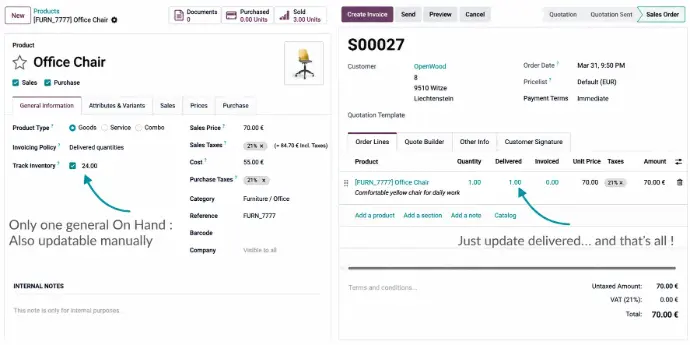
Inventory Management
Odoo 20 is expected to improve inventory accuracy with smarter forecasting, warehouse optimization, and enhanced stock management.
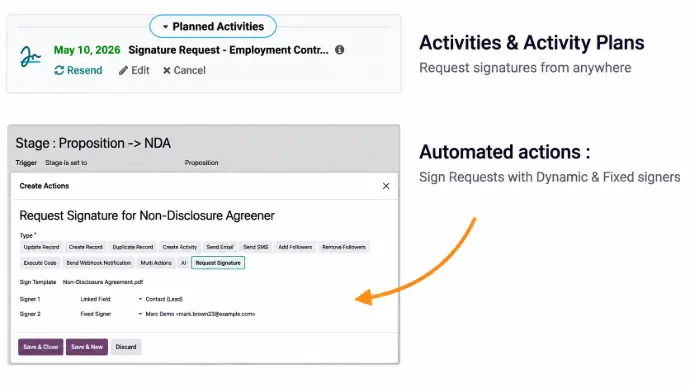
Odoo Sign
Odoo 20 is expected to streamline digital signing with improved automation, security, and tighter integration across business applications.
New Industry-Specific Solutions in Odoo 20
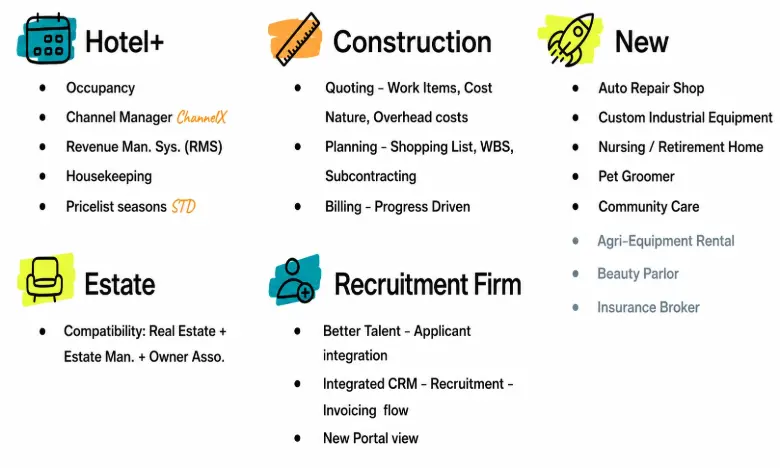
One of the most exciting additions in Odoo 20 is the expansion of its industry-specific solutions. Rather than offering a one-size-fits-all ERP, Odoo continues to introduce tailored workflows designed to address the unique operational needs of different industries.
These pre-configured solutions help businesses get started faster while reducing the need for extensive custom development.
Hotel+
Occupancy management, Channex Channel Manager integration, Revenue Management System (RMS), housekeeping management, and seasonal pricing.
Construction
Work item-based quotations, overhead cost estimation, Work Breakdown Structure (WBS) planning, subcontractor management, and progress-based billing.
Recruitment Firms
Integrated CRM-to-Recruitment-to-Invoicing workflow, enhanced applicant management, and a redesigned candidate portal.
New Vertical Solutions
Auto Repair Shops, Custom Industrial Equipment, Nursing & Retirement Homes, Pet Grooming Businesses, and Community Care Organizations.
Why it matters: These ready-to-use industry solutions reduce implementation time, minimize customization efforts, and enable businesses to adopt Odoo faster with workflows tailored to their specific operations.
Documents & Knowledge: Easier Group-Based Sharing
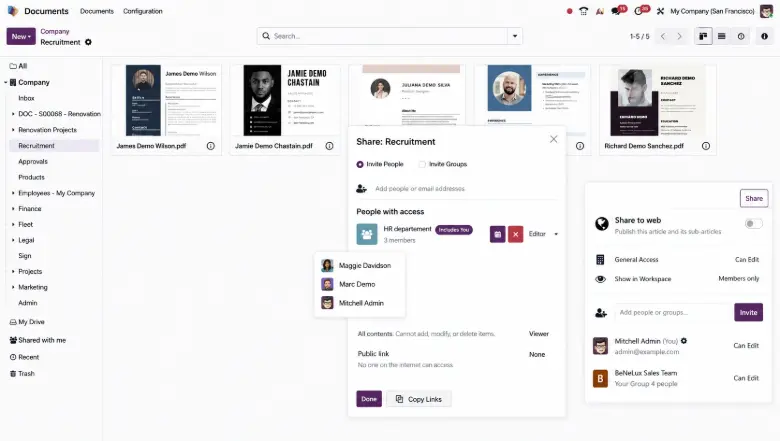
Managing access to company documents becomes increasingly challenging as organizations grow. Odoo 20 addresses this by introducing group-based sharing for both the Documents and Knowledge applications.
Instead of granting access to individual users one by one, administrators can now share documents and knowledge articles with entire teams or departments, making collaboration faster, more secure, and significantly easier to manage.
Key Benefits
Group-based sharing makes document management far more scalable for growing businesses. Teams always have access to the information they need, while administrators spend less time managing permissions and more time focusing on strategic work.
Odoo 20 vs Odoo 19: What's Really Changing?
While Odoo 19 introduced AI-powered assistance and workflow automation, Odoo 20 is expected to take a much bigger step by making AI more autonomous and deeply integrated into everyday business operations. Instead of simply helping users complete tasks, Odoo 20 is designed to automate repetitive processes, simplify business workflows, and improve decision-making across multiple departments.
| Feature | Odoo 19 | Odoo 20 (Expected) |
|---|---|---|
| AI Capabilities | AI Assistant | Autonomous AI Agents |
| Mobile Experience | Standard Mobile App | Completely Redesigned Mobile Experience |
| Payroll | Work Entries Based | Simplified Payroll Workflow |
| CRM | AI Suggestions | Smarter Lead Management & Automation |
| Accounting | Basic AI Support | AI-powered Financial Insights |
| Inventory | Standard Warehouse Features | Enhanced Forecasting & Replenishment |
| Website Builder | Drag & Drop | AI-assisted Content & Better SEO Tools |
| Marketing | Basic Automation | Smarter Customer Journey Automation |
| POS | Improved Performance | Faster Checkout & Better Integration |
| Productivity | Workflow Automation | Intelligent Business Automation |
Should You Upgrade?
If you're already using Odoo 19, upgrading to Odoo 20 could be worthwhile if your business wants to reduce manual work, improve operational efficiency, and take advantage of AI-driven automation. Organizations still running Odoo 16, 17, or 18 may benefit even more, as they'll gain access to multiple years of performance improvements, security updates, and new functionality in a single migration.
Odoo 20 Upgrade Checklist
A successful ERP upgrade involves much more than installing a new version. Proper planning helps minimize downtime and ensures your business continues to operate smoothly throughout the migration process.
Pro Tip: Completing these steps before upgrading can significantly reduce implementation risks, minimize downtime, and speed up user adoption after migration.
Best Practices for a Smooth Odoo 20 Migration
Every business uses Odoo differently, so there isn't a one-size-fits-all migration strategy. A structured approach helps reduce technical issues and keeps business operations running without major disruptions.
1. Analyze Your Current System
Document your existing modules, customizations, workflows, reports, and integrations before starting the upgrade.
2. Identify Custom Developments
Review custom modules to determine which ones require modifications for compatibility with Odoo 20.
3. Test Before Going Live
Always perform migration testing in a staging environment. Validate accounting data, inventory balances, payroll records, CRM pipelines, and automated workflows before deploying to production.
4. Train Your Team
Even small interface improvements can affect user productivity. Providing short training sessions helps employees adapt quickly to new features.
5. Monitor After Deployment
Continue monitoring performance, integrations, and business processes during the first few weeks after deployment to identify any issues early.
How Different Industries Can Benefit from Odoo 20
Although Odoo 20 introduces platform-wide improvements, the real value comes from how different industries can use these capabilities to solve day-to-day business challenges.
Final Thoughts
Odoo 20 isn't simply another annual software update—it's shaping up to be one of the platform's most ambitious releases.
The expected introduction of autonomous AI, a redesigned mobile experience, simplified payroll, smarter accounting, enhanced CRM, and improvements across Inventory, POS, Website Builder, and Marketing demonstrates Odoo's continued focus on helping businesses automate routine work while making better decisions with less effort.
For organizations already using Odoo, this release presents an opportunity to modernize existing workflows, improve employee productivity, and prepare for the next generation of AI-powered ERP systems.
If you're planning an upgrade, now is the ideal time to review your current implementation, evaluate customizations, and prepare a migration strategy so you're ready when Odoo 20 becomes officially available.
Frequently Asked Questions
1. When will Odoo 20 be released?
Odoo 20 is expected to be officially announced during Odoo Experience 2026, with the stable release likely becoming available shortly afterward in October–November 2026.
2. What are the biggest new features in Odoo 20?
Some of the most anticipated features include autonomous AI agents, a redesigned mobile application, simplified payroll processing, enhanced accounting, improved CRM, smarter marketing automation, and better inventory management.
3. Is Odoo 20 suitable for small businesses?
Yes. While enterprise organizations will benefit from advanced automation, small and medium-sized businesses can also take advantage of improved usability, simplified workflows, and better operational efficiency.
4. Should I upgrade from Odoo 19?
If your business wants to leverage AI-powered automation, improve productivity, and stay on the latest supported version, upgrading to Odoo 20 is likely to provide long-term benefits. A technical assessment of your existing customizations and integrations should be completed before migration.
5. Will custom modules work after upgrading?
Most standard modules will migrate smoothly, but custom modules and third-party integrations may require updates or compatibility testing depending on how they were developed.
6. How can GritXi help with Odoo 20?
GritXi provides end-to-end Odoo services, including implementation, migration, customization, integration, support, and performance optimization. Our experts can help you plan and execute a seamless upgrade while minimizing downtime and ensuring your business continues to operate efficiently.
A Look at the Odoo 20 Roadmap
While Odoo 20 introduces several exciting enhancements, it's worth remembering that many of these features are based on Odoo's official product roadmap.
The roadmap was presented in April 2026 by Luc Nailis, Product Owner at Odoo, offering an early look at the innovations planned for the next major release. As Odoo itself humorously describes it, the roadmap is "a list of things we will maybe do," meaning some features may evolve or change before the final release.
Based on the current roadmap, Odoo 20 is expected to be officially unveiled during Odoo Experience 2026, taking place in Brussels, Belgium, from September 24–26, 2026.
As more information becomes available, we'll continue updating this guide with the latest confirmed features, product announcements, and release details to help you stay informed and prepare your upgrade strategy.
Odoo 20 Release Date & New Features Everything You Need to Know