Odoo 20 Email Marketing introduces conditional content, allowing you to show specific blocks of an email only to recipients who match defined conditions. Instead of creating separate mailings for different audiences, you can use one mailing and control which recipients see each block.
A mailing can include different content blocks, such as text, images, buttons, and other elements. With conditional content, these blocks can be displayed based on recipient information, such as their country or other available contact details. For example, you can configure a block to appear only for recipients whose country code is BE.
This gives you more control over how email content is presented to different audiences while keeping the campaign within a single mailing.
What's New: Visibility Rules for Mailing Blocks
A mailing is made of blocks such as text, images, and buttons. In Odoo 20, these blocks can be displayed based on recipient information, such as the recipient's country or other available contact details. For example, a block can appear only when Country code = BE. The feature has two parts that work together:
Visibility option on every block
Every block in the mailing editor has a Visibility option. Set it to Conditionally to limit who sees that block.
Rules on the recipient
Add a condition such as Country code = BE. Only matching recipients get the block.
How Conditional Blocks Work
Conditional content controls the visibility of individual blocks, not the email as a whole. You still send one mailing, and every recipient receives the same email. The rule only decides whether a given block is included for that recipient.
- Blocks without a condition stay in everyone's email.
- Blocks with a condition are checked by Odoo for each recipient when the mailing is sent. Matching recipients get the block; everyone else receives the same email without it.
When Conditional Content Is Useful
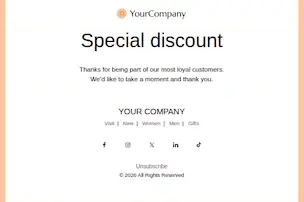
Use it when most of the mailing is the same for everyone and only part of it should reach a specific group. In the Special Discount mailing used in this guide, the heading and thank-you message are for all readers, while the "Enjoy 10% OFF" coupon block can be limited with a rule such as Country code = BE.
- Only one block, or a few, differs between audiences.
- The difference depends on recipient information, such as country.
- You would otherwise duplicate the mailing or split the list to change one block.
Previous Approach vs. Conditional Blocks
Workflow
From opening the mailing to sending it, the process has five stages:
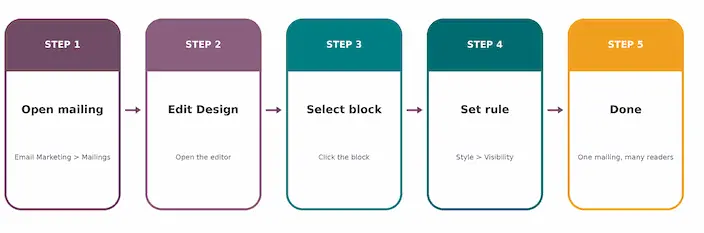
- Open the mailing and choose the recipients.
- Edit the design and build the blocks everyone should see.
- Limit a block meant for some readers.
- Define the rule on the recipient.
- Send and review. Each recipient gets only the blocks that match them.
How to Show a Block Only to Some Readers in Odoo 20
There is nothing extra to install or configure beyond the Email Marketing app, because conditional blocks are part of the mailing editor you already use.
Choose the Recipients
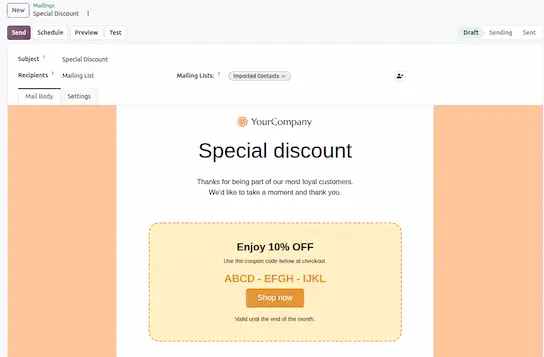
Choose the recipients first, for example Contacts or a mailing list. The rule is written on that recipient type, and changing the recipient type later clears the conditions. In the example below, the Special Discount mailing is sent to a mailing list.
Open Edit Design and Select the Block
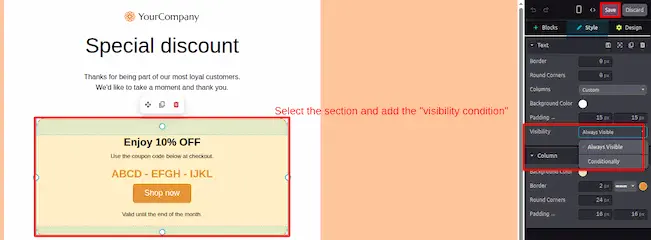
Go to Email Marketing ▸ Mailings, open the mailing, and click Edit Design. Then click the block you want to show only to some readers.
Set Visibility to Conditionally
With the block selected, open the Style tab and find the Visibility option. Choose Conditionally instead of Always Visible.
Define the Condition
Click Edit Conditions and define the rule on the recipient, for example Country code = BE. Only recipients who match the rule will receive the block.
Save and Send the Mailing
Save the design and send the mailing. Odoo checks the rule for each recipient at send time.
What You See After Setting the Condition
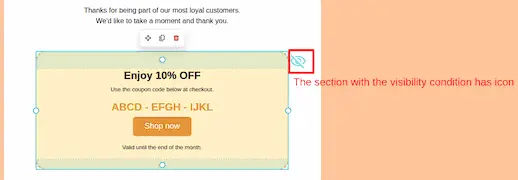
- In the editor: a crossed-eye icon marks the conditional block, so it is easy to spot.
- For matching recipients: the email includes the block.
- For everyone else: the same email arrives without the block, as shown below.
Conditional content in Odoo 20 Email Marketing lets one mailing serve several audiences by controlling which blocks each recipient sees. Choose the recipients, set a block's Visibility to Conditionally, define the rule, and Odoo applies it for each recipient at send time. You maintain one design and review one set of statistics instead of managing separate mailings.
Implementation Suggestions for Odoo 20 Email Marketing
To get the best results from conditional content, plan your recipient conditions carefully and test each variation before sending a campaign.
1. Define the Target Audience
Identify which recipients should see personalized content. For example, a business may want to display a regional promotion to customers in Belgium. Make sure the relevant country information is available and accurate in recipient records.
2. Keep General Content Visible
Keep the main greeting, introduction, and general campaign information visible to everyone. Apply conditional visibility only to content that needs to vary, such as regional offers, localized messages, or audience-specific calls to action.
3. Configure Clear Visibility Conditions
Select the relevant block, set its visibility to Conditionally, and define the appropriate recipient rule. Use clear, specific conditions to avoid showing a promotion to the wrong audience.
4. Test Each Content Variation
Before sending the mailing, test the expected results for recipients who match the condition and those who do not. Check the text, images, links, promotional codes, and calls to action in each variation.
5. Review Recipient Data and Campaign Results
Check recipient information before launching the campaign. After sending, review available mailing performance metrics to understand the results and identify opportunities to improve future campaigns.
6. Verify the Feature in Your Odoo Version
Confirm the visibility options and recipient conditions available in your installed Odoo version. If you are migrating from an earlier version, test the workflow in a staging environment before using it in production.
Conditional Email Content: Practical Example
A campaign can include a welcome message for every recipient and a special discount block for recipients who match a country-specific condition. This allows you to personalize selected content while maintaining one mailing.
Note: This is an illustrative example. Verify the available recipient fields and visibility conditions in your installed Odoo version.
Odoo 20 Email Marketing: New Features and Upgrades