A CRM should do more than store customer information. It should actively help sales teams move deals forward, and that is the direction Odoo 20 CRM takes. This release brings a unified lead generation hub, Dun & Bradstreet intelligence, workload-balanced lead assignment, and automated alerts for stale deals. In this guide, we walk through each major capability, the technical components behind it, and the features that were replaced or removed, so you know exactly what to expect when planning your upgrade.
Executive Overview & Strategic Advancements
Odoo 20 marks a generational milestone in enterprise pipeline management. Rather than operating simply as a passive system of record, Odoo 20 transforms CRM into an autonomous sales acceleration engine.
Unified Lead Generation Hub
Consolidates 8 distinct inbound and outbound capture channels into a single unified header dropdown.
Dun & Bradstreet Intelligence
Replaces legacy Clearbit data with Dun & Bradstreet's global directory of 580M+ verified commercial entities with D-U-N-S® attribution.
Multi-Team Pipeline Switcher
Instant multi-team toggling with state persistence via the new TeamSwitcher OWL component.
Workload-Balanced Auto-Assignment
Granular rotation rules (Always in rotation, In rotation with a limit, Out of rotation) with capacity formulas.
Automated Opportunity Rotting
Proactive stale deal detection per stage via rotting_threshold_days and visual decaying badges.
Dynamic Lead Properties
No-code dynamic custom fields (widget="properties") integrated into Kanban cards, forms, and search filters.
Subscriptions & Upsell Engine
Direct stat button access to recurring contracts, MRR/ARR metrics, and one-click renewal/upsell quotations (crm_sale_subscription).
Prorated Revenue Forecasting
Rebuilt forecast_kanban and forecast_list views calculating weighted expected revenue and MRR.
Clean Form Modernization & Address Abstraction
Streamlined lead forms hiding unformatted street fields (invisible="1") to incentivize centralized master contact record creation.
1. Unified Lead Generation Hub
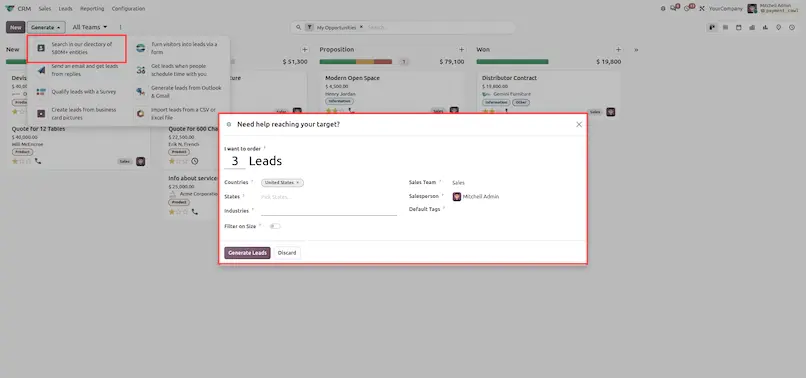
In Odoo 20, lead capture is brought directly into the main CRM interface through a prominent "Generate" header dropdown. Sales teams no longer need to navigate through disjointed configuration screens to source new business.

| Channel Name | Addon | Methodology & Operational Use Case |
|---|---|---|
| Search 580M+ Directory |
crm_iap_mine
|
Outbound prospecting via Dun & Bradstreet API. Filter by country, size, and industry. |
| Web Form Visitors |
website_crm
|
Inbound web traffic capture from contact and demo request forms with UTM attribution. |
| Mass Email Replies |
mass_mailing_crm
|
Email marketing integration where prospect replies route automatically to sales reps. |
| Appointment Bookings |
calendar / appointment
|
Online self-service appointment scheduling converts meeting bookings into CRM deals. |
| Survey Pre-qualification |
survey_crm
|
Multi-question interactive questionnaires that score and pre-qualify complex B2B inquiries. |
| Outlook & Gmail Plugins |
crm_mail_plugin
|
Personal email add-ins allowing reps to create leads and log messages without leaving their inbox. |
| Business Card OCR |
crm_iap_mine / OCR
|
Mobile camera snapshot extracts card contact details via AI Vision OCR at trade shows. |
| CSV / Excel Import |
crm (Client Action)
|
Bulk legacy spreadsheet migration with intelligent column mapping and duplicate detection. |
Administrative Privilege Gate: When an uninstalled app (e.g. Website or Survey) is selected by an administrator, Odoo prompts an immediate background installation. For regular sales reps, an automated access request ticket is created.
2. Dun & Bradstreet Global Enterprise Directory Integration
A strategic technological advancement in Odoo 20 CRM is the migration of company sourcing from Clearbit to Dun & Bradstreet (D&B):
580M+ Global Entities
D&B indexes more than 580 million enterprise records across North America, Europe, Asia-Pacific, Latin America, and Africa.
D-U-N-S® Identification
Leads generated through the IAP portal receive an official D-U-N-S® 9-digit corporate identifier, stored in reveal_id.
Verified Firmographics
Directly injects official corporate revenues, employee brackets, and standard SIC / NAICS industry codes.
3. Multi-Team Pipeline Switcher
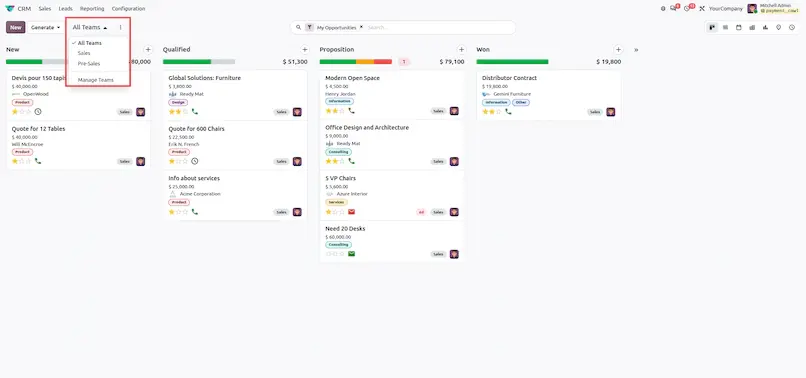
Enterprise sales organizations often operate multiple distinct pipelines (e.g., Enterprise Direct, Inside Sales, Partner Channel, and Renewals). In Odoo 20, the TeamSwitcher component sits permanently in the Kanban control panel header:
Instant Dropdown Access
Displays all accessible sales teams with a direct shortcut to "Manage Teams".
Dynamic Kanban Columns
Switching teams immediately recalculates Kanban stage columns to match the selected team's specific stages.
Session Persistence
Stores the active team ID in browser localStorage (crm.switcher_team_id), keeping the rep's view persistent across navigation.
Contextual Creation
Automatically passes default_team_id into action context when creating new opportunities.
4. Team-Wise Lead Distribution & Workload Balancing
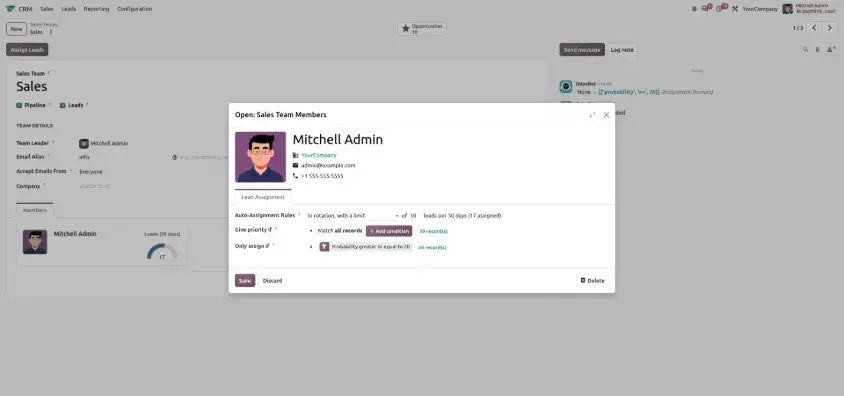
Odoo 20 equips sales team managers with an intelligent auto-assignment engine designed to eliminate lead stagnation and balance quotas across reps.
Member Rotation Modes (crm.team.member)
| Mode | Technical Value (assignment_rules) | Daily Quota Formula | Operational Purpose |
|---|---|---|---|
| Always in rotation | unlimited | Unlimited (Up to System Cap) | Senior reps or full-time inbound account executives. |
| In rotation, with a limit | limited | round(assignment_max / 30.0) | Reps with capped bandwidth (e.g. 30 leads/month = 1 lead/day). |
| Out of rotation | opt-out | 0 leads/day | Reps on leave, part-time staff, or managers. |
5. Automated Opportunity Rotting (Stale Deal Alerts)
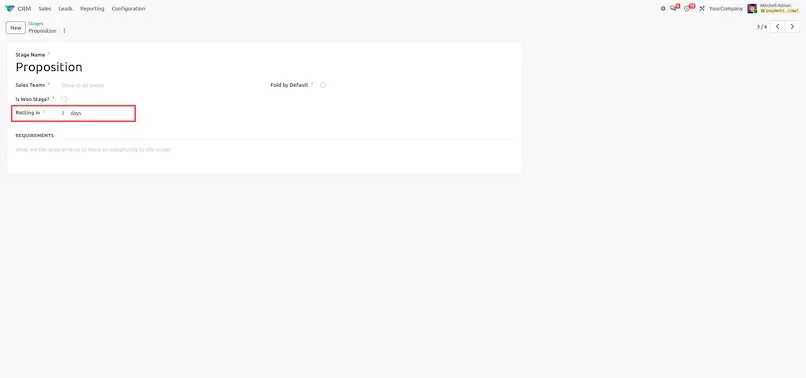
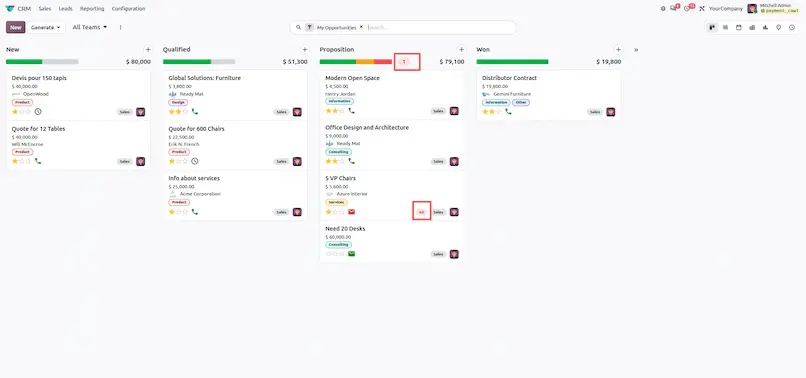
In Odoo 20, stage management introduces automated Opportunity Rotting to prevent deals from stalling unnoticed in sales pipelines:
- Configuration: Go to CRM ▸ Configuration ▸ Pipeline ▸ Stages and set "Days to rot" (
rotting_threshold_days, e.g. 7 days). - Automated Tagging: When an opportunity sits in a stage longer than 7 days without updates, the system flags it as rotting (
is_rotting = True). - Visual Indicators:
- Kanban Card: Displays a visual decaying days badge (
widget="rotting_days"). - Form Status Bar: Displays the decaying duration on the stage status bar (
widget="rotting_statusbar_duration").
- Kanban Card: Displays a visual decaying days badge (
6. Dynamic Lead Properties (widget="properties")
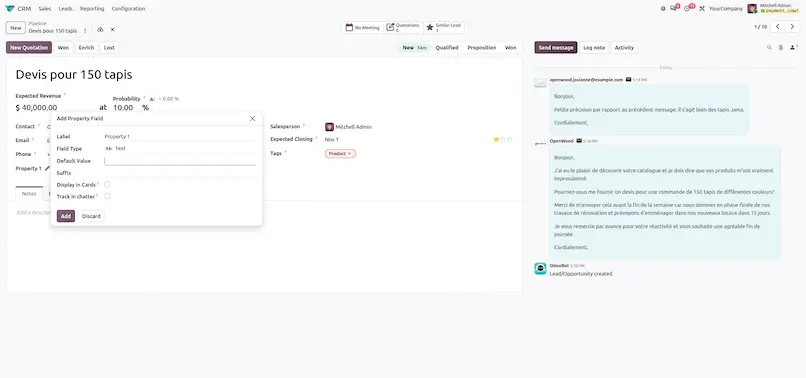
Odoo 20 natively integrates Lead Properties (widget="properties"), allowing teams to define dynamic custom key-value fields per lead or category without custom Python modules:
No-Code Creation
Click Add a Property directly on the Opportunity form above notebook tabs.
Supported Field Types
Text, Selection, Date, Monetary, Checkbox, and Many2one.
Cross-View Availability
Properties render on Kanban cards, List views, and are grouped in Search filters (<filter string="Properties" name="group_by_lead_properties" context="{'group_by':'lead_properties'}"/>).
7. Subscriptions & Upsell Engine (crm_sale_subscription)
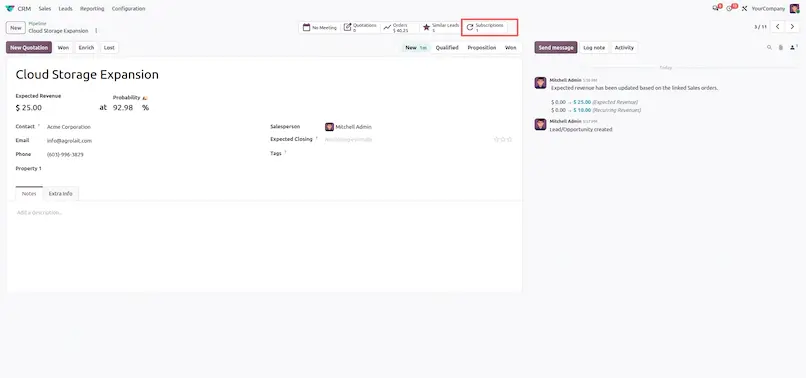
For companies offering SaaS, maintenance agreements, or service retainers, Odoo 20 establishes a direct bidirectional link between CRM opportunities and recurring subscription contracts:
Smart Button Contract Stats
A dedicated Subscriptions stat button (action_open_subscriptions) displays active contracts, Monthly Recurring Revenue (MRR), and Annual Recurring Revenue (ARR) directly on the opportunity form.
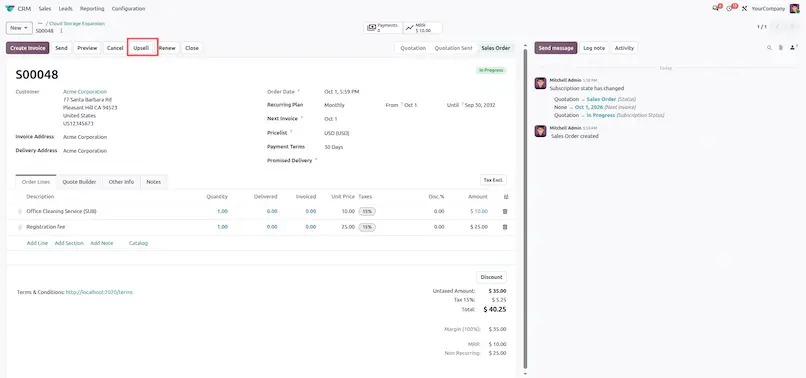
Direct "Raise Upsell" Wizard
Launch a pre-populated upsell quotation with one click from the subscription view, carrying forward the customer's active contract plan and pricing.
Revenue Synchronization
Opportunity expected revenue automatically updates to reflect Annual Contract Value (ACV).
8. Form Modernization & Address Abstraction
In Odoo 20, the opportunity form has been modernized to eliminate clutter and improve data hygiene by hiding unformatted street address fields:
<!-- crm/views/crm_lead_views.xml -->

<field name="street" invisible="1"/>

<field name="street2" invisible="1"/>
Contact Centralization
Eliminates duplicate, contradictory street addresses between transient leads and master contact records (res.partner).
Streamlined Intake
Accelerates phone qualification and inbound triage by minimizing mandatory fields.
Responsive Mobile UX
Significantly improves usability on mobile phones and tablets for traveling sales teams.
Summary of Deprecated & Removed Features in Odoo 20 CRM
Key CRM components that were removed, replaced, or redesigned in Odoo 20 and how they affect daily operations.
crm.action_your_pipeline
crm.crm_lead_action_pipeline
invisible="1"
on lead form
res.partner.
Frequently Asked Questions
1. What is new in Odoo 20 CRM?
Odoo 20 transforms CRM from a passive system of record into an autonomous sales acceleration engine. Key additions include the Unified Lead Generation Hub, Dun & Bradstreet intelligence, the TeamSwitcher pipeline switcher, workload-balanced auto-assignment, automated opportunity rotting, dynamic lead properties, a subscriptions and upsell engine, and prorated revenue forecasting.
2. How many lead generation sources does Odoo 20 CRM support?
The "Generate" header dropdown consolidates 8 ingestion sources: the 580M+ directory search, web form visitors, mass email replies, appointment bookings, survey pre-qualification, Outlook & Gmail plugins, business card OCR, and CSV / Excel import.
3. Why did Odoo 20 replace Clearbit with Dun & Bradstreet?
Dun & Bradstreet provides a global directory of 580M+ verified commercial entities. Leads receive an official D-U-N-S® 9-digit identifier stored in reveal_id, along with verified firmographics such as corporate revenues, employee brackets, and SIC / NAICS industry codes.
4. How does the Multi-Team Pipeline Switcher work?
The TeamSwitcher component sits in the Kanban control panel header and lists all accessible sales teams. Switching teams recalculates the Kanban stage columns for the selected team, and the active team ID is stored in browser localStorage (crm.switcher_team_id) so the view persists across navigation.
5. What are the lead rotation modes for sales team members?
There are three modes: Always in rotation (unlimited), In rotation, with a limit (limited, quota of round(assignment_max / 30.0) leads per day), and Out of rotation (opt-out, 0 leads per day).
6. How does Opportunity Rotting detect stale deals?
Set "Days to rot" (rotting_threshold_days) on a stage under CRM ▸ Configuration ▸ Pipeline ▸ Stages. When an opportunity sits in that stage longer than the threshold without updates, it is flagged as rotting (is_rotting = True) and shown with a decaying days badge on the Kanban card and the form status bar.
7. Can I add custom fields to leads without writing code?
Yes. Lead Properties (widget="properties") let you click Add a Property on the Opportunity form. Supported types are Text, Selection, Date, Monetary, Checkbox, and Many2one, and properties appear on Kanban cards, List views, and Search filters.
8. How does CRM connect with subscriptions in Odoo 20?
With crm_sale_subscription, a Subscriptions stat button on the opportunity form shows active contracts, MRR, and ARR. You can launch a pre-populated upsell quotation with the "Raise Upsell" wizard, and the opportunity expected revenue updates to reflect Annual Contract Value (ACV).
9. Which features were deprecated or removed in Odoo 20 CRM?
The Clearbit engine was replaced by Dun & Bradstreet, the legacy crm.action_your_pipeline was rerouted to crm.crm_lead_action_pipeline, the static automated probability field became an interactive AI Probability Switcher Toggle, and direct street address entry on leads is now hidden (invisible="1") in favor of centralized contact records under res.partner.
Odoo 20 CRM: New Features & Complete Guide