Odoo ERP Implementation Step by Step Process for Your Businesses
Introduction
Implementing an ERP system is one of the most important decisions a growing business can make. An effective ERP implementation helps organizations streamline operations, improve productivity, eliminate data silos, and gain real-time visibility across departments. Among the various ERP solutions available today, Odoo ERP stands out due to its flexibility, scalability, cost-effectiveness, and comprehensive suite of business applications.
However, the success of your ERP journey depends not only on choosing the right software but also on following a structured implementation approach. In this guide, we'll walk you through the complete Odoo Implementation Services process, explain best practices, common challenges, and how businesses can ensure a successful deployment.
What is Odoo ERP Implementation?
Odoo ERP implementation is the structured process of planning, configuring, customizing, testing, and deploying Odoo to streamline business operations. A successful implementation ensures every department works within a single integrated system, improving efficiency, collaboration, and data accuracy.
Result: A well-implemented Odoo ERP system centralizes business data, automates daily operations, improves collaboration across departments, and provides real-time insights that enable faster and more informed business decisions.
Why Businesses Choose Odoo ERP
Odoo has become one of the world's most trusted ERP platforms because it combines powerful business applications, flexibility, and affordability in a single solution. Here are the key reasons why organizations of every size choose Odoo.
All-in-One Business Platform
Manage CRM, Sales, Accounting, Inventory, Manufacturing, Purchase, HR, Projects, Helpdesk, Website, and E-commerce from one fully integrated ERP system.
Highly Customizable
Adapt workflows, dashboards, reports, approvals, and modules to match your unique business processes without changing how your company operates.
Cost-Effective ERP
Odoo delivers enterprise-grade capabilities at a significantly lower total cost of ownership compared to many traditional ERP solutions.
Built to Scale
Start with only the modules you need today and expand your ERP as your business grows, without replacing your existing system.
Open-Source Flexibility
Odoo's open-source architecture gives businesses complete flexibility to customize features, integrate third-party applications, automate complex workflows, and continuously evolve the ERP as operational needs change.
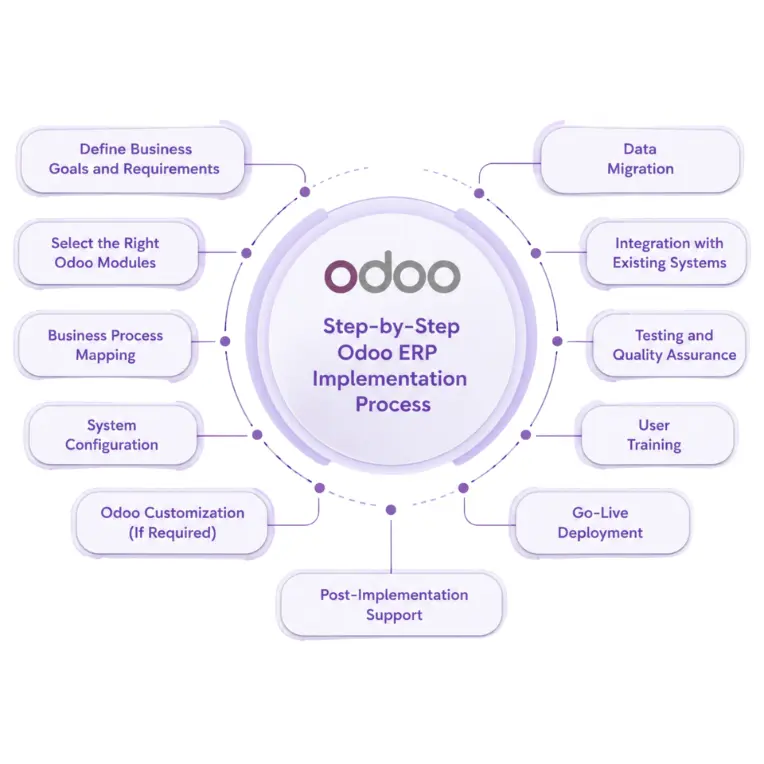
Step-by-Step Odoo ERP Implementation Process
Step 1: Define Business Goals and Requirements
The first and most critical phase is understanding what your business aims to achieve through ERP implementation. Ask questions such as:
- → What operational challenges are we facing?
- → Which processes need automation?
- → What departments will use Odoo?
- → What KPIs should improve after implementation?
Deliverables: Requirement gathering document, business process analysis, project scope definition, success metrics.
A clear understanding of business objectives helps avoid scope creep and implementation delays.
Step 2: Select the Right Odoo Modules
Odoo offers a wide range of applications. Not every business requires all modules. Common module selections include:
Sales & CRM
Lead management, opportunity tracking, quotations, sales orders, and customer communication.
Inventory Management
Stock control, warehouse operations, inventory tracking, barcode scanning, and replenishment.
Accounting
Invoicing, payments, bank reconciliation, tax management, and financial reporting.
Manufacturing
Production planning, work orders, Bill of Materials (BoM), and shop floor operations.
HR & Payroll
Employee records, attendance, recruitment, payroll, leaves, and performance management.
And Much More...
Depending on your business requirements, Odoo also offers Purchase, Project, Helpdesk, Website, E-commerce, Marketing Automation, Field Service, POS, Documents, and many other applications.
Selecting only the necessary modules keeps implementation efficient and cost-effective.
Step 3: Business Process Mapping
Before configuring Odoo, existing workflows must be documented and analyzed. This phase identifies: current processes, bottlenecks, manual tasks, automation opportunities.
Current Sales Process
Optimized Odoo Process
Process mapping ensures the ERP system supports business growth rather than replicating inefficient workflows.
Step 4: System Configuration
Once processes are finalized, the Odoo environment is configured. Configuration includes:
- → Company settings
- → User roles and permissions
- → Fiscal positions
- → Warehouses
- → Product categories
- → Tax rules
- → Approval workflows
This stage establishes the foundation of your ERP system.
Step 5: Odoo Customization (If Required)
While Odoo covers most standard business requirements, some organizations need custom functionality. Typical customizations include:
- → Custom workflows tailored to your business processes
- → Additional fields for capturing business-specific data
- → Industry-specific modules and custom applications
- → Custom reports for better business insights
- → Interactive dashboards with real-time analytics
- → Seamless third-party integrations with external systems
Best Practice: Customize only when necessary. Excessive customization can increase implementation costs and future upgrade complexity.
Step 6: Data Migration
Migrating data accurately is one of the most critical stages of ERP implementation. Common data migrated includes:
- → Customers
- → Vendors
- → Products
- → Inventory
- → Accounting records
- → Employees
- → Sales history
Data Migration Checklist
✔ Remove duplicate records
✔ Standardize data formats
✔ Validate master data
✔ Create backup copies
✔ Test migration before go-live
Clean data ensures better reporting and operational efficiency.
Step 7: Integration with Existing Systems
Many businesses use multiple software solutions. Odoo can integrate with:
- → Payment gateways
- → E-commerce platforms
- → Shipping providers
- → POS systems
- → Banking systems
- → Third-party applications
- → Marketing automation tools
Proper integration eliminates duplicate data entry and improves workflow automation.
Step 8: Testing and Quality Assurance
Before launching the system, thorough testing is essential.
Functional Testing
Verifies that every Odoo module functions correctly and delivers the expected business outcomes.
User Acceptance Testing
Business users validate workflows to ensure the system meets operational requirements before go-live.
Integration Testing
Ensures reliable communication between Odoo and external applications, APIs, and third-party services.
Performance Testing
Confirms that the system remains fast, stable, and responsive under expected workloads and concurrent users.
Identifying issues before go-live significantly reduces operational disruptions.
Step 9: User Training
Even the best ERP system can fail if users are not properly trained. Training should cover:
- → Daily operations
- → Department-specific workflows
- → Reporting
- → Dashboard usage
- → Approval processes
Benefits of User Training
✔ Faster adoption
✔ Reduced errors
✔ Higher productivity
✔ Better ROI
Investing in training increases implementation success rates.
Step 10: Go-Live Deployment
After successful testing and training, the system is deployed for real-world usage. During go-live:
- → Final data migration is completed
- → Users begin operating in Odoo
- → Legacy systems are phased out
- → Support teams monitor performance
Many businesses choose a phased rollout to minimize risk.
Step 11: Post-Implementation Support
ERP implementation doesn't end at go-live. Continuous support helps:
- → Resolve issues quickly
- → Improve user adoption
- → Optimize workflows
- → Add new functionalities
- → Upgrade Odoo versions
Ongoing support ensures long-term success and maximizes ERP investment.
Common Odoo ERP Implementation Challenges
Resistance to Change
Employees may hesitate to adopt new processes and workflows, slowing the implementation process.
Poor Data Quality
Inaccurate or duplicate data can create reporting errors and operational issues after migration.
Scope Creep
Continuously adding new requirements during implementation increases costs and project delays.
Inadequate User Training
Without proper training, users struggle to adopt the ERP system and productivity suffers.
Lack of Expert Guidance
Odoo implementation combines business consulting, technical expertise, data migration, integrations, and change management. Without experienced guidance, projects often exceed timelines and budgets.
Best Practices for a Successful Odoo ERP Implementation
Following proven implementation practices helps reduce project risks, improve user adoption, and maximize the return on your Odoo ERP investment.
Key Takeaway: Successful Odoo ERP implementation is not just about deploying software—it requires careful planning, clean data, effective user training, and continuous optimization to achieve long-term business value.
How Long Does Odoo ERP Implementation Take?
Implementation timelines vary depending on project complexity.
Factors affecting timelines include:
- → Number of modules
- → Customizations
- → Data volume
- → Integrations
- → User count
- → Business complexity
Why Choose GritXi for Your Odoo ERP Implementation?
At GritXi, we help businesses successfully implement Odoo ERP by combining functional expertise, technical excellence, and industry best practices. From planning and implementation to post-go-live support, our team ensures a smooth digital transformation journey.
18+
Years of Experience
75+
Projects Every Year
69+
Published Odoo Apps
32+
In-house Experts
Official Odoo Partner
Delivering Odoo ERP solutions across 13+ countries with a team of certified experts.
Conclusion
Odoo ERP implementation is more than simply installing software—it is a strategic investment that transforms the way your business operates. A well-planned implementation helps streamline processes, improve collaboration across departments, reduce operational costs, and provide real-time visibility into every aspect of your business.
From business requirement analysis and module selection to customization, data migration, user training, deployment, and post-go-live support, every phase contributes to the long-term success of your ERP system. By partnering with an experienced Odoo implementation expert, you can minimize risks, accelerate deployment, and maximize the return on your ERP investment.
Ready to implement Odoo ERP? Whether you're deploying Odoo for the first time or upgrading an existing system, the right implementation strategy and expert guidance can help you achieve faster adoption, smoother operations, and sustainable business growth.
Odoo ERP Implementation FAQs
Find answers to the most commonly asked questions about Odoo ERP implementation, timelines, costs, implementation partners, and best practices.
1. What is Odoo ERP implementation?
Odoo ERP implementation is the structured process of configuring, customizing, migrating data to, and deploying Odoo software to manage a company's core business operations. It typically includes eight key phases: requirement analysis, module selection, process mapping, configuration, customization, data migration, testing, training, and go-live.
2. How long does Odoo ERP implementation take?
Small businesses typically require 4–8 weeks, medium-sized companies 2–4 months, while large enterprises may need 4–8 months. The timeline depends on the number of modules, business complexity, customizations, integrations, and data migration requirements.
3. What are the main phases of Odoo ERP implementation?
The implementation process includes business requirement analysis, module selection, process mapping, system configuration, customization, data migration, testing, user training, go-live deployment, and ongoing post-implementation support.
4. What is the difference between Odoo Community and Odoo Enterprise?
Odoo Community is a free, open-source edition suitable for businesses with basic ERP requirements. Odoo Enterprise includes premium features such as Odoo Studio, advanced reporting, official support, mobile applications, and enhanced scalability for growing organizations.
5. Why do Odoo ERP implementations fail?
ERP projects usually fail because of poor planning, changing project scope, inadequate user training, poor-quality data, and lack of experienced implementation guidance. A structured implementation methodology significantly reduces these risks.
6. What does an Odoo implementation partner do?
An Odoo implementation partner manages business analysis, module configuration, custom development, data migration, third-party integrations, user training, deployment, and long-term technical support to ensure a successful ERP implementation.
7. How much does Odoo ERP implementation cost?
The implementation cost depends on the number of users, modules, customizations, integrations, data migration complexity, and overall project scope. Most businesses receive a tailored estimate after a detailed requirement analysis.
Odoo ERP Implementation: Step-by-Step Guide for Businesses