Discover how the Global Search module lets Odoo users search records across multiple models from one place while respecting access rights and improving productivity.
Install GritXi's Global Search from the Odoo Apps Store
Searching for records in Odoo often requires switching between modules, applying filters, and browsing multiple views to locate the right information. If you don't remember where a customer, product, invoice, purchase order, or sales order is stored, the process can quickly become inefficient.
GritXi's Global Search solves this by providing a unified search bar that lets users search records across multiple Odoo models from a single place. Accessible from almost anywhere in Odoo, it simplifies navigation, reduces time spent searching, and improves productivity.
This guide explains how GritXi's Global Search works, its key features, technical capabilities, and the benefits it brings to businesses using Odoo ERP.
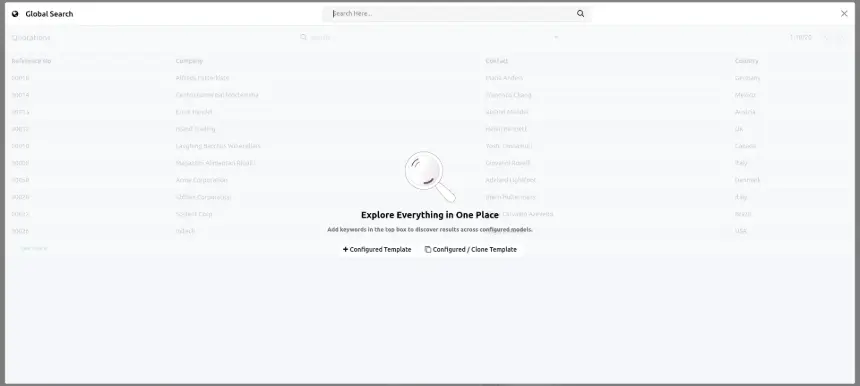
What Is GritXi's Global Search in Odoo?
GritXi's Global Search is an Odoo search module that enables users to find records without knowing in advance which application they're stored in. Instead of switching between different applications to locate customers, products, invoices, purchase orders, sales orders, or other business records, users can search from one place and instantly access the information they need.
GritXi's Global Search adds a powerful search bar that is accessible from almost anywhere in Odoo. Search results are organized using configurable search templates, allowing businesses to customize how records are searched and displayed for different Odoo models. The module also fully respects Odoo's Access Rights and Record Rules, ensuring users only see records they are authorized to access.
Whether you're working in Sales, Purchase, Inventory, Accounting, CRM, Manufacturing, or other Odoo modules, Global Search provides a faster, smarter, and more consistent way to locate business information while improving navigation and everyday productivity across the Odoo ERP system.
Why Odoo Users Need Global Search
Odoo's native search tool is scoped to whatever module is currently open. If a record could belong to more than one app, that scoping becomes a liability: each app has to be opened and filtered in turn, on the chance that the current one holds the match.
A unified search layer sidesteps that entirely. One query returns results from across the models you've configured, organized by template, so the time that used to go into navigating gets redirected toward the actual task at hand. For any business running more than a handful of Odoo modules, that shift adds up.
A few situations where this plays out daily
Teams across every department save time by searching everything from one place.
Support Agent
Look up a customer by phone number without knowing whether the record is stored in Contacts, Sales, or Helpdesk.
Accountant
Instantly locate an invoice reference received by email without navigating through Accounting menus.
Sales Representative
Open a quotation during a customer call instead of searching through multiple menus.
Warehouse Team
Find stock transfers immediately without browsing through inventory screens.
Mobile Manager
Check purchase order status from anywhere without opening multiple applications.
One Search. Instant Results.
Without Global Search, users often navigate through multiple menus, open different modules, and make several unnecessary clicks just to locate a single record. Global Search centralizes everything into one fast, intelligent search interface.
A Typical Before-and-After
Before Global Search
A customer asks about a delayed shipment. The support team needs to search across multiple Odoo applications:
- Contacts to verify customer details
- Sales to locate the order
- Inventory to check shipment status
Multiple apps. Multiple clicks. More time spent searching.
With Global Search
The user enters the customer's name or order number once. Global Search instantly finds related records across Odoo:
- Customer information
- Sales orders
- Inventory movements
- Related business records
One search. Complete visibility. Faster responses.
Odoo's Built-In Search vs. GritXi's Global Search
Odoo's default search lives inside each module and only reads records from that module. GritXi's Global Search sits above that as an independent layer, querying many models in parallel. Here's the comparison:
Native Odoo search works well when you already know the right application, model, and location of your data. GritXi's Global Search removes that limitation by allowing teams to discover records across the entire Odoo ecosystem — without knowing where the information is stored beforehand.
Key Features of GritXi's Global Search
Configurable Search Templates
Set field visibility and layout per model so each team's results match how it actually works.
Advanced Search Options
Facets, per-model templates, adjustable result counts, and list-view selection, all available from the same panel.
Multi-Criteria Filtering
Stack several conditions in one query to narrow results across models at once.
Template-Specific Behaviour
Result counts, layout, and interaction rules can differ from one template to the next.
No-Code Configuration
Build and manage search templates through an intuitive configuration interface without writing custom code.
Model Filter Sidebar
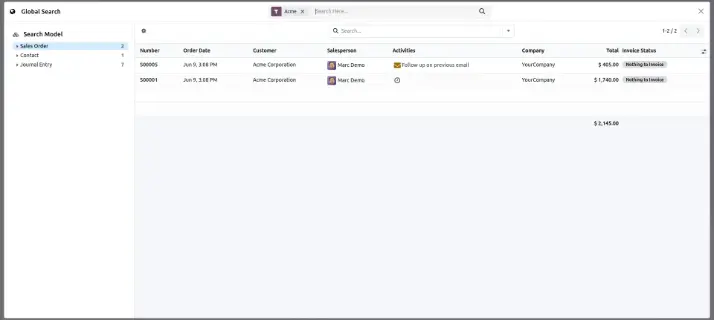
Browse results grouped by model, making it easy to jump directly to Sales Orders, Contacts, Invoices, or any other record type.
Multi-Company Filter
Instantly switch search context between companies using a dedicated filter without changing your active company.
Live Result Counts & Aggregated Totals
Every model displays the number of matching records before you open them. Numeric fields such as order totals are automatically aggregated at the bottom of the list, helping Sales and Accounting teams analyze data instantly without exporting reports.
Setting Up Global Search in Odoo: Step-by-Step
Rolling it out follows a simple five-step path. Once set up, records across your Odoo models become reachable from one search interface.
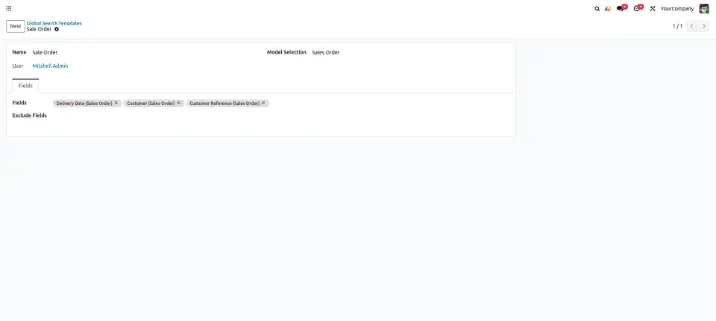
Configure a Template for Each Model
An administrator picks which fields are searchable and how results should be displayed, tailoring the setup to each business process rather than using one generic layout for everything.
Search From Anywhere in Odoo
Once configured, the search bar is reachable from nearly any backend screen, regardless of which module happens to be open at the time.
Access Stays Restricted to Internal Users
Portal and public users have no path into the interface — it's built strictly for internal operations.
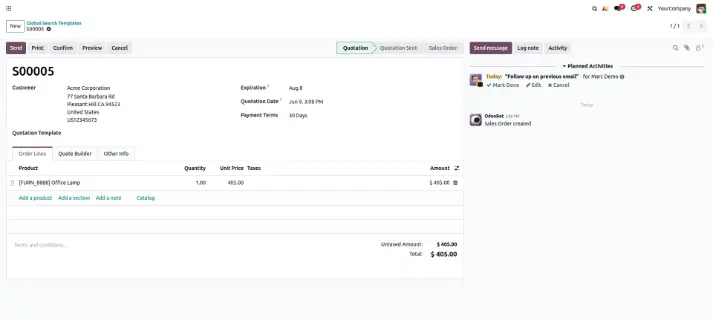
Open Records Instantly
Matches appear in an organized list; clicking one opens the record directly, with no extra menu navigation in between.
Works Across Every Device
Screen size doesn't change the experience — desktop, tablet, and phone all get the same interface and behavior.
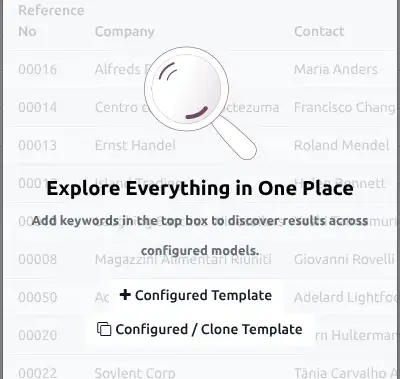
Because each step builds on the last, admins can start by configuring templates for the most-used models and expand coverage as needs grow.
Real Business Use Cases
From customer support to daily operations, GritXi's Global Search helps teams find important Odoo records faster without switching between applications.
Customer Lookup
Find customer records instantly without opening the Contacts application.
Invoice Search
Quickly locate invoices using numbers, references, or related details.
Product Discovery
Search products using SKU, barcode, or internal references instantly.
Sales & Purchase Records
Open quotations, sales orders, and purchase documents directly from search.
Inventory Tracking
Locate stock transfers, pickings, and inventory records faster.
CRM & Vendor Search
Access leads, opportunities, and vendor information without changing apps.
Security & Access Rights
Global Search operates entirely within Odoo's existing permission model — it adds a search layer, not a bypass. Each query still runs through Odoo's Access Control Lists and Record Rules before any result reaches the screen.
Search across multiple Odoo models through one unified interface.
Access rights are validated before displaying any search results.
Users can only access records they are already authorized to view.
Sensitive information remains protected automatically without additional search-level configuration.
Whether users are searching HR documents, financial records, or customer information, Odoo access permissions are validated consistently before results are displayed. Faster discovery never compromises data security or governance.
Benefits of GritXi's Global Search
Instant Record Discovery
Locate records in seconds, regardless of which Odoo application stores the information.
Reduced Navigation Time
Replace repeated menu navigation with one powerful search experience.
Quick Data Insights
View totals for numeric fields like order values without exporting or opening multiple records.
One-Click Access
Open any search result directly in the original Odoo record view.
Workflow-Based Templates
Configure search templates with fields that match each team's workflow.
Multi-Company Support
Narrow results by company to work efficiently in multi-company Odoo environments.
Frequently Asked Questions
1. What is Global Search?
Global Search is an Odoo search module that allows users to search records across multiple Odoo models from a single search interface. Instead of switching between modules, users can quickly find customers, products, invoices, purchase orders, and other records, making everyday work faster and more efficient.
2. Does Global Search respect access rights?
Yes. Global Search fully respects Odoo's Access Control Lists and Record Rules. Every search result is filtered based on the current user's permissions, so users can only view records they are authorized to access.
3. Can I customize search results?
Yes. Each Odoo model can have its own configurable search template. Users can customize the displayed fields, search behavior, and result layout to match their business requirements and improve the overall search experience.
4. Does it work on mobile devices?
Yes. Global Search is fully responsive and works on desktops, tablets, and mobile devices. The interface adapts to different screen sizes, allowing users to search records and navigate results smoothly from anywhere.
5. Can I limit Global Search to specific models only?
Yes. Templates are configured per model, so administrators choose exactly which models — Sales, Contacts, Invoicing, CRM, and so on — are included in Global Search. There's no requirement to enable every model at once.
6. Can different teams have different search templates?
Yes. Templates are configurable per model and per use case, so Sales, Accounting, Inventory, and other teams can each get a search experience — fields, layout, result counts — suited to how they work, without affecting other teams' setups.
7. How long does it take to set up Global Search?
Setup is quick since no coding is required. Administrators configure search templates per model — defining which fields are searchable — and the search bar becomes available immediately after. Most teams can have their most-used models searchable within minutes.
8. Does Global Search slow down Odoo performance?
No. Global Search queries only the models and fields defined in your configured templates, so searches stay targeted and fast rather than scanning your entire database indiscriminately.
Summary
GritXi's Global Search transforms the way users find information in Odoo by bringing records from multiple models into one powerful search experience. Instead of switching between applications, navigating menus, and applying repeated filters, users can quickly discover the information they need from a single interface.
With flexible, template-based configuration, businesses can start with their most important workflows and expand search coverage as requirements grow — without complex development efforts or data migration.
From Sales and CRM to Purchase, Inventory, and Accounting, GritXi's Global Search helps teams spend less time searching and more time taking action. It delivers a faster, secure, and scalable way to work efficiently across your entire Odoo environment.
Global Search in Odoo: How to Find Records Across Multiple Modules