Streamline Your Everyday Odoo Workflow
Eliminate tab-switching, endless scrolling, lost files, and mouse dependency with 7 purpose-built Odoo productivity apps.
Here's something almost every Odoo user has felt but never said out loud: the software is genuinely good, but somewhere between logging in and finishing your task, small annoyances keep stealing your time. A file you can't find. A dropdown list so long you give up scrolling. A customer who abandons an order because the checkout took too many clicks.
None of these problems are big enough to complain about in a meeting. But add them up over a month, across your whole team, and you start to wonder — where does all that time actually go?
That question is exactly what Gritxi Technologies set out to answer. We looked at the small, repeated frustrations that Odoo users deal with every single day, and built seven focused Odoo apps to fix them — practical Odoo solutions and workflow extensions, not flashy add-ons for the sake of it, just real fixes for real problems. Together, they represent some of the best Odoo apps available today for teams that want more Odoo productivity without a full re-implementation.
Whether you're browsing Odoo community apps for the first time or already comparing Odoo ERP apps for your next upgrade, this list of Odoo business apps focuses on the everyday details that most Odoo extensions overlook: workflow automation, faster search, cleaner document handling, and a genuinely better Odoo user experience. If you use Odoo, or you're planning to, chances are you'll recognise at least three of these problems from your own workday. Let's go through them one by one — and if you're on Odoo 19, all seven of these apps are ready to install today.
What You'll Know
This guide is a working reference, not just a product list. By the end, you'll know:
- What Odoo apps, modules, and addons actually are, and how they differ from custom development
- Seven specific everyday problems inside Odoo, and the purpose-built apps that solve each one
- Real-world examples of how each app changes a day-to-day workflow
- A simple framework for deciding which Odoo apps are worth installing first
- Where to find each app, what setup involves, and which team benefits most
What Are Odoo Apps? (Odoo Apps, Modules & Addons Explained)
An Odoo app — also called an Odoo module or Odoo addon — is a self-contained package that installs on top of your existing Odoo system and adds, changes, or extends one specific piece of functionality, without altering the underlying platform. Think of it the way you'd think of a phone app: Odoo itself is the operating system, and each app adds a capability without requiring you to rebuild the system underneath it.
The three terms are used almost interchangeably in the Odoo world, but here's the distinction when it matters:
- Modules — the technical building blocks Odoo itself is made of; every core feature, from Sales to Accounting, is a module.
- Addons — the umbrella term for modules built on top of Odoo's core, usually by Odoo partners or independent developers, and installed into a standard instance.
- Apps — the customer-facing name for anything installable from the Odoo Apps Store, whether it's a small utility addon or a large, full-featured module.
In practice, most Odoo users — and this guide — use “app,” “module,” and “addon” interchangeably. What matters more than the label is scope: a well-built Odoo app solves one clear problem, installs cleanly on Community or Enterprise, and doesn't force you to change workflows that already work.
Who Is This Article For?
This list was built around specific, everyday friction, so it's most useful if you fall into one of these groups:
- Sales & CRM teams who spend their day flipping between customer records, quotes, and orders
- Finance & accounting teams chasing down invoices, POs, and supporting documents
- Inventory & warehouse staff working through long product and order lists
- eCommerce and online store managers trying to reduce checkout friction for repeat buyers
- Odoo Community edition users looking for targeted upgrades without an Enterprise migration
- Odoo Enterprise edition users who still hit these same everyday friction points
- Odoo partners and consultants evaluating apps to recommend to clients
#1 The Tab-Switching Problem: Multi Tabs
Picture this. You're halfway through checking a customer's order history when you get a message asking about their last invoice. You click away to check it. By the time you come back, you've forgotten what you were originally looking for, and you have to start over.
This happens dozens of times a day, for every person on your team who touches Odoo. It's such a normal part of the routine that nobody thinks to fix it — until they realise it doesn't have to be this way.
How Multi Tabs Fixes It
This Odoo app simply adds tabs to Odoo, the same way your browser has tabs. Open a customer record in one tab, an invoice in another, a task in a third — and jump between them instantly without losing your place. There's nothing new to learn. If you can use Chrome or Edge, you already know how to use this Odoo module.
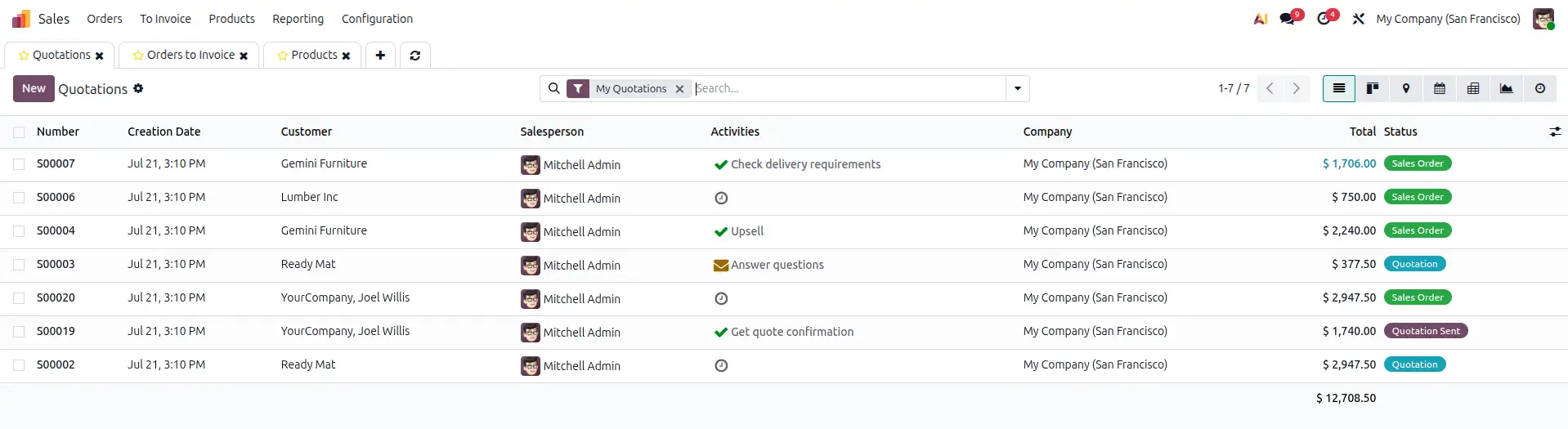

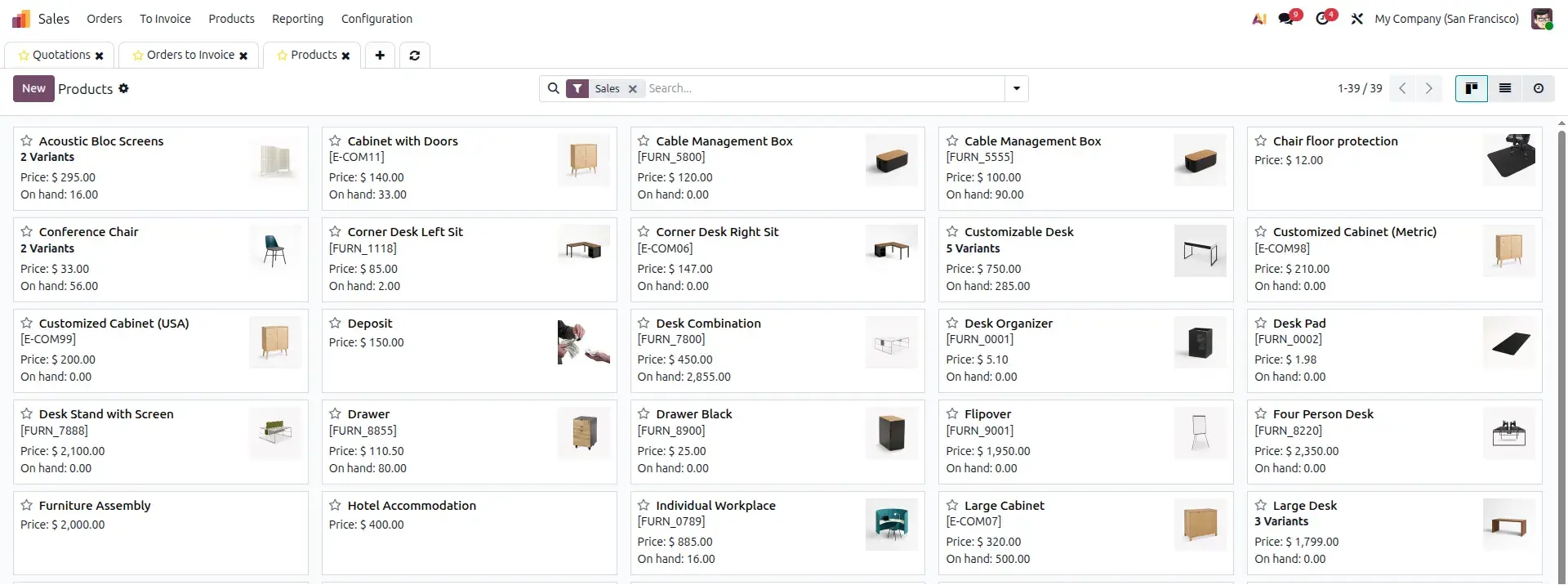
A sales rep at a distribution company keeps three customer accounts open in separate tabs while working a renewal quote — switching between purchase history, the current quote, and an open support ticket without losing progress on any of them.
Odoo Native vs. Gritxi's App
| Odoo Native (Out of the Box) | With Gritxi's Odoo App |
|---|---|
|
|
Benefits of Using This App
- No more losing your place when you get pulled into something else.
- Faster work for anyone who deals with multiple records at once — sales, support, accounts, everyone.
- Zero training needed. It just feels natural from the first click.
- Small daily time savings that add up fast across a whole team.
#2 The Endless Scrolling Problem: One2many / Many2many Searchable
Now here's another one you've probably lived through. You open an order with forty product lines, or a contact with a long list of related documents, and you need just one item from that list. So you scroll. And scroll. And scroll some more, squinting at each line hoping the right one jumps out at you.
It sounds like a small thing — until you realise how often it happens across invoices, orders, and contact lists, every single day, for every employee who works with Odoo's lists.
How This Odoo Module Fixes It
This Odoo addon adds a simple search box right above these long lists inside Odoo — the One2many and Many2many fields you see constantly on orders, invoices, and contacts. Instead of scrolling, you just type a few letters, and the record you need appears. You can even filter and group things right there, without leaving the page you're on.
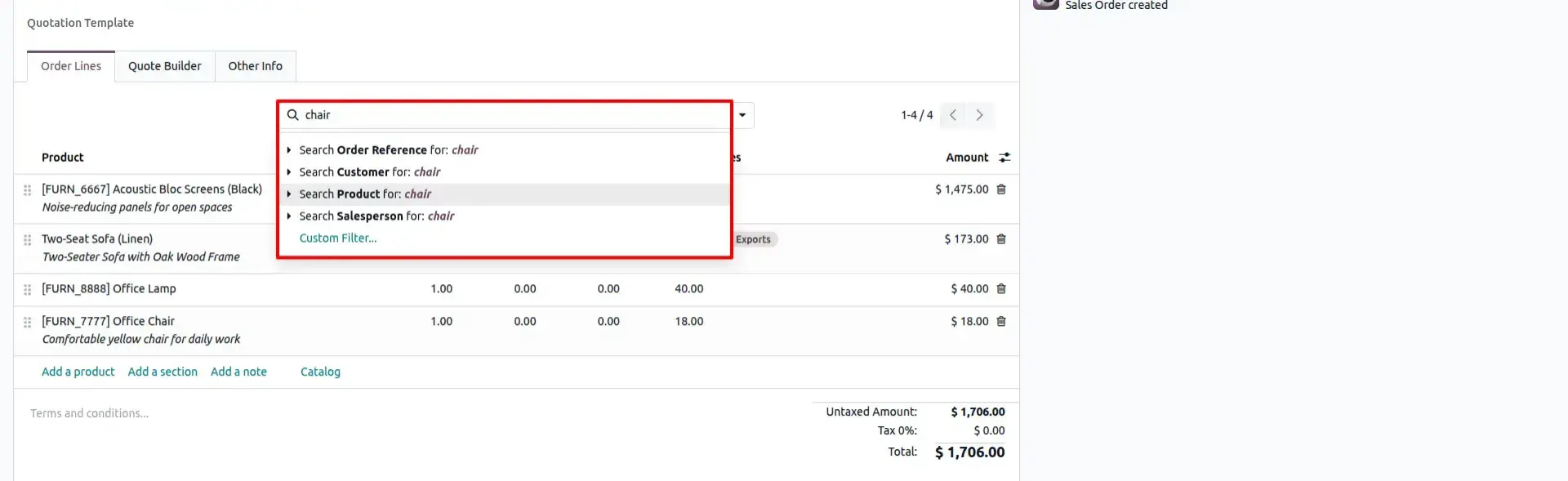
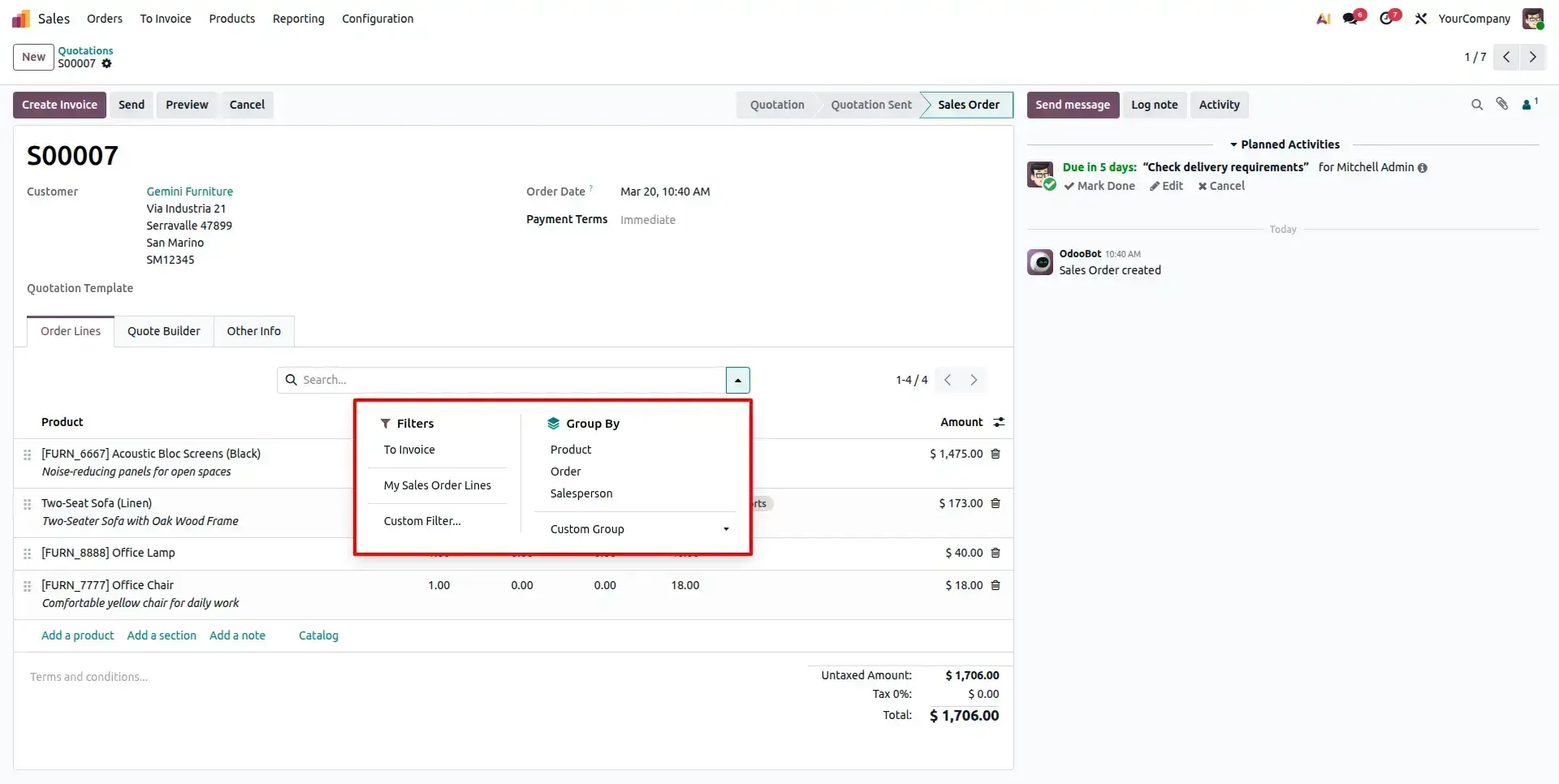
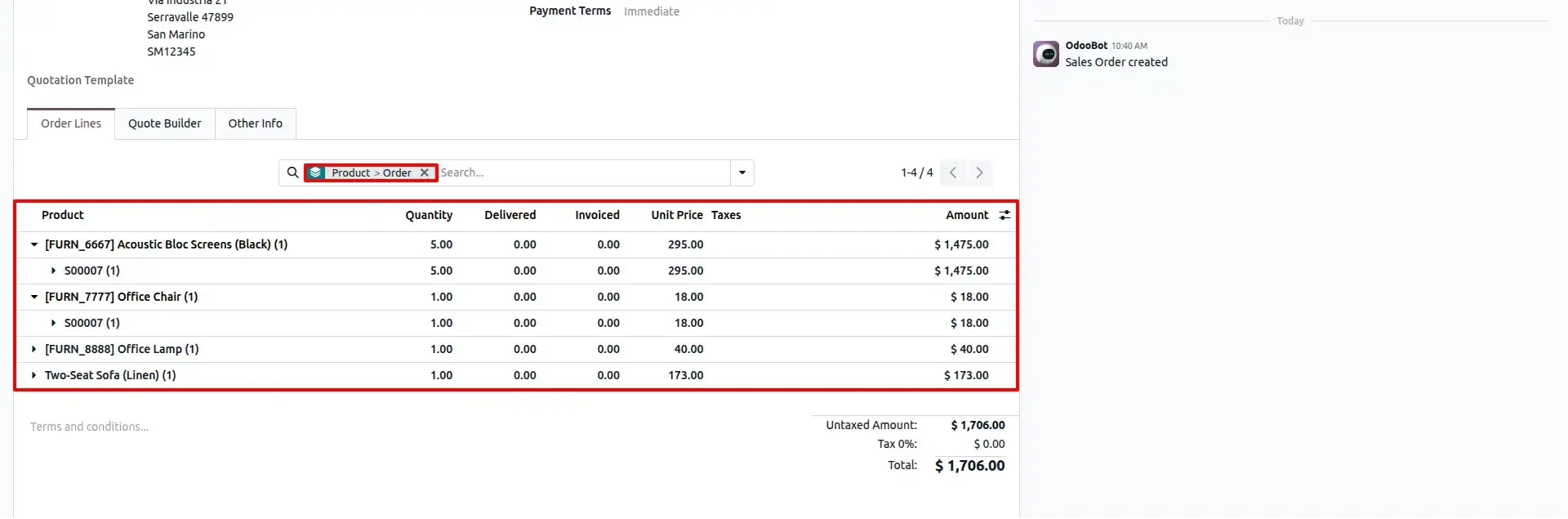
A wholesale distributor's sales coordinator processes an order pulled from a master catalogue of hundreds of SKUs. Instead of scrolling through the full product list, she types a partial SKU and finds the right line in seconds.
This kind of friction is common enough that it shows up in broader workplace research, too: studies on knowledge-worker productivity, including widely cited McKinsey research, have found that employees can lose close to a fifth of their workweek simply hunting for information that already exists somewhere in their systems. Long, unsearchable lists inside daily-use software are exactly the kind of small friction that research points to.
Odoo Native vs. Gritxi's App
| Odoo Native (Out of the Box) | With Gritxi's Odoo App |
|---|---|
|
|
Benefits of Using This App
- What used to take a minute of scrolling now takes seconds.
- Fewer mistakes from picking the wrong line by accident in a long, tiring list.
- Especially useful if your business deals with big orders, long product catalogues, or detailed contact records.
- Keeps staff working inside the same form instead of jumping elsewhere to search.
#3 The Missing File Problem: Attachment Manager & Advanced Attachment Manager
Ask anyone in your finance or operations team about this one, and you'll probably get a sigh. A signed contract that's “somewhere in the emails.” A delivery proof nobody can locate when a customer disputes an order. An old invoice copy that takes fifteen minutes to track down because Odoo's default attachment list is just a flat, unhelpful list.
This isn't a small inconvenience. When you can't find the right document at the right moment, you delay payments, frustrate customers, and sometimes even lose disputes you should have won easily. Gritxi built two Odoo apps for this, and they work together as a document-management pair — so we're covering them as one story.
Attachment Manager — Fixing the Everyday Mess
This is the starting point. It replaces Odoo's plain, boring attachment list with a proper file manager built right into every record. Uploading, previewing, and finding files becomes something you can actually do quickly, without leaving the screen you're working on.
An accounts payable clerk needs a signed purchase order to release a delayed vendor payment. Instead of searching a shared inbox, she opens the record and previews the file directly, cutting a fifteen-minute hunt down to a few clicks.
Odoo Native vs. Gritxi's App
| Odoo Native (Out of the Box) | With Gritxi's Odoo App |
|---|---|
|
|
Benefits of Using Attachment Manager
- Find that signed PO or delivery slip in seconds, not minutes.
- No more chasing colleagues over email asking “can you resend that file?”
- A noticeably tidier, more professional-feeling Odoo for everyone who works with documents.
Advanced Attachment Manager — Built for When Things Scale Up
As your business grows, so does your paperwork. This Odoo extension builds on top of the basic Attachment Manager and gives you a much more organised, powerful way to manage large volumes of documents — the kind of setup that keeps working even when you've got thousands of files across hundreds of customers and projects.
A growing distributor with several thousand customer files finds that new hires can locate a two-year-old delivery record on their first week, without asking a senior colleague where things are kept.
Odoo Native vs. Gritxi's App
| Odoo Native (Out of the Box) | With Gritxi's Odoo App |
|---|---|
|
|
Benefits of Using Advanced Attachment Manager
- Keeps your document mess under control even as the business grows.
- Documents stay easy to find, even years later or after staff have changed.
- Supports growth without needing extra admin staff just to manage paperwork.
#4 The Slow Checkout Problem: Website Quick Order
Here's a question worth sitting with: if one of your regular customers wanted to reorder exactly what they bought last month, how many clicks would it take them on your website today? If the honest answer is “quite a few,” you might be losing orders you don't even know about.
Repeat customers, especially business buyers, don't want to browse. They want to find what they always order, add it to cart, and be done. Every extra step is a chance for them to get distracted, give up, or just call a competitor instead.
How This Odoo Workflow Automation App Fixes It
Website Quick Order gives your customers a dedicated “Quick Shop” page built for speed. They can save their favourite products for one-click reordering, create reusable order templates, search using their own product codes, and even upload a whole order through Excel if they're buying in bulk. On top of that, it handles the entire process of turning a regular visitor into an approved B2B account — with instant alerts to your team and one-click approval, so a new wholesale customer isn't stuck waiting around.
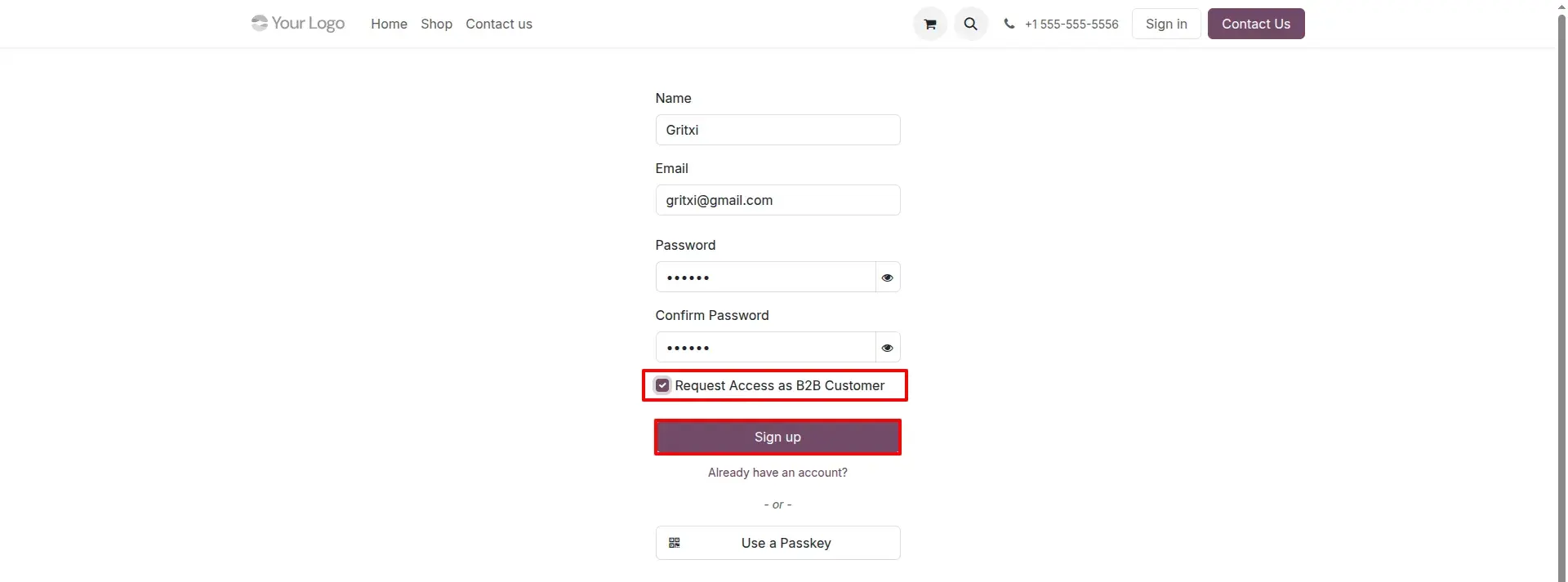

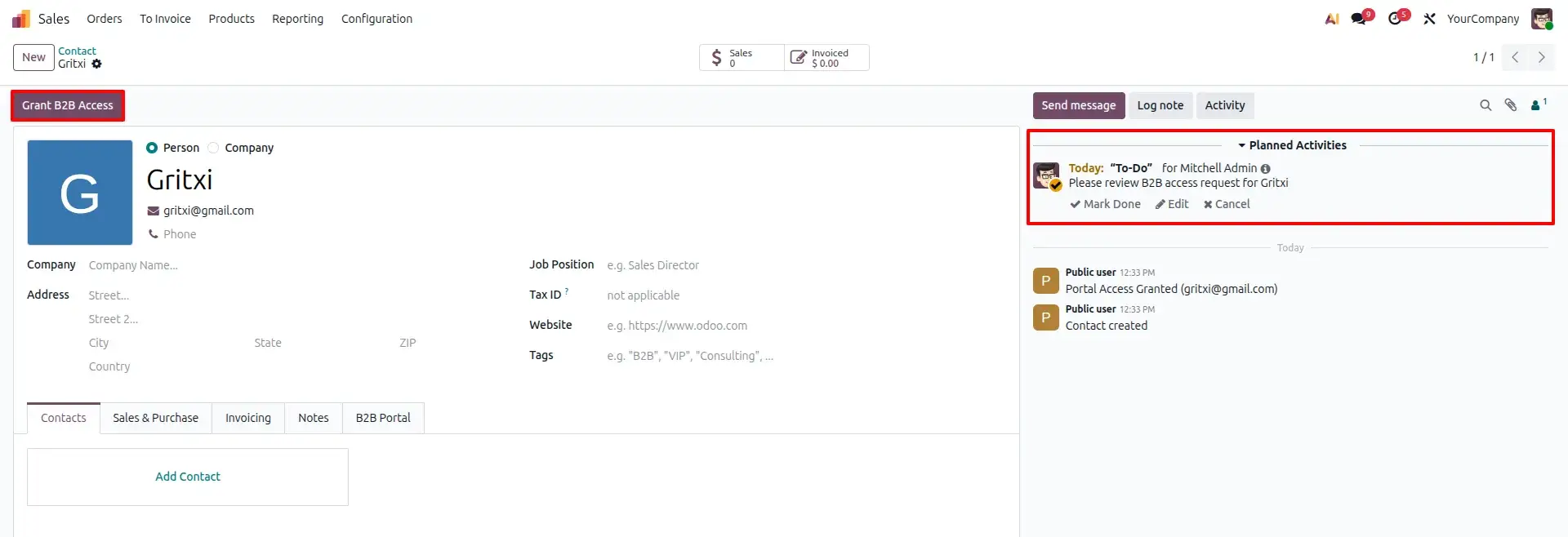
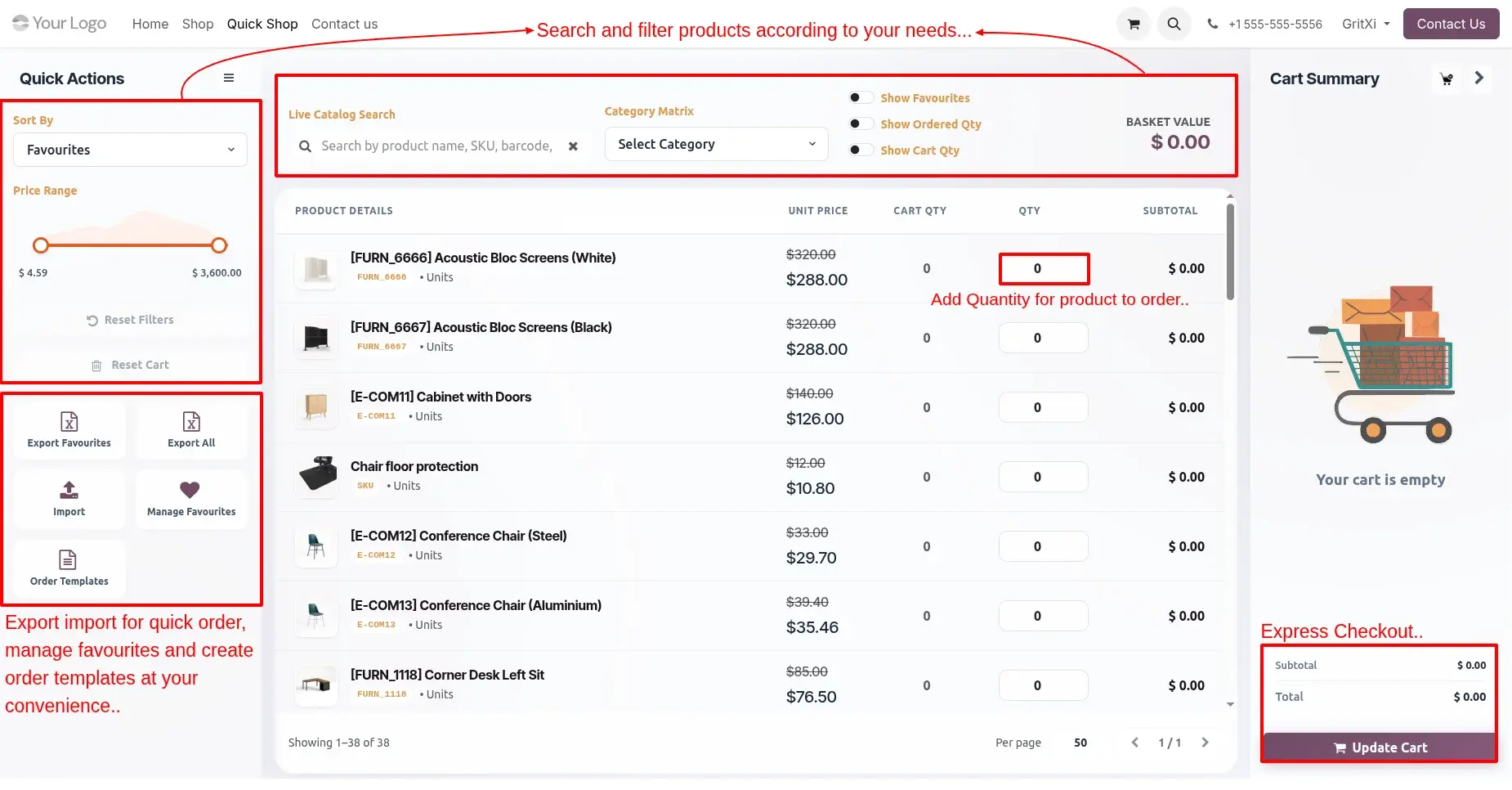
A returning wholesale customer logs in, opens Quick Shop, and reorders last month's exact product mix in under a minute — instead of rebuilding a forty-item cart from scratch by browsing categories.
Checkout friction is one of the most heavily studied problems in eCommerce for good reason. Baymard Institute's ongoing checkout usability research consistently finds that a long or complicated checkout process is one of the leading reasons shoppers abandon a cart before completing a purchase — a pattern that applies just as much to a B2B reorder flow as to a first-time consumer purchase.
Odoo Native vs. Gritxi's App
| Odoo Native (Out of the Box) | With Gritxi's Odoo App |
|---|---|
|
|
Benefits of Using This App
- Regular customers can reorder in seconds, which means they're more likely to order more, more often.
- Big bulk orders stop being a manual, error-prone task.
- New B2B customers get approved and start buying faster instead of sitting in an email thread.
- A smoother buying experience that makes your website feel more professional and trustworthy.
#5 The “Where Is That Record?” Problem: Global Search
As your Odoo setup grows — more apps, more modules, more data — a strange new problem shows up. You know a piece of information exists somewhere in the system. You just don't know if it's sitting in Sales, Helpdesk, Accounting, or somewhere else entirely. So you open one app, don't find it, open another, and keep guessing.
How This Odoo App Fixes It
Global Search puts one single search bar across your entire Odoo system. Type what you're looking for, and it doesn't matter which app it actually lives in — Global Search finds it, filters it, and takes you straight there. It works just as well on a phone as it does on a desktop, and it's one of the most requested Odoo extensions among growing companies.
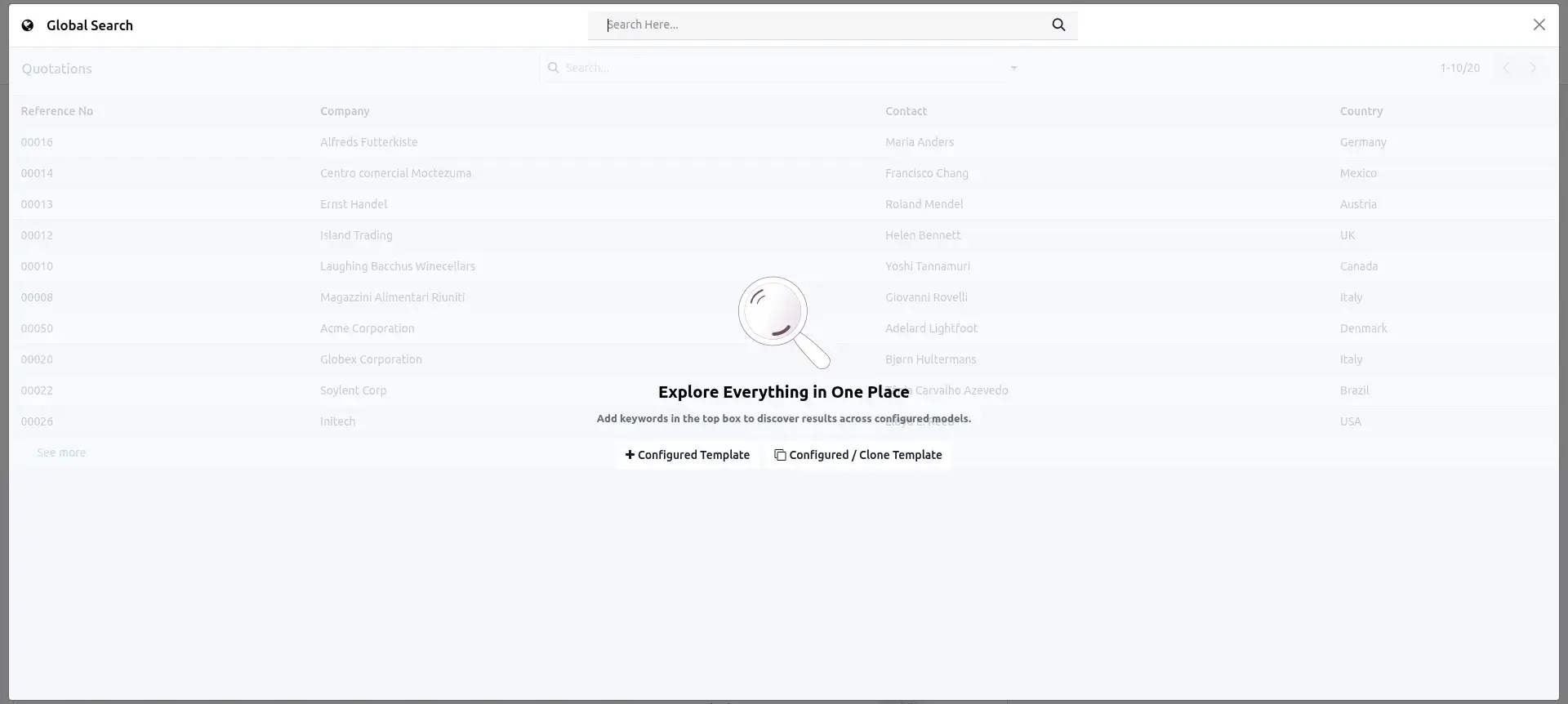
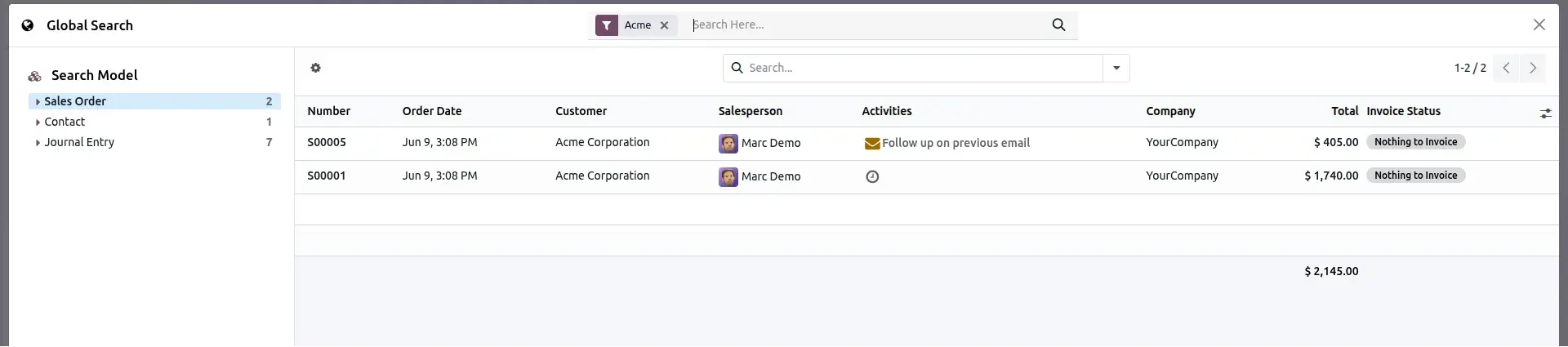
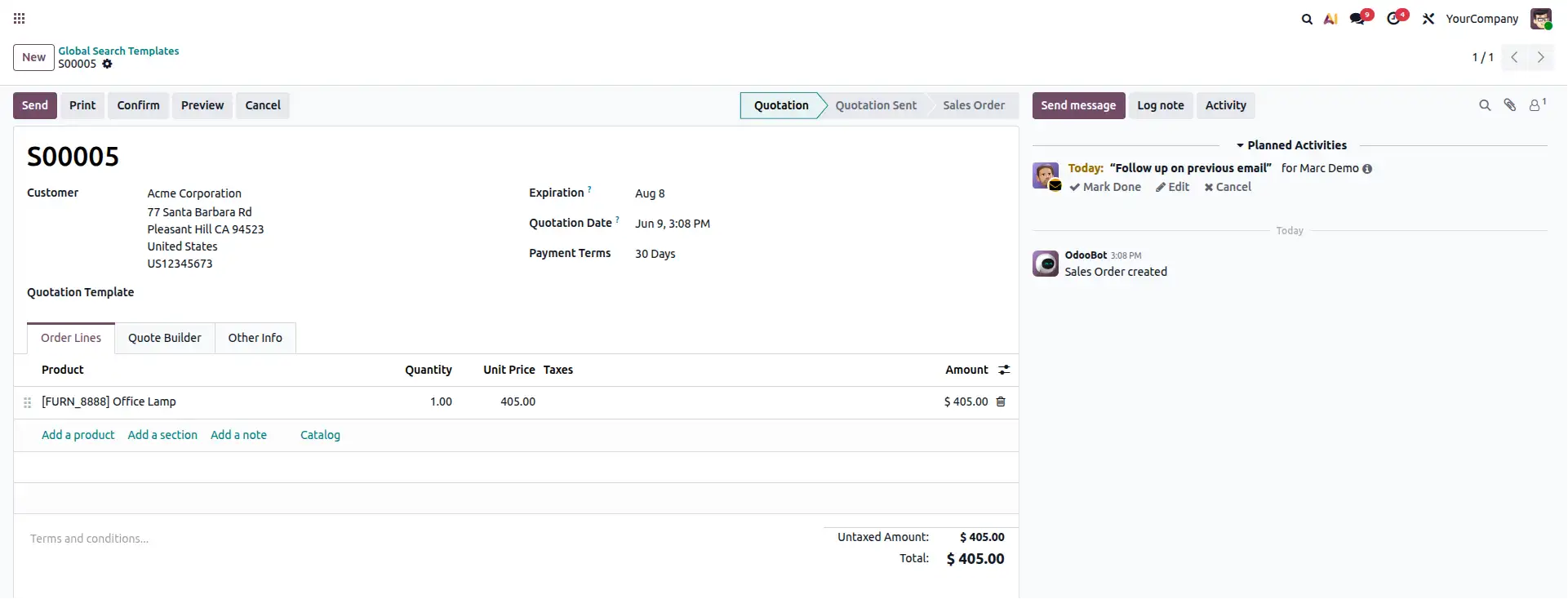
A new accounts payable hire is asked to pull up a specific vendor bill mentioned in a chat message. Instead of opening Purchase, then Accounting, then Vendor Bills in turn, she types the vendor name once into Global Search and jumps straight to the record.
Odoo Native vs. Gritxi's App
| Odoo Native (Out of the Box) | With Gritxi's Odoo App |
|---|---|
|
|
Benefits of Using This App
- No more app-hopping just to find one customer or one order.
- New employees can find things themselves instead of constantly asking a senior colleague.
- Gets more useful the bigger and more complex your Odoo setup becomes.
#6 The First Impression Problem: Advance Signup
Before a customer ever speaks to your sales team, they meet your signup page. If that page is confusing, generic, or doesn't ask the right questions, you either lose the visitor completely or end up with messy, incomplete information that your sales team has to clean up later by chasing the customer for details.
How This Odoo Customization Fixes It
Advance Signup improves the whole registration experience on your Odoo website — capturing the right details up front and notifying your team properly the moment someone signs up, so no lead slips through unnoticed.
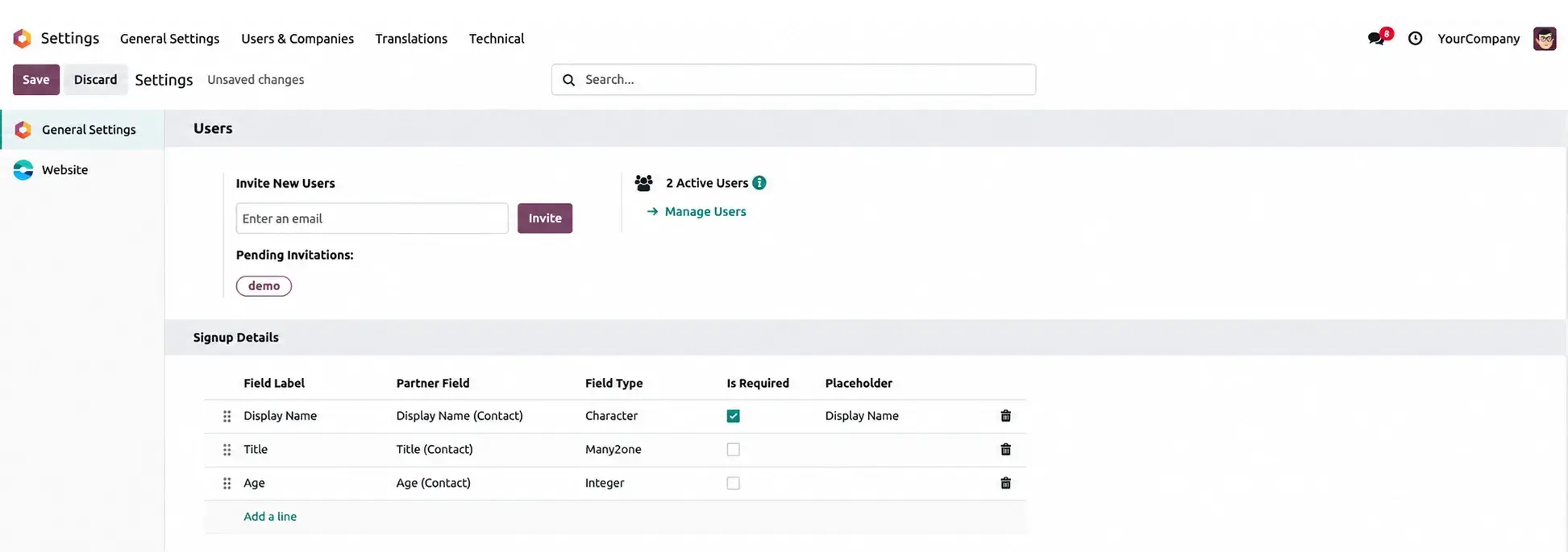
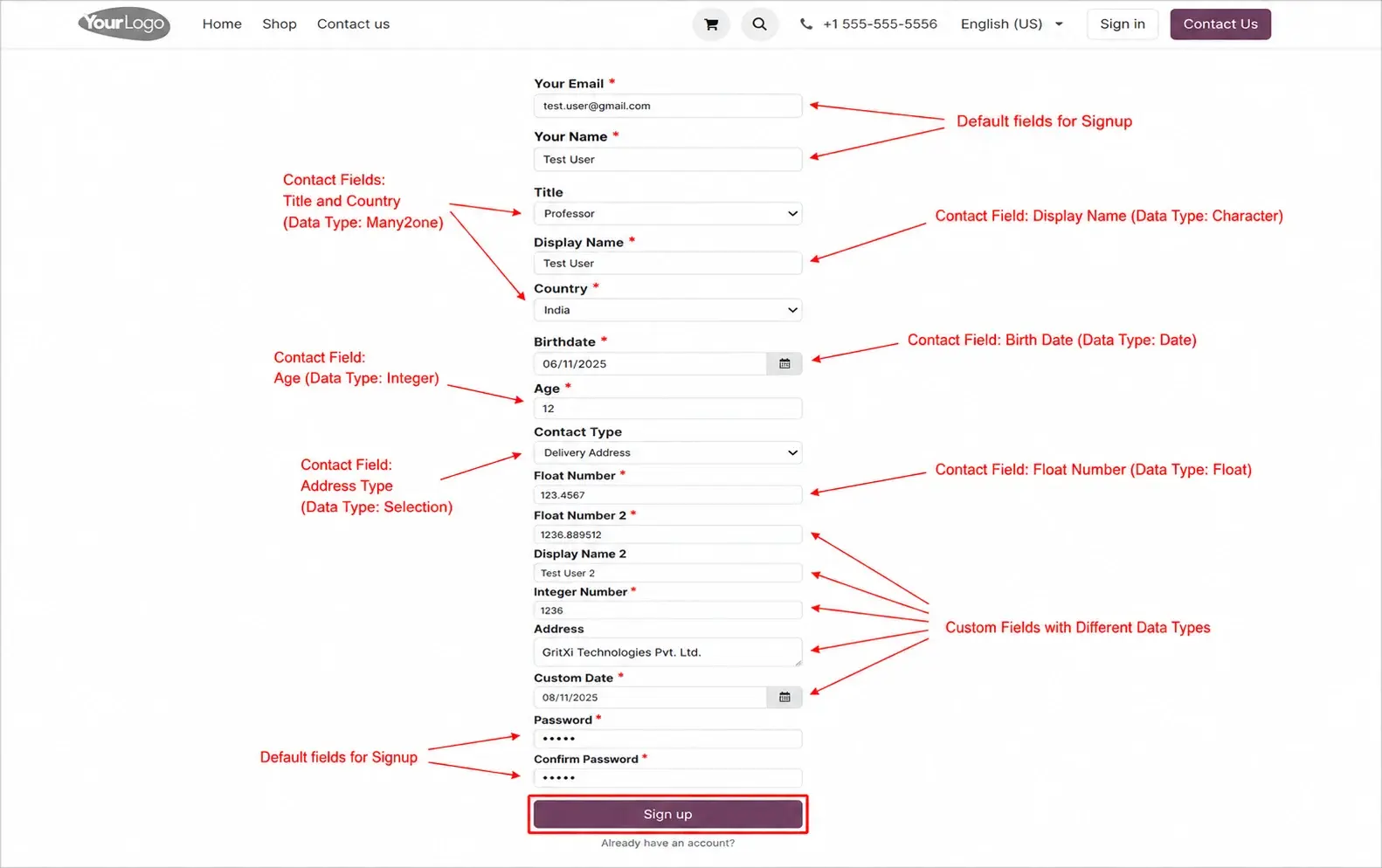
A distributor's website receives a wholesale account request overnight. Because Advance Signup instantly notifies the sales manager and pre-fills the key business details, the account is reviewed and approved before the requester's next working day.
Odoo Native vs. Gritxi's App
| Odoo Native (Out of the Box) | With Gritxi's Odoo App |
|---|---|
|
|
Benefits of Using This App
- A smoother, more trustworthy first impression for new visitors.
- Better quality information collected right from the start.
- Fewer signups that quietly go unnoticed or unanswered.
#7 The Mouse-Dependency Problem: Smart Keyboard & Arrow Key Navigation
Last one, and it's a favourite among anyone who does heavy data entry. If your job involves opening dozens of forms a day — updating records, adding order lines, switching between tabs on a form — you already know how much time gets lost simply reaching for the mouse, clicking, missing, clicking again.
How This Odoo App Fixes It
This Odoo module makes Odoo fully usable with just your keyboard. Arrow keys move a clear highlight across menus, forms, and lists. Press Enter to select a field or trigger a button. Shortcuts like Shift+1, Shift+2 jump straight between tabs, and other shortcuts let you add or delete order lines instantly — all without your hands ever leaving the keyboard.
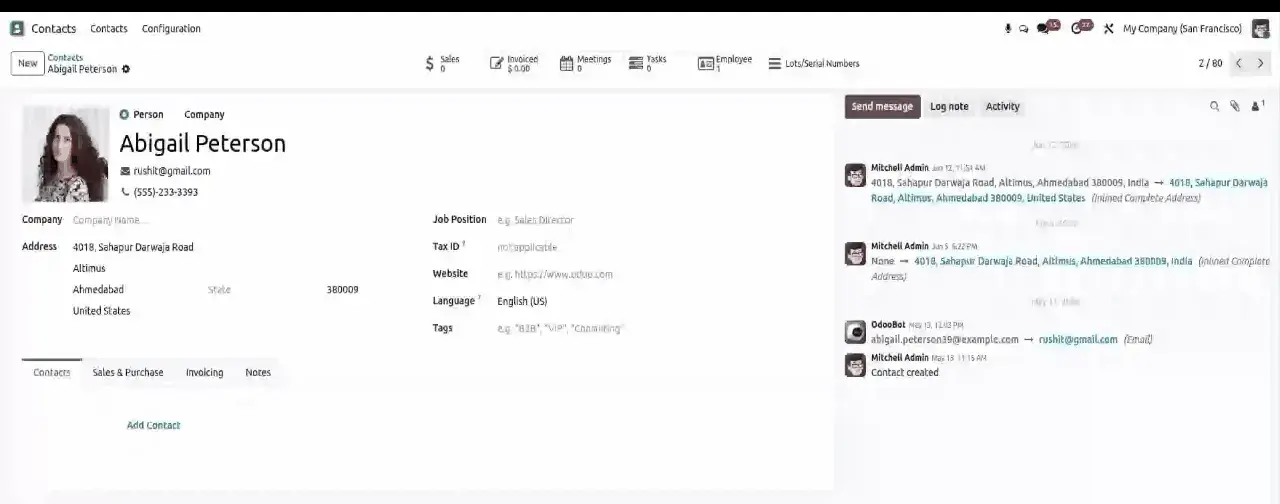
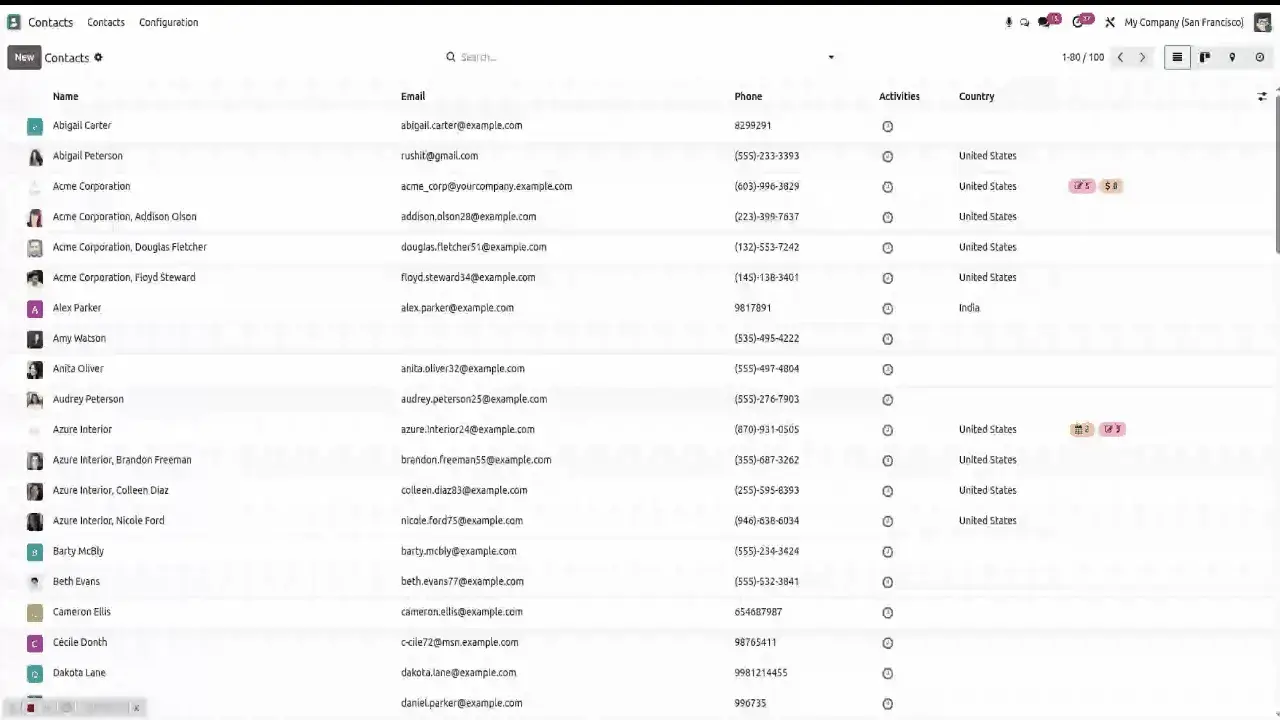
A data entry clerk processing hundreds of purchase order lines a day switches from mouse clicks to keyboard shortcuts, shaving a few seconds off every line — time that adds up to a meaningful amount by the end of the shift.
Odoo Native vs. Gritxi's App
| Odoo Native (Out of the Box) | With Gritxi's Odoo App |
|---|---|
|
|
Benefits of Using This App
- Noticeably faster data entry for anyone doing repetitive, high-volume work.
- Less strain from constant mouse use across a long workday.
- A genuine productivity boost for your busiest, most repetitive roles.
How to Choose the Right Odoo App
With seven apps on the table, the natural question is where to start. Here's a simple way to decide, in order:
- Start with your biggest daily friction, not the longest feature list. Revisit the “Who Is This Article For?” section above and be honest about which problem costs your team the most time right now.
- Match the app to the team that feels the pain most. A warehouse team scrolling long lists gets more value from One2many/Many2many Searchable than from Advance Signup, even if both are useful company-wide.
- Check compatibility with your Odoo version and edition. All seven apps covered here are built for Odoo 19 and work on both Community and Enterprise — confirm this against your own instance before installing.
- Prefer focused, single-purpose apps over broad suites when you're solving one specific problem. Each of these apps does one job well, which keeps the risk of installing them low.
- Test on a staging or duplicate database first, especially for anything touching checkout or signup flows, before rolling it out to production.
- Roll out one or two apps at a time rather than all seven at once, so you can actually measure the time or conversions you get back before deciding what to add next.
Key Takeaways: Why These Small Fixes Matter
Zoom out and a pattern emerges across all seven of these apps: none of them change what Odoo does at a fundamental level. What they change is how much friction stands between a person and the task they're trying to finish.
That distinction is worth remembering whenever you're evaluating any Odoo extension, not just these seven. The biggest productivity gains inside a mature ERP system rarely come from adding entirely new modules. More often, they come from removing the small, repeated friction that has quietly become “just how Odoo works” for your team — the kind of friction that's easy to overlook precisely because everyone has already adapted to it.
If one or two of the problems in this guide sounded familiar, that's a reasonably reliable signal, not a coincidence. These are common patterns across Odoo installations, not isolated bugs specific to your setup. The practical next step isn't necessarily to install all seven apps at once — it's to use the framework above to identify which one or two problems cost your team the most time this month, and start there.
Quick Summary — All 7 Apps at a Glance
Here's the whole story in one table, in case you want to revisit any of these before deciding what to do next.
| App | The Problem | The Fix |
|---|---|---|
| Multi Tabs | Losing your place when switching between records | Work on multiple records at once, browser-tab style |
| One2many/Many2many Searchable | Scrolling through long order, invoice, or contact lists | Instant search, filter, and group-by inside any list field |
| Attachment Manager | Files scattered, hard to find, no proper preview | A clean, organised file manager on every record |
| Advanced Attachment Manager | Document chaos as the business scales up | Enterprise-grade document organisation at high volume |
| Website Quick Order | Slow, click-heavy website reordering for repeat buyers | One-click reorders, templates, Excel bulk upload, fast B2B approval |
| Global Search | Not knowing which app a record is hiding in | One search bar across your entire Odoo system |
| Advance Signup | Generic signup form, poor quality lead data | A smarter, more informative signup and approval flow |
| Smart Keyboard & Arrow Navigation | Constant reaching for the mouse during data entry | Full keyboard control with arrow keys and shortcuts |
Related Reading
If this guide was useful, these related topics build on it (link once the corresponding Gritxi blog posts are published — do not invent URLs):
- Upgrading to Odoo 19: What's New and What It Means for Your Business
- Odoo Community vs Odoo Enterprise: How to Choose the Right Edition
- A Practical Guide to Odoo Customization Without Breaking Your Core Workflows
- How to Reduce Odoo Implementation Time: A Step-by-Step Approach
8. Comparison Table — All Odoo Apps Summarized
An expanded, SEO-friendly comparison table for readers and search engines scanning for the best Odoo apps by category and use case.
| App | Category | Best For |
|---|---|---|
| Multi Tabs | Odoo productivity app / navigation | Teams juggling multiple records daily (sales, support, accounts) |
| One2many/Many2many Searchable | Odoo UX / list management addon | Businesses with long order lines, catalogues, or contact lists |
| Attachment Manager | Odoo document management module | Any team that stores files against records |
| Advanced Attachment Manager | Odoo ERP app / enterprise document management | Growing businesses with high document volume |
| Website Quick Order | Odoo eCommerce / workflow automation app | B2B sellers and repeat-order websites |
| Global Search | Odoo productivity / search extension | Multi-app, multi-department Odoo instances |
| Advance Signup | Odoo customization / lead-capture app | Websites that need better-qualified signups |
| Smart Keyboard & Arrow Navigation | Odoo accessibility / data-entry app | High-volume data entry and repetitive workflows |
9. FAQ
What are the best Odoo apps for improving daily productivity?
For everyday productivity, the most useful Odoo apps tend to be small, focused Odoo modules rather than large suites — tools like Multi Tabs, Global Search, and Smart Keyboard Navigation, which remove specific friction points without changing how your team already works.
What is the difference between an Odoo module and an Odoo addon?
In practice, the terms are used interchangeably. Both describe an installable package that extends Odoo's core functionality — whether that's a small Odoo addon like a search bar enhancement or a larger Odoo module like a document management system.
Are these Odoo apps compatible with Odoo 19?
Yes, all seven apps covered here — including Multi Tabs, Attachment Manager, and Website Quick Order — are built and listed for Odoo 19, and are available directly on the Odoo Apps Store.
Can I install multiple Odoo extensions from Gritxi at once?
Yes. Each app is built to work independently, so you can install just the one or two Odoo extensions that solve your biggest pain point, or combine several for a broader Odoo productivity upgrade.
Do these Odoo apps require developer help to install?
Most can be installed directly from the Odoo Apps Store like any other Odoo module. For larger or customized rollouts, Gritxi Technologies' team can help with setup and configuration.
What is Odoo workflow automation and how do these apps support it?
Odoo workflow automation means reducing manual, repetitive steps inside your processes. Apps like Website Quick Order and Advance Signup automate reordering, approvals, and lead notifications so staff spend less time on repetitive tasks.
How do Odoo productivity apps improve the Odoo user experience?
They remove small friction points — endless scrolling, lost tabs, mouse-only navigation — that add up over a workday. Better Odoo user experience usually comes from many small fixes like these rather than one big redesign.
What's the difference between Attachment Manager and Advanced Attachment Manager?
Attachment Manager replaces Odoo's default flat file list with a proper file manager for everyday use. Advanced Attachment Manager builds on it with enterprise-grade organisation for businesses managing very large volumes of documents.
Will these Odoo business apps slow down my Odoo instance?
These apps are built as lightweight, focused Odoo modules addressing one specific function each, so they're designed to add functionality without introducing unnecessary overhead to your Odoo instance.
Where can I find trusted Odoo community apps?
The official Odoo Apps Store is the primary place to browse verified Odoo community apps, including all seven apps discussed in this article, each listed with reviews, documentation, and version compatibility.
How much Odoo customization is needed to use these apps?
Very little. Each app is designed to install cleanly into an existing Odoo setup without requiring you to change core workflows or retrain your entire team — a low-risk way to customize Odoo incrementally.
Who is Gritxi Technologies?
Gritxi Technologies is an Odoo apps and ERP consulting team that builds focused Odoo apps aimed at solving everyday operational friction, alongside broader Odoo implementation and customization services.
10. Image Placement & ALT Text Recommendations
Add original screenshots or annotated UI captures at the following points. Avoid stock photography for product sections — real product screenshots support E-E-A-T and user trust.
| Placement | Recommended Image | Suggested ALT Text |
|---|---|---|
| Hero image, top of article | Split-screen graphic of a cluttered vs. streamlined Odoo screen | Best Odoo apps that fix everyday Odoo frustrations |
| #1 Multi Tabs | Screenshot of Odoo with multiple browser-style tabs open | Multi Tabs Odoo app showing multiple records open as tabs |
| #2 One2many/Many2many Searchable | Screenshot of the search bar above a long order line list | Odoo module adding search to One2many and Many2many fields |
| #3 Attachment Manager | Screenshot of the structured file manager on a record | Attachment Manager Odoo app file preview screen |
| #3 Advanced Attachment Manager | Screenshot/diagram of organized folders at scale | Advanced Attachment Manager Odoo app for large document volumes |
| #4 Website Quick Order | Screenshot of the Quick Shop page with saved favourites | Website Quick Order Odoo app B2B quick shop page |
| #5 Global Search | Screenshot of the global search bar with results across apps | Global Search Odoo app searching across Sales and Accounting |
| #6 Advance Signup | Screenshot of the guided signup form | Advance Signup Odoo app guided registration form |
| #7 Smart Keyboard Navigation | Screenshot/GIF of keyboard highlight moving across a form | Smart Keyboard and Arrow Key Navigation Odoo app in use |
| Comparison table section | Simple icon-based infographic summarizing all 7 apps | Comparison of the 7 best Odoo apps by category and use case |
| Author bio (E-E-A-T) | Headshot or team photo of the article's Odoo consultant author | Gritxi Technologies Odoo consultant author photo |
11. Internal & External Linking Suggestions
Internal Linking (add once corresponding pages exist — do not invent URLs)
- Link the phrase “Odoo implementation” in the intro to Gritxi's Odoo Implementation Services page.
- Link “Odoo customization” (used in the Advance Signup, How to Choose, and Key Takeaways sections) to Gritxi's Odoo Customization Services page.
- Link “Gritxi Apps page” in the CTA to a dedicated Gritxi Odoo Apps catalog/landing page.
- Link each individual app name (Multi Tabs, Global Search, etc.) to its own product page on gritxi.com if one exists, in addition to the Odoo Apps Store link.
- Link “Gritxi Technologies” in the FAQ answer to the site's About Us page.
- Link the “Related Reading” titles to their corresponding Gritxi blog posts once published.
- Cross-link to any existing Gritxi blog posts about Odoo 19 features, Odoo migration, or Odoo ERP selection, using descriptive anchor text (e.g. “upgrading to Odoo 19”).
External Linking (authoritative sources only)
- Odoo Apps Store listing for each of the 7 apps — already included as direct product links (apps.odoo.com).
- Official Odoo documentation (www.odoo.com/documentation) for readers who want technical detail on modules, addons, or Odoo 19 release notes.
- Baymard Institute's checkout usability research (baymard.com) as a supporting citation near the Website Quick Order / checkout-abandonment discussion.
- McKinsey's research on time spent searching for workplace information as a supporting citation near the One2many/Many2many Searchable discussion.
- Nielsen Norman Group (nngroup.com) as a supporting citation near the Odoo user experience discussion, if a specific study is quoted.
7 Best Odoo Apps for Productivity, Automation & Better Workflows