
Website Payment Method Fees
Charge a percentage-based service fee per payment method on eCommerce checkout
Website Payment Method Fees
Optimize your margins with smart checkout surcharges. Automatically recover transaction costs with flexible, provider-specific fee structures calculated in real-time.
App Overview

Introduction
The Website Payment Method Fees module enables e-commerce businesses to automatically apply additional charges or surcharges based on the payment provider selected by the customer during the website checkout process. It extends standard Odoo Website and Payment functionality by allowing administrators to configure custom fee rules directly on payment provider forms, which can be calculated as a fixed amount or a percentage of the total order value.
By default, Odoo does not natively support adding dynamic fees based on the specific payment gateway chosen, often resulting in merchants absorbing processing costs from providers like PayPal or Stripe. This module ensures that these operational expenses can be transparently passed to the customer or managed as part of a strategic pricing model. With clear displays on checkout summaries, order confirmations, and final invoices, it is the ultimate tool for optimizing profit margins.

Purpose
Online merchants often lose 2-4% of every sale to payment processor surcharges from gateways like Stripe or PayPal. In high-volume or thin-margin businesses, these fees can quickly erode project profitability.
The **Website Payment Method Fees** module is designed to give tactical control back to the merchant. By providing a bridge between transaction costs and customer choices, it allows you to transparently pass on gateway fees or use tiered logic to incentivize lower-cost payment methods, ensuring your business remains profitable and cash-efficient.

Target Users

Online Retailers
High order volume makes absorbing gateway processing fees a major cost center that erodes monthly profits.

Wholesale B2B
Large order amounts lead to high percentage-based fees that need to be transparently passed on to maintain margins.

Digital Services
Subscription-based models benefit from fixed, automated fee structures across recurring monthly or yearly billing cycles.
Key Features
Provider-Specific Fees
Configure unique processing fees for different gateways (e.g. higher for Credit Cards, zero for Wire).
Advanced Fee Logic
Apply fees as a flat percentage or use intelligent price-range tiers based on the total cart value.
Real-time Cart Updates
Fees are computed and added instantly the moment a customer toggles between payment options.
Transparent Breakdown
Display "Service Charges" as a distinct line item to maintain trust and clarity with your customers.
Invoicing Integration
Applied fees are automatically converted into invoice lines for perfect financial accounting.
Native Workflow
Designed natively for Odoo Website and Payments with zero impact on site performance.
Business Use Cases
Card Transaction Recovery
Apply a 2.5% fee specifically for Stripe/Stripe payments to cover gateway costs without manual effort.
Fixed COD Handling
Apply a fixed handling fee for "Cash on Delivery" to cover courier surcharges for physical cash collection.
Wire Transfer Incentives
Keep Wire Transfers at zero fees while charging for gateways to incentivize low-cost bank payments.
Configuration Steps
No complex configuration is required. The module integrates directly with Odoo Payment Methods and allows administrators to configure service fees using either a fixed percentage or price-range based percentage model. Follow the steps below to configure and verify the fee workflow.
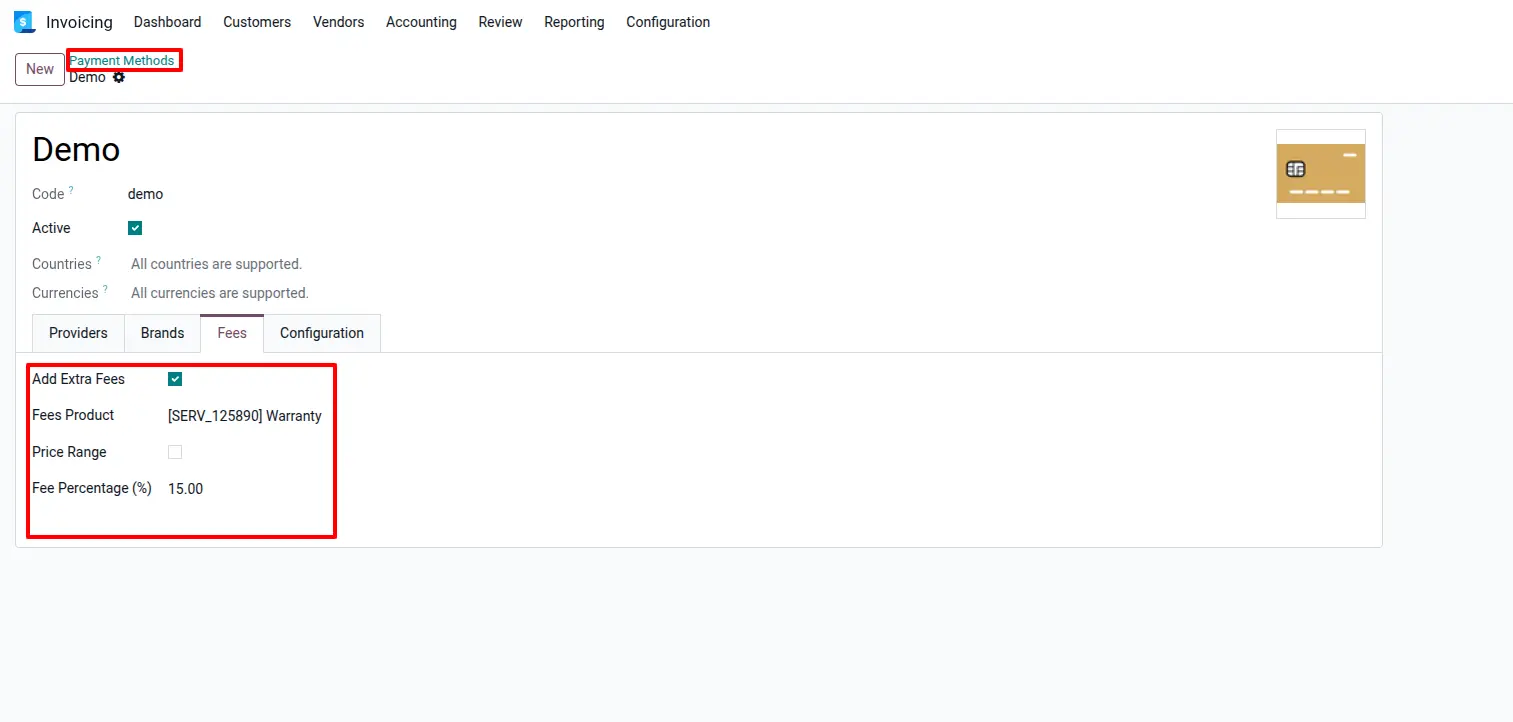
Configure Fixed Percentage Fee
Navigate to Invoicing → Configuration → Payment Methods. Open a payment method, enable Add Extra Fees, select the fee product and define a fixed percentage fee that will be applied when customers choose this payment method.
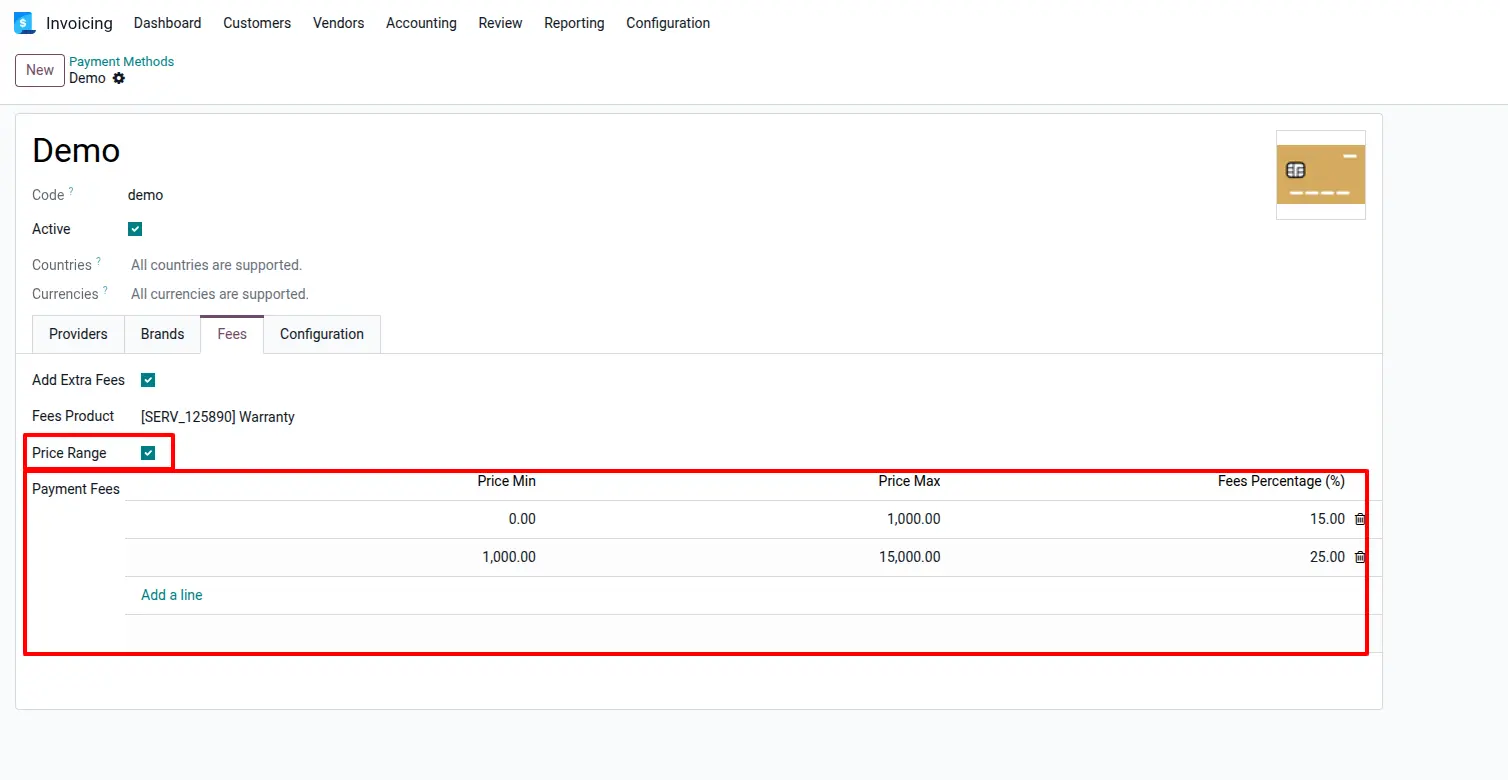
Configure Price Range Percentage Fee
Enable the Price Range option to create multiple fee percentages based on order value. Define minimum and maximum price ranges and assign different percentages for each range, allowing flexible fee calculations for small and large transactions.
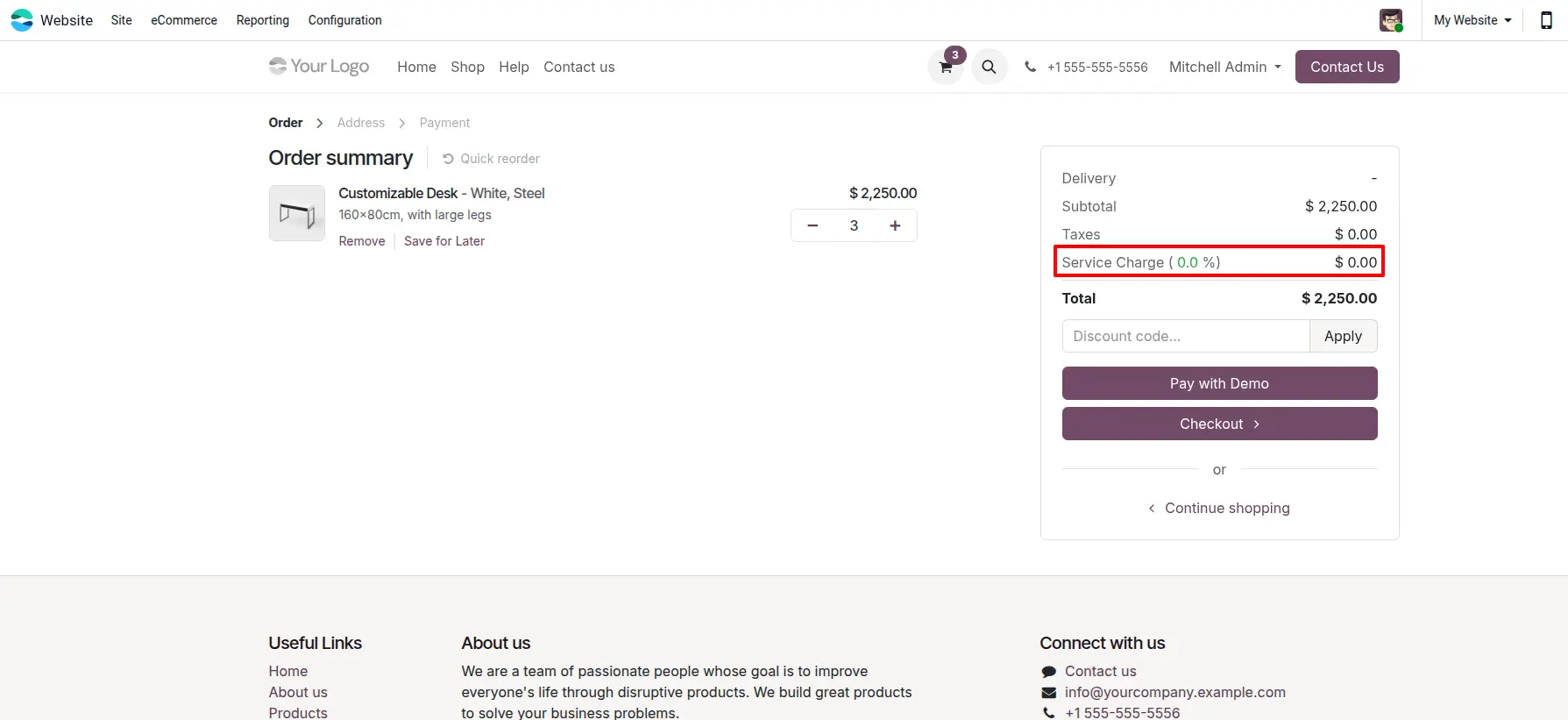
Review Fee During Checkout
Add products to the shopping cart and proceed to checkout. The order summary automatically displays the calculated Service Charge based on the selected payment provider configuration.
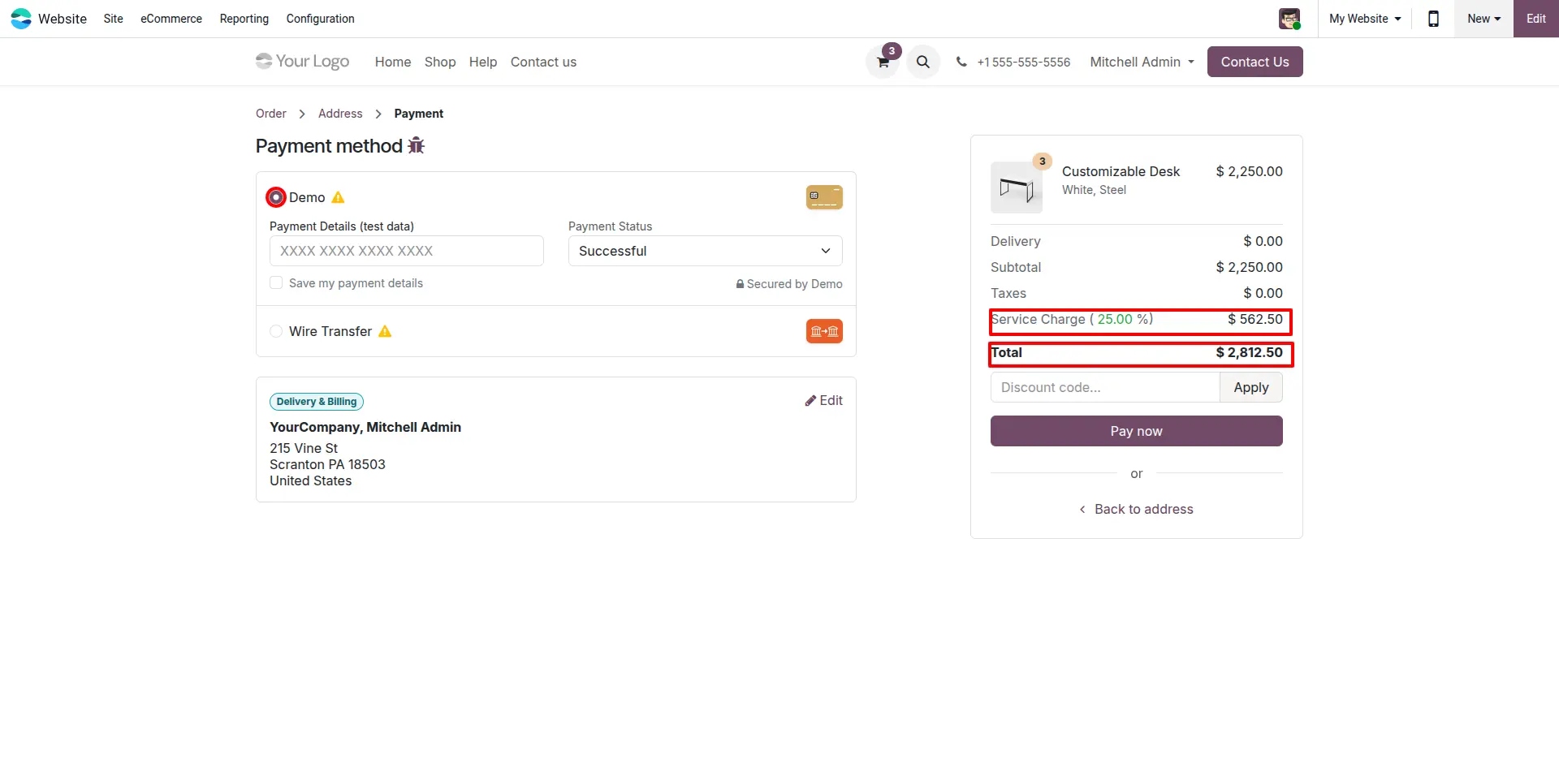
Select Payment Method
During payment selection, Odoo recalculates the service fee according to the chosen payment method. Customers can clearly view the fee amount before completing payment, ensuring complete transparency.
Verify Fee on Order Confirmation
After successful payment, the customer is redirected to the order confirmation page where the applied fee remains visible in the order summary together with the purchased products.
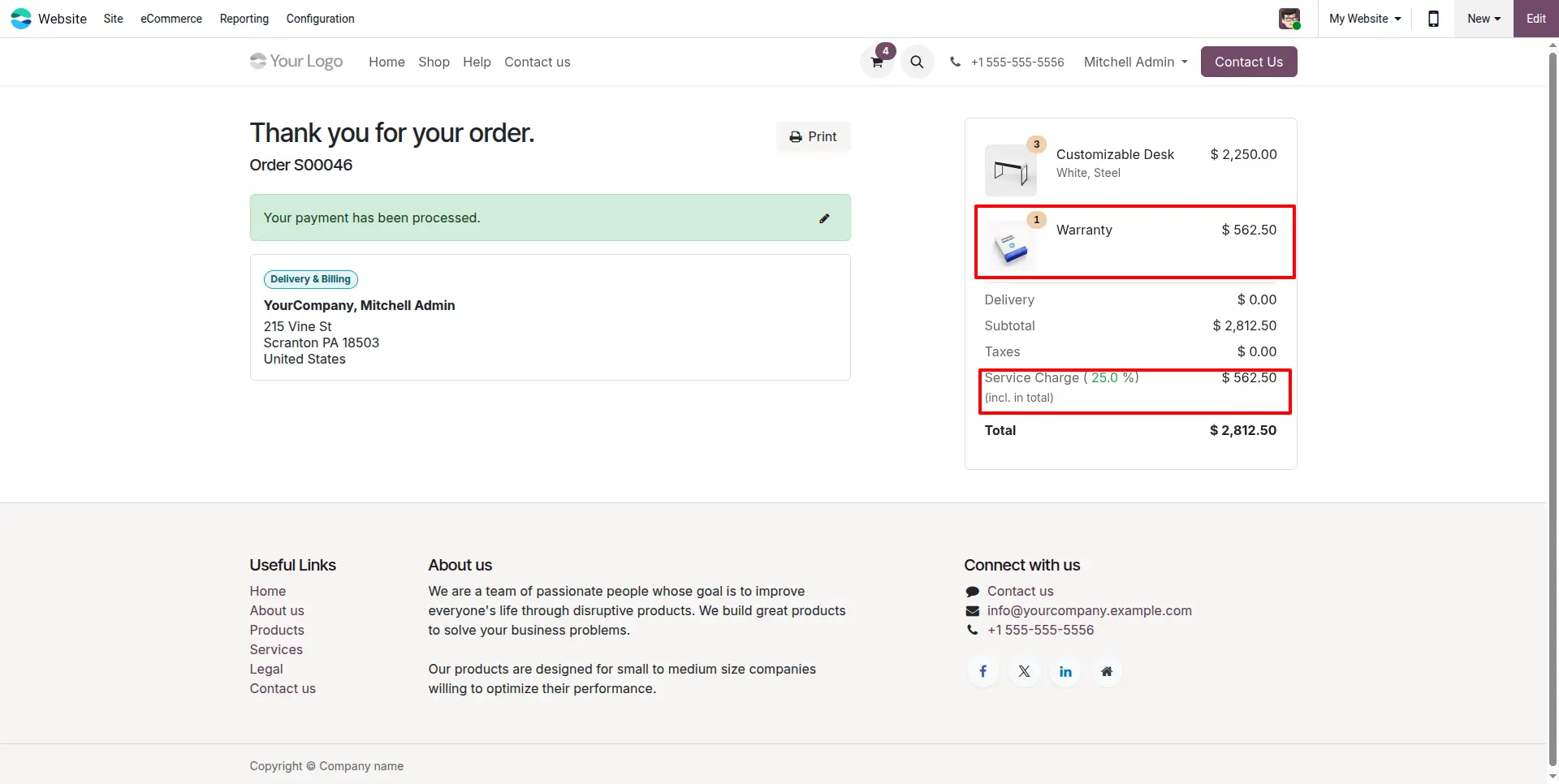
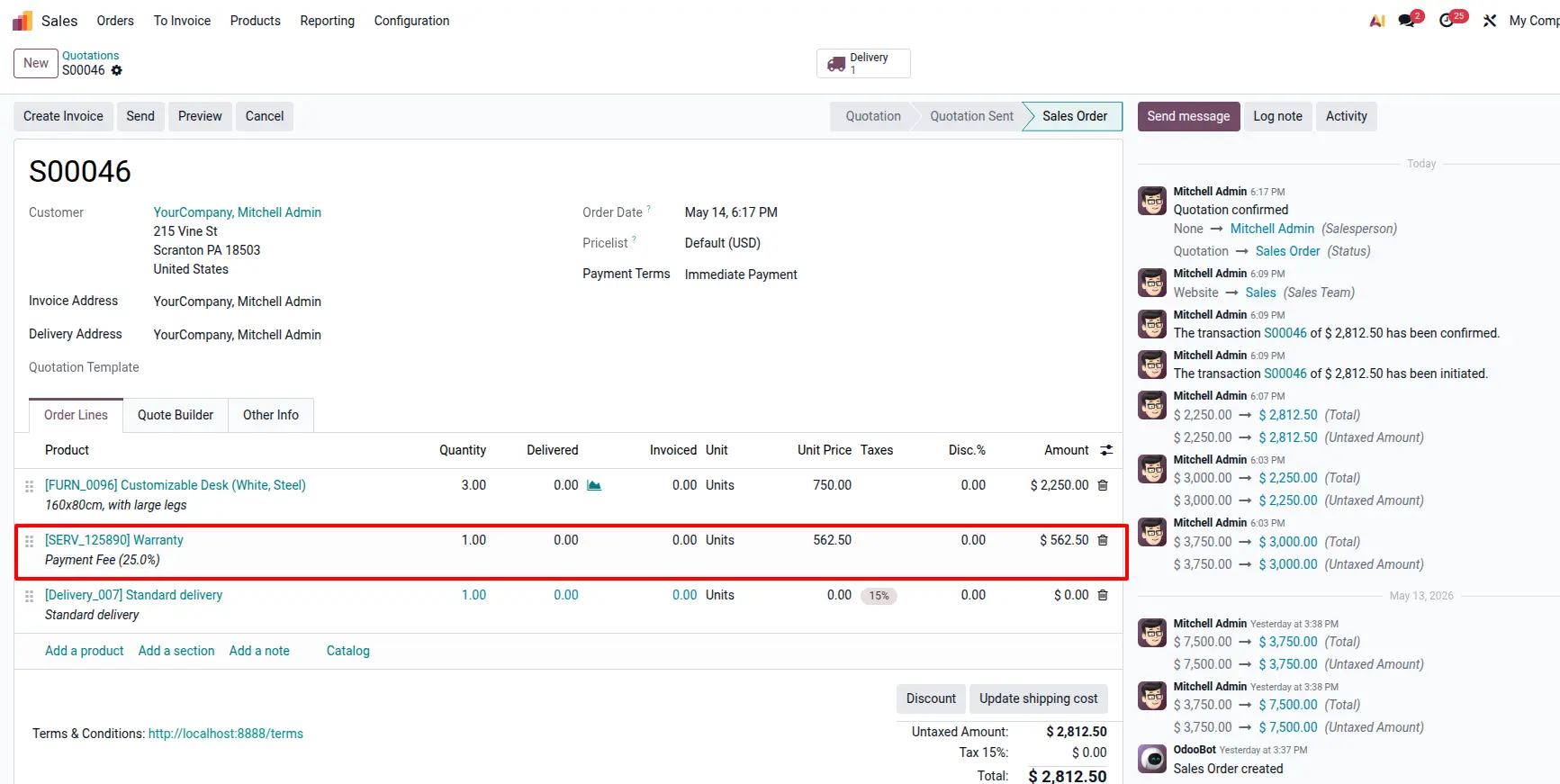
Verify Fee in Backend Sales Order
Open the generated Sales Order in the backend. The service fee is automatically added as a separate Sales Order line using the configured fee product, ensuring proper accounting and invoicing treatment within Odoo.
Frequently Asked Questions
Technical Details
Dependencies
• Invoicing (account)
• eCommerce (website_sale)
• Discuss (mail)
• Website (website)
License
OPL-1
Need Assistance?
Email Support
contact@gritxi-tech.comAny Questions?
Have questions about this app?
Fill out the form below and our team will get back to you with more information.
Customer Reviews
Share your experience with this module.
Write a Review
Latest Reviews
No reviews yet. Be the first to share your thoughts!