
Purchase Multi Discount
Add multiple discount fields with automatic discount calculation on Purchase and Vendor Bills
Purchase Multi Discount
Apply multiple discounts on purchase orders in a clean and controlled way. Configure multi level discounts on each line, let Odoo automatically calculate the final cost, and keep vendor negotiations fully traceable.
App Overview

Introduction
The Multi Discount on Purchase & Invoice app helps businesses apply cascading, multiple or successive discounts directly on Purchase Orders and Vendor Bill in Odoo.
Using this module, internal users can apply multiple percentage-based discounts on individual purchase order lines and bill lines for products. The application automatically calculates discounted prices, taxes, untaxed amounts and total amounts without requiring manual adjustments. It also automatically carries over discounts from Purchase Orders to Vendor Bill, ensuring consistency throughout the Purchase process.
The app ensures that all discount details are accurately reflected in printed reports and documents, providing better pricing transparency and improving overall business workflow management.
This module is especially useful for companies that use layered discount strategies such as seasonal discounts, partner discounts, promotional offers, reseller pricing or customer specific pricing policies.

Purpose
Managing complex supplier agreements often involves base discounts plus performance or seasonal bonuses. This module’s purpose is to provide pricing transparency and error-free calculation for tiered discounts. By ensuring that negotiated terms are accurately reflected in reports and accounting, it helps businesses maintain perfect landing costs and financial consistency.
Targeted Businesses

Retail & Distribution
Capture complex negotiated deals involving base discounts plus additional performance bonuses accurately.

Manufacturing
Handle tiered volume discounts on raw materials to ensure accurate product landed costs in accounting.

Wholesale Groups
Easily manage trade discounts that apply differently across various product categories from the same supplier.
Business Use Cases
Tiered Volume & Promo Strategy: A supplier ofrece a 15% wholesale discount and an additional 5% seasonal promotional discount.
- 1 Agent enters 15% in Disc 1 and 5% in Disc 2.
- 2 System applies 15% to $1,000 baseline ($850).
- 3 System applies 5% to the $850 balance ($807.50 final).
Automated Net Price Calculation
Key Features

Chaining Discounts
Apply multiple discounts sequentially. The system applies the next percentage to the remaining balance automatically.

Auto Calculation
Instantly calculates net price, taxes and totals based on sequential entries, eliminating manual math errors.
Document Clarity
Displays multi-discount breakdown on PO and Bill Reports ONLY when values are present for professional clarity.
Configuration & Workflow
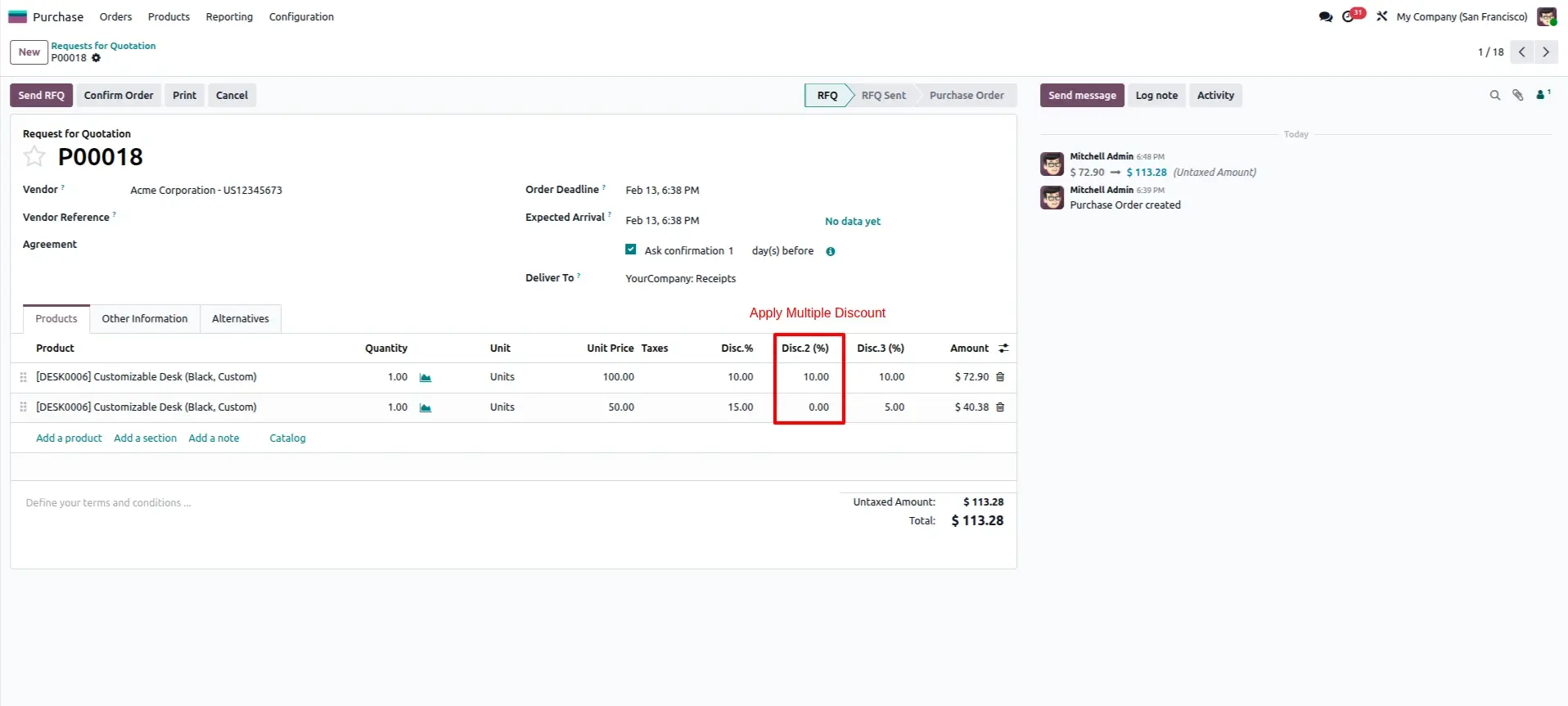
Apply Multiple Discounts Per Line
Each purchase order line now includes three Discount Percentage columns. You can apply independent rates for trade discounts, rebates, or volume bonuses directly on the RFQ line.
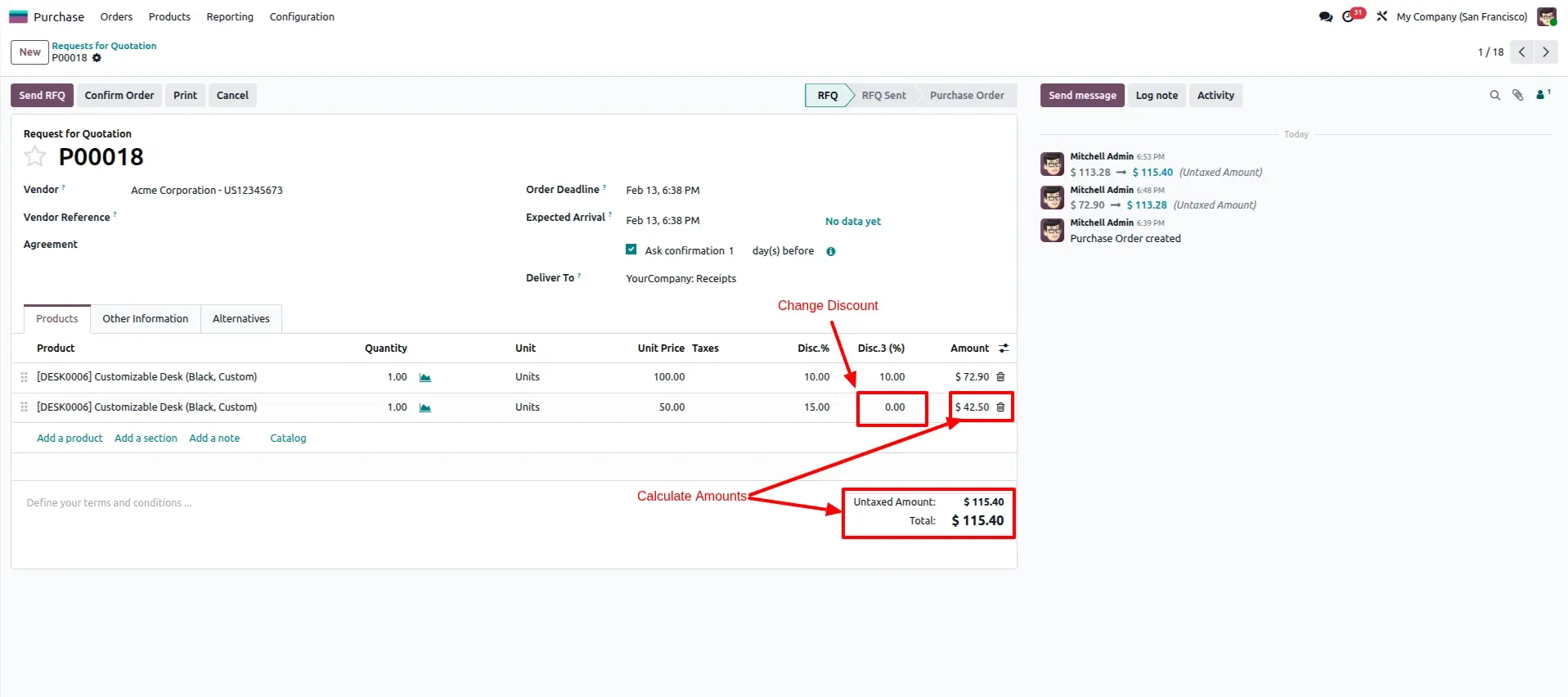
Auto Calculate All Prices
Changing any discount value triggers an instant recalculation of the line subtotal, untaxed amounts, and final totals. Every pricing change is logged in the Chatter for a complete audit trail.
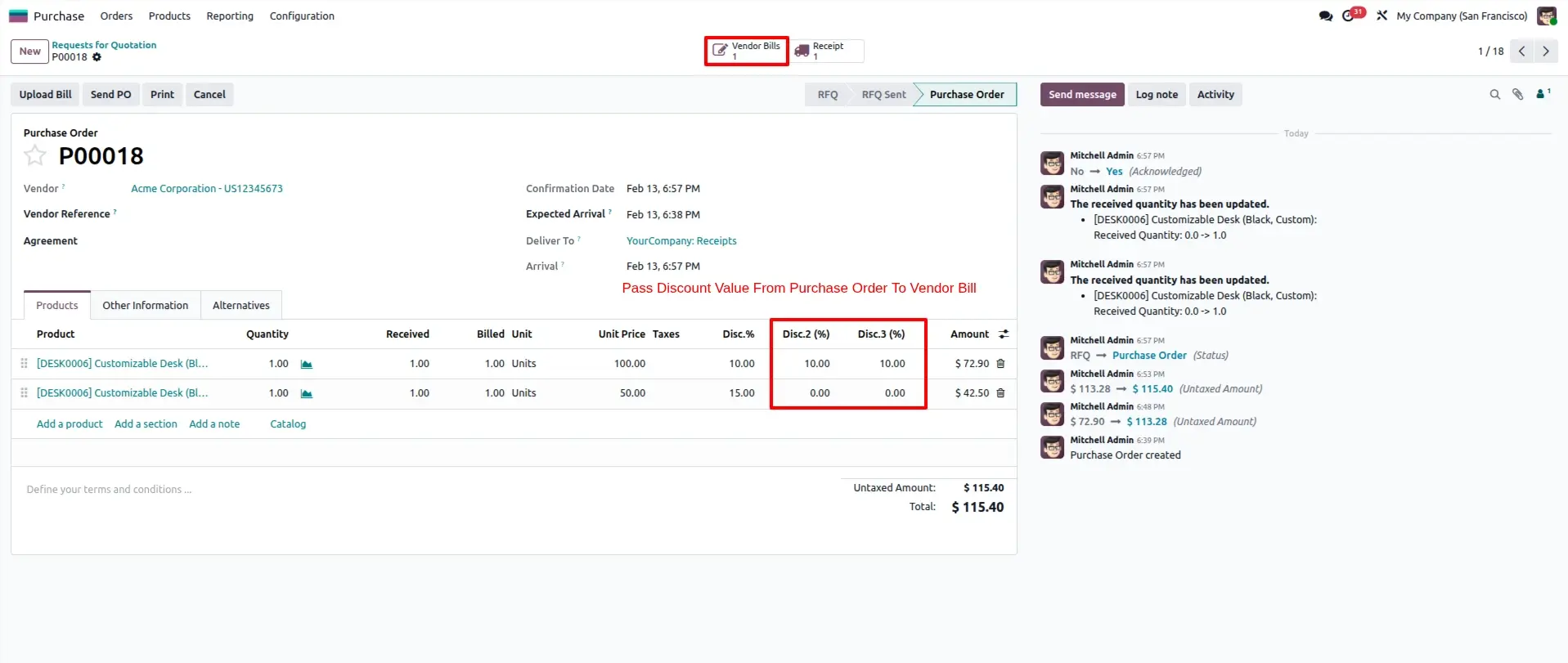
Seamless Pass to Bill
Eliminate data entry errors. Once the Purchase Order is confirmed and billed, all three discount values are automatically carried over to the linked Vendor Bill lines.
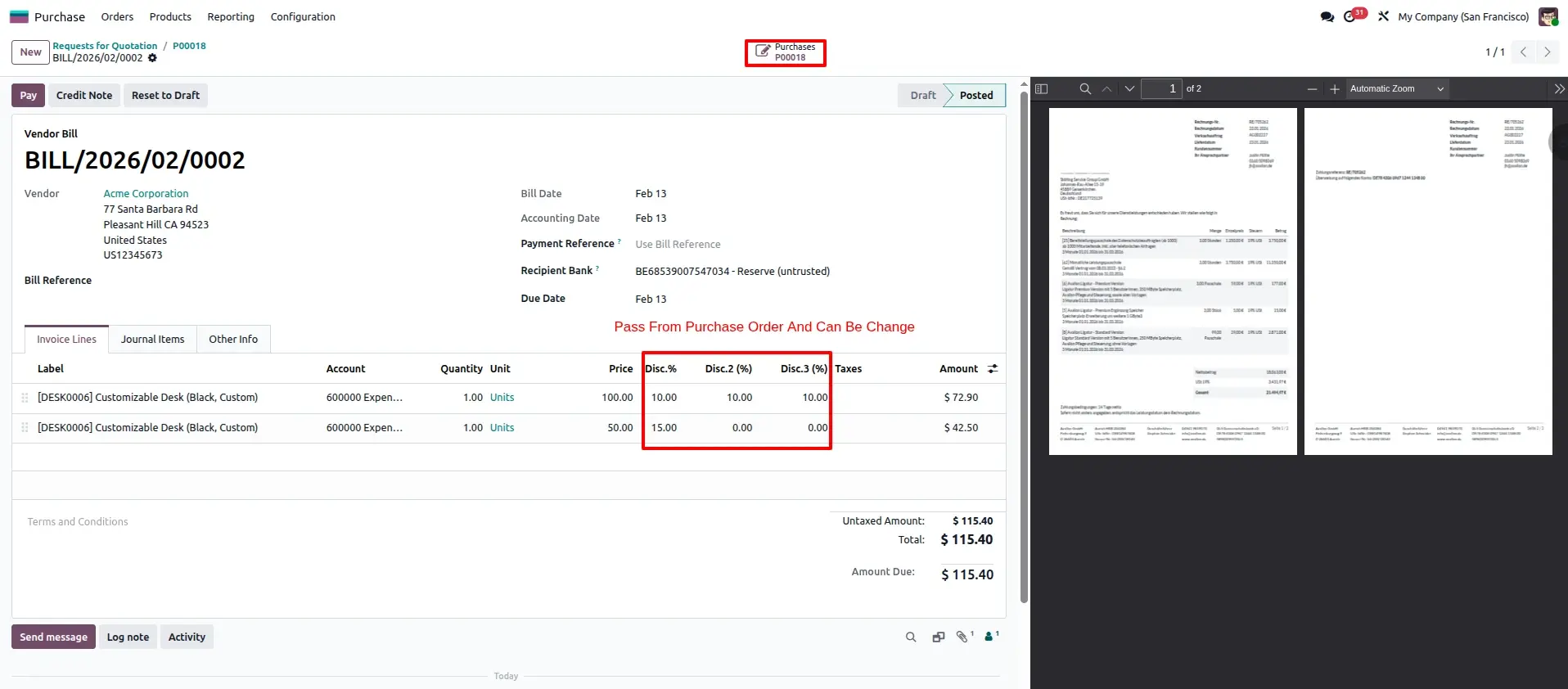
Vendor Bill Management
Discounts passed from the PO remain fully editable. If the vendor applies a last-minute price correction on the invoice, adjustments can be made directly and totals will re-sync immediately.
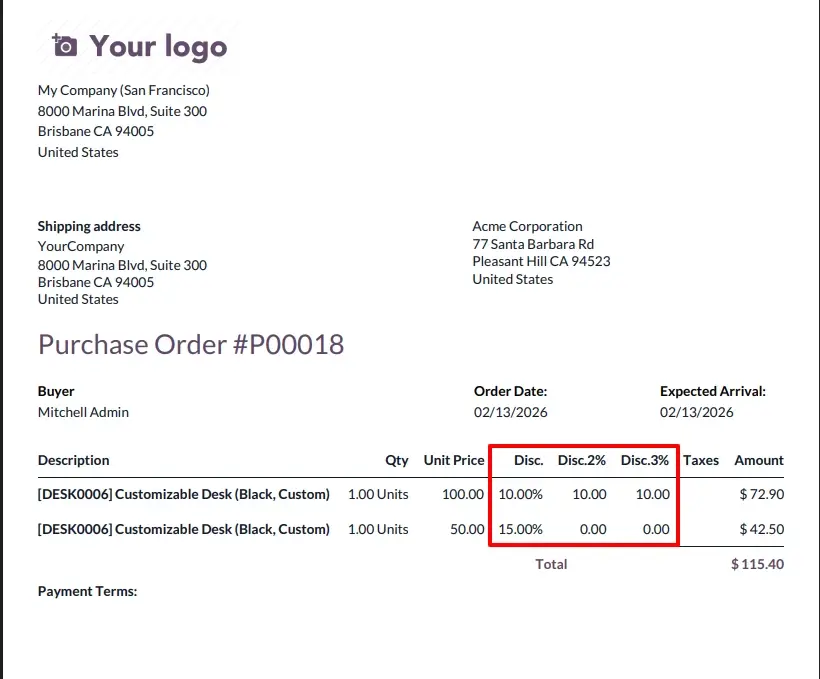
Purchase Order Reports
The printed PO report provides a transparent view for your suppliers, displaying the breakdown of all three discount tiers for every line item to ensure communication clarity.
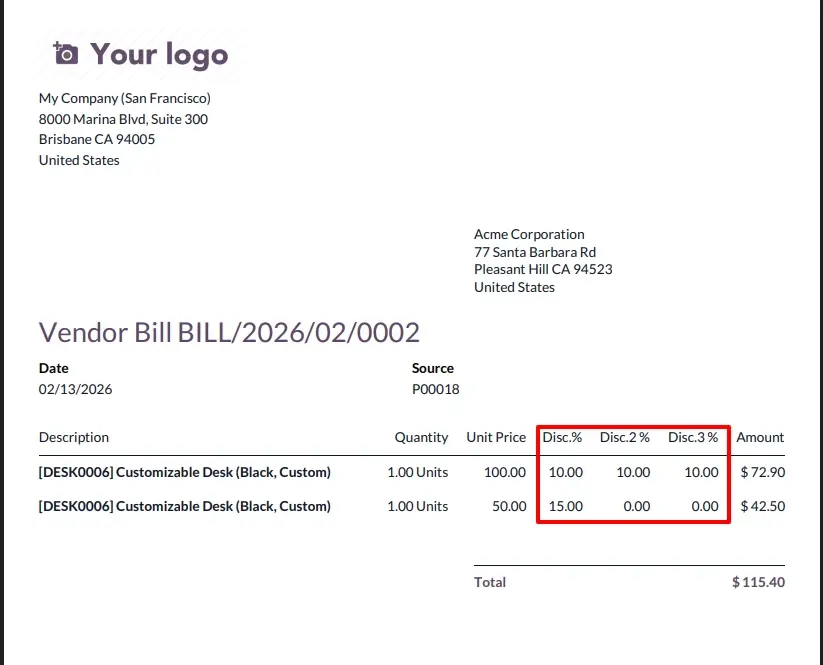
Vendor Bill Reports
The final Vendor Bill PDF mirrors the PO discount structure, allowing your accounting team to verify the final billed amount against the original negotiated terms easily.
Frequently Asked Questions
Technical Details
Dependencies
• Invoicing (account)
• Purchase (purchase)
• Discuss (mail)
License
OPL-1
Need Assistance?
Email Support
contact@gritxi-tech.comAny Questions?
Have questions about this app?
Fill out the form below and our team will get back to you with more information.
Customer Reviews
Share your experience with this module.
Write a Review
Latest Reviews
No reviews yet. Be the first to share your thoughts!