
Multi Company Default Template
Company Wise Default Email Template For Invoice/SO/PO
Multi Company Default Template
Streamline company-specific email communication with automated template selection for Sales, Purchase, and Invoicing.

Introduction
The Multi Company Default Email Template app enhances Odoo email workflows by automatically applying company-specific default email templates for Sales, Purchase, and Invoice operations.
Using this module, administrators can configure default email templates for Sales Quotations, Sales Orders, Purchase Orders, RFQs, and Customer Invoices directly from Odoo Settings. When users click the standard Send by Email/Send button, the system automatically loads the appropriate template inside the Email Send Wizard based on the active company and document type.
The app also supports workflow-based template switching, such as automatically using separate templates for Sales Quotations and confirmed Sales Orders.
This module helps businesses improve email automation, maintain company-wise branding consistency, reduce manual template selection, and streamline communication across multi-company environments.

Purpose
The purpose of the Multi Company Default Email Template app is to simplify and automate email template management in multi-company Odoo environments for Sales, Purchase, and Invoice workflows.
The app helps businesses automatically apply the correct company-specific default email templates when sending quotations, sales orders, purchase orders, RFQs, and invoices through the standard Send by Email functionality. It reduces manual template selection, minimizes communication errors, maintains branding consistency across companies, and improves overall operational efficiency.
This module is especially beneficial for organizations managing multiple companies, subsidiaries, or branches that require separate email communication formats and automated workflow-based email handling.
Key Features

Company-Wise Templates
Set default email templates company-wise for each branch independently.

Sales Quotations & Orders
Dedicated support for both Quotations and Order confirmation emails.

Purchase RFQ & Orders
Configure templates for RFQs and Purchase Orders with ease.

Customer Invoices
Automatically apply professional templates for all customer invoices.

Active Company Selection
The selection is automatically handled based on your active company context.

Standard Wizard Integration
Templates load directly inside the standard 'Send by Email' wizard.

Multi-Company Support
Optimized for complex management across subsidiaries and branches.

Workflow Automation
Full workflow-based template selection and communication automation.

Branding Consistency
Maintain professional and consistent branding across all business units.

Reduced Manual Effort
Save time by eliminating the need to manually choose templates.

Easy Configuration
Quickly manage all mapping settings inside Odoo General Settings.

Customizable Templates
Fully adaptable to your unique business communication requirements.
Configuration Steps
General Setup
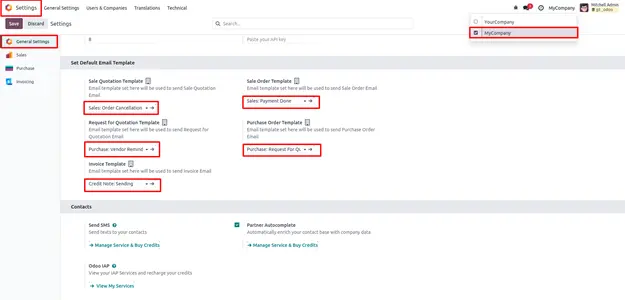
Go to Settings → General Settings. Within the Multi-Company section, define your preferred default templates for each module.
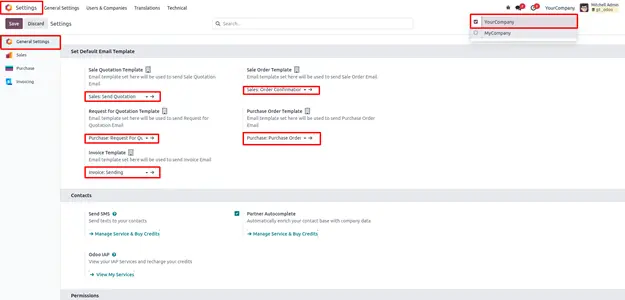
Configuration Detail
Precisely map the templates for Sales, Purchase, and Invoicing across all active companies to ensure consistent branding.
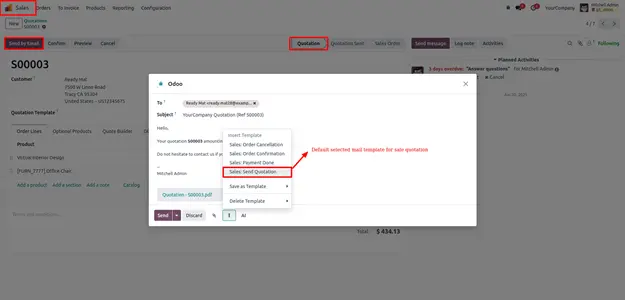
Sales Quotation
When you click 'Send by Email' on a quotation, the system automatically loads the Sales: Send Quotation template.
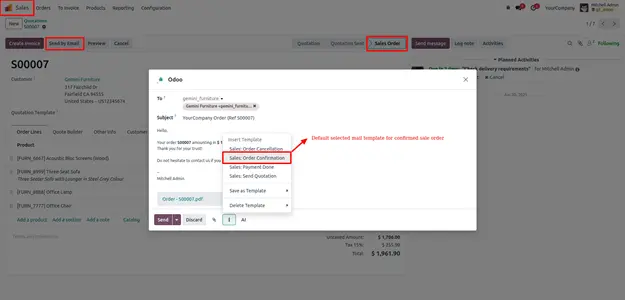
Sales Order
Upon confirmation of an order, the Sales: Order Confirmation template is pre-selected for your customer communication.
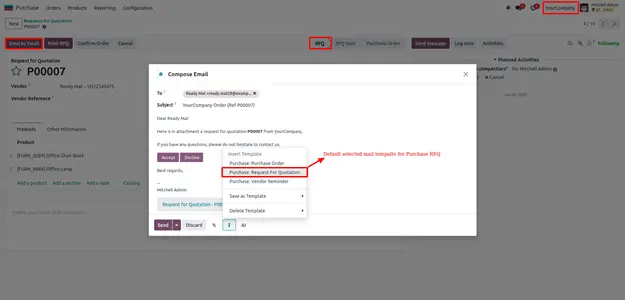
Request for Quotation
For supply requests, the Purchase: Request For Quotation template is automatically applied within the procurement wizard.
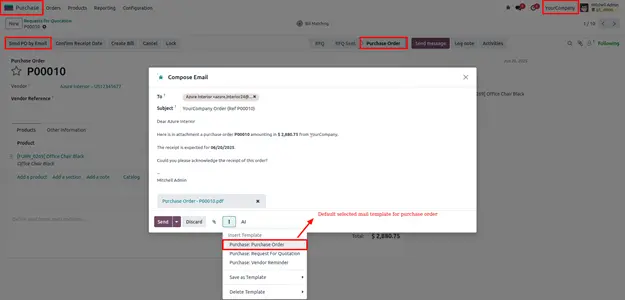
Purchase Order
Once a PO is confirmed, the specific Purchase: Purchase Order template is loaded to ensure vendor clarity.
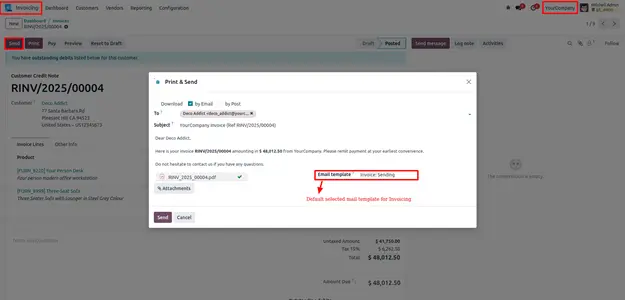
Customer Invoice
Finally, all invoices automatically pre-load the company’s preferred Invoice: Sending template for professional billing.
Frequently Asked
Technical Details
Dependencies
• Discuss (mail)
• Purchase (purchase)
• Invoicing (account)
• Sales (sale_management)
License
OPL-1
Need Assistance?
Email Support
contact@gritxi-tech.comAny Questions?
Have questions about this app?
Fill out the form below and our team will get back to you with more information.
Customer Reviews
Share your experience with this module.
Write a Review
Latest Reviews
No reviews yet. Be the first to share your thoughts!