
Job Positions on Multiple Websites
Publish Job Openings Across Multiple Websites from a Single Odoo Recruitment Dashboard.
Job Positions on Multiple Websites
Eliminate Duplicate Job Records and Manage Recruitment Across Multiple Websites from a Single Source of Truth.
App Overview

Introduction
By default, Odoo limits job positions to a single website. This module removes that restriction, allowing modern organizations to manage recruitment across multi-brand career portals, regional websites, and franchise platforms from one unified record. All candidate applications are collected into a single Recruitment pipeline, regardless of the website they originated from.

Purpose
The purpose of this module is to simplify and centralize recruitment management
in Odoo Multi Website environments by allowing a single job position to be
published across multiple websites simultaneously.
Instead of creating and maintaining separate job records for different brands,
regions, franchises, or client portals, HR teams can manage all recruitment
activities from one unified job position while controlling exactly where each
vacancy is displayed.
By consolidating candidate applications into a single recruitment pipeline,
the module improves hiring efficiency, reduces administrative effort, ensures
consistent job postings across websites, and provides complete visibility into
recruitment operations from one centralized Odoo dashboard.
Targeted Business Type
Enterprise Companies
Publish job openings across multiple corporate websites from a single Odoo backend.
Franchise Businesses
Share specific vacancies on regional franchise portals to simplify branch-level hiring.
Recruitment Agencies
Manage jobs across several client recruitment websites while centralizing candidate data.
Multi-Brand Organizations
Maintain centralized hiring for different brands without maintaining separate job records.
International Businesses
Publish region-specific vacancies to country-specific websites for localized recruitment.
HR Service Providers
Simplify recruitment website management for multiple clients from one unified dashboard.
Business Use Cases
Global Brand Recruitment
Context: A corporation with separate websites for its "Luxury" and "Consumer" brands wants to hire a common "Sales Manager" without maintaining separate records.
2. Selects both "Luxury.com" and "Consumer.com" in the Websites field.
3. The job appears automatically on both brand career pages.
4. Applications flow into one unified Kanban pipeline.
Regional Hiring Management
Context: An international company operates separate recruitment websites for USA, Europe, and Asia and needs region-specific job visibility.
2. They select only the Europe Careers and Asia Careers websites.
3. Vacancy stays hidden from the USA site but visible in target regions.
4. Regional applications are managed under one centralized workflow.
Franchise Recruitment Workflow
Context: A franchise business with branch websites wants to advertise a “Store Manager” opening only on selected franchise portals.
2. They select websites for Ahmedabad, Mumbai, and Delhi branches.
3. The vacancy appears only on those specific franchise websites.
4. Branch applications are handled from one centralized dashboard.
Recruitment Agency Multi Client
Context: An agency manages hiring for several clients, where each client requires the same job role to be published on their own website.
2. Selects multiple client recruitment websites simultaneously.
3. The same job is published across all selected client portals.
4. Applications from every site collect into a single pipeline.
Enterprise Bulk Operations
Context: A large enterprise needs to update dozens of job openings across multiple company career websites quickly.
2. Selects multiple job positions at once.
3. Uses Action → "Assign Multiple Websites" to select target sites.
4. All selected jobs are updated across websites instantly.
Key Features
Multiple Website Assignment
Assign a single job position to multiple websites simultaneously from one recruitment form.
Centralized Job Management
Manage recruitment postings for all websites from a single Odoo job position record.
Settings Integration
Enable or disable multi-website functionality directly from Recruitment settings.
Multi-Website Selection
User-friendly Many2many website selection field with a modern tag-style interface.
Bulk Website Assignment
Assign websites to multiple job positions at once using efficient list-view actions.
Unified Workflow
All applications from different websites are collected into the same recruitment pipeline.
Multi Site Compatibility
Fully compatible with Odoo Multi-Website environment and native recruitment workflows.
Improved Recruitment Reach
Publish job openings across multiple company career portals instantly for maximum reach.
Configuration & Workflow
Enable and manage multi-website recruitment in 6 simple steps.
Recruitment Settings Configuration
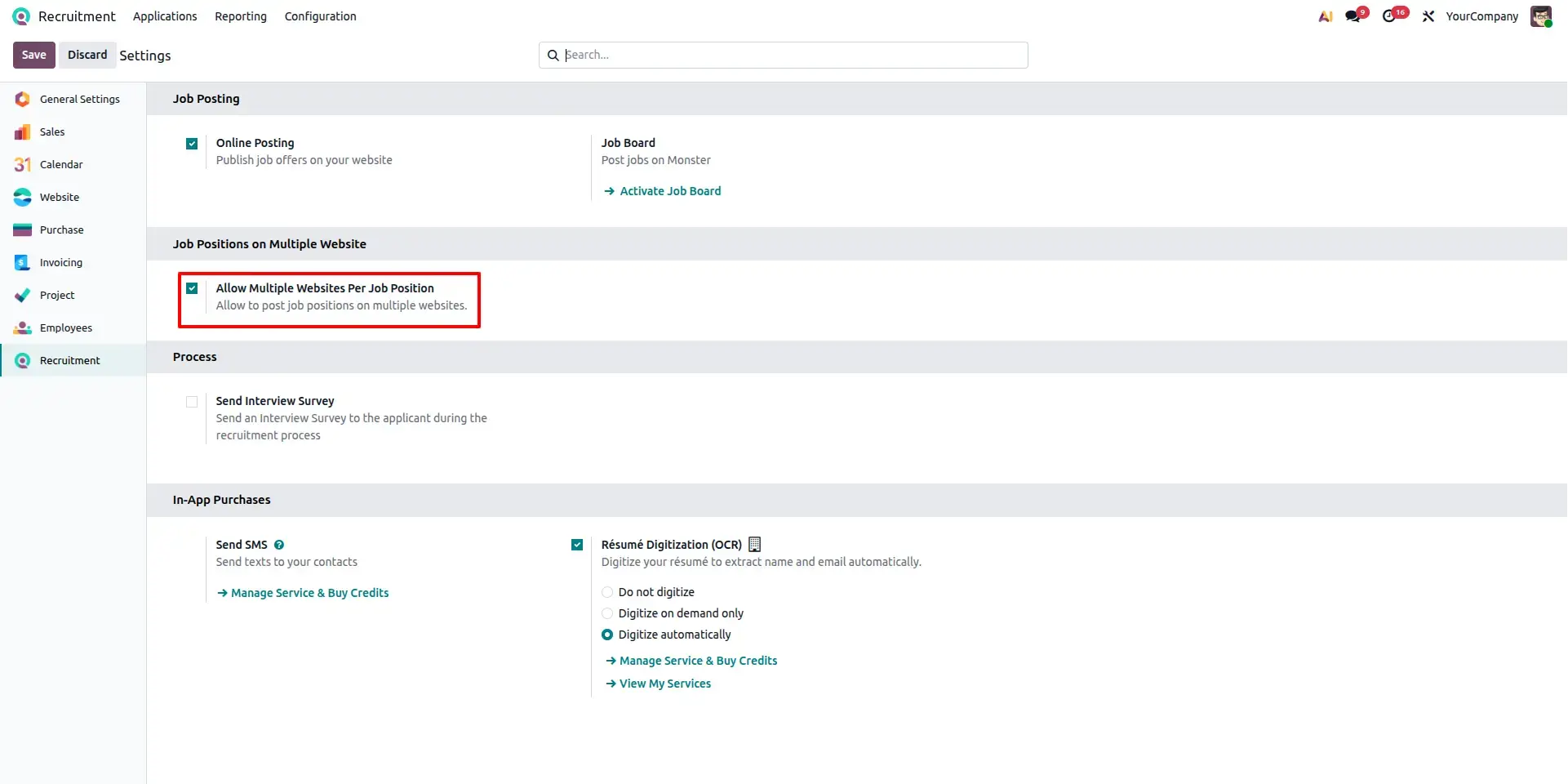
This screen shows the configuration option inside Recruitment settings used to enable multi website support for job positions. Once activated, recruiters can assign multiple websites to the same job opening directly from the recruitment workflow.
Job Position Form with Multiple Websites
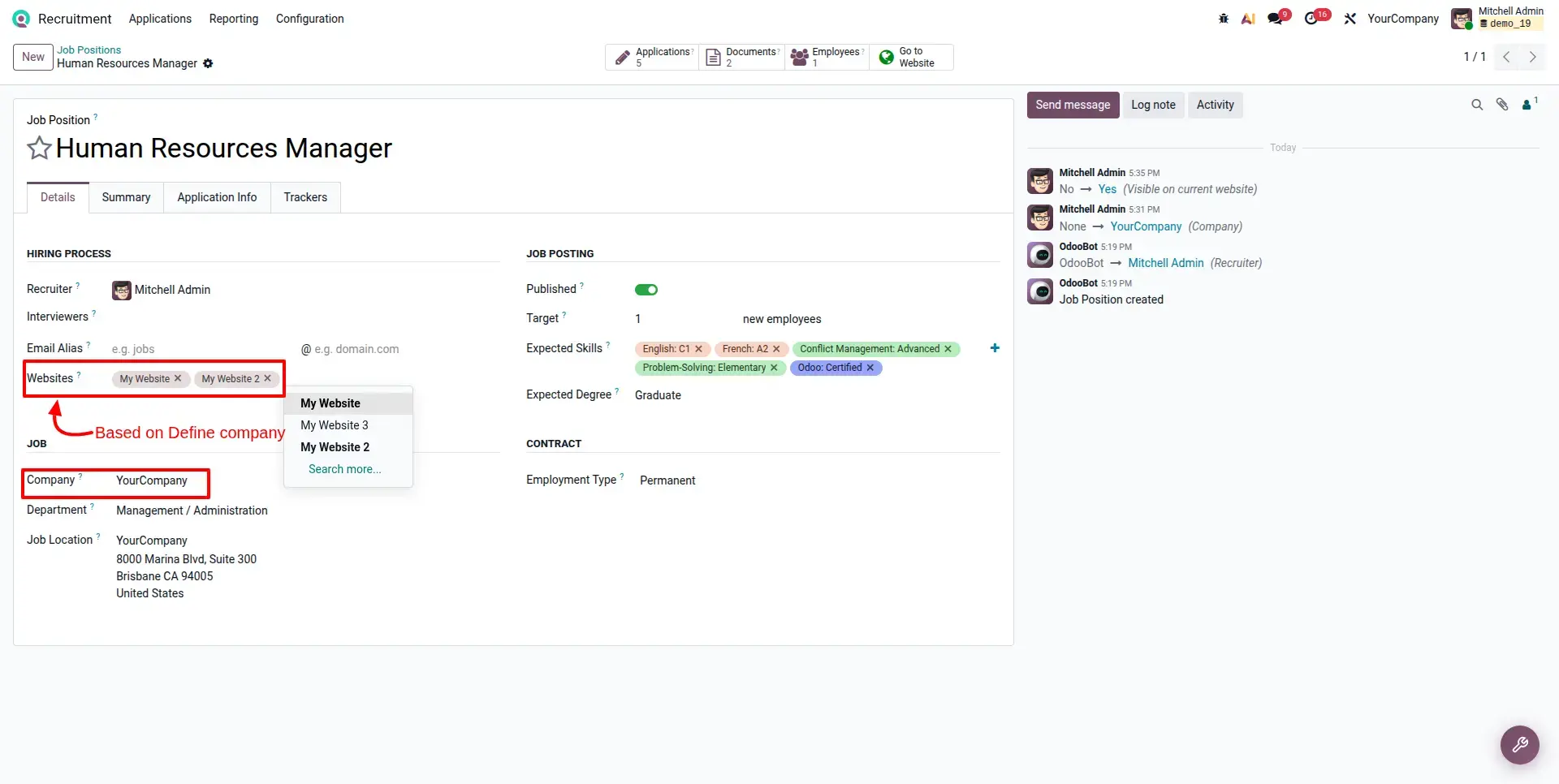
The Job Position form after enabling the feature. A new Websites field becomes available, allowing users to select and manage multiple recruitment websites from a single job record.
Job Position Published Across Multiple Websites
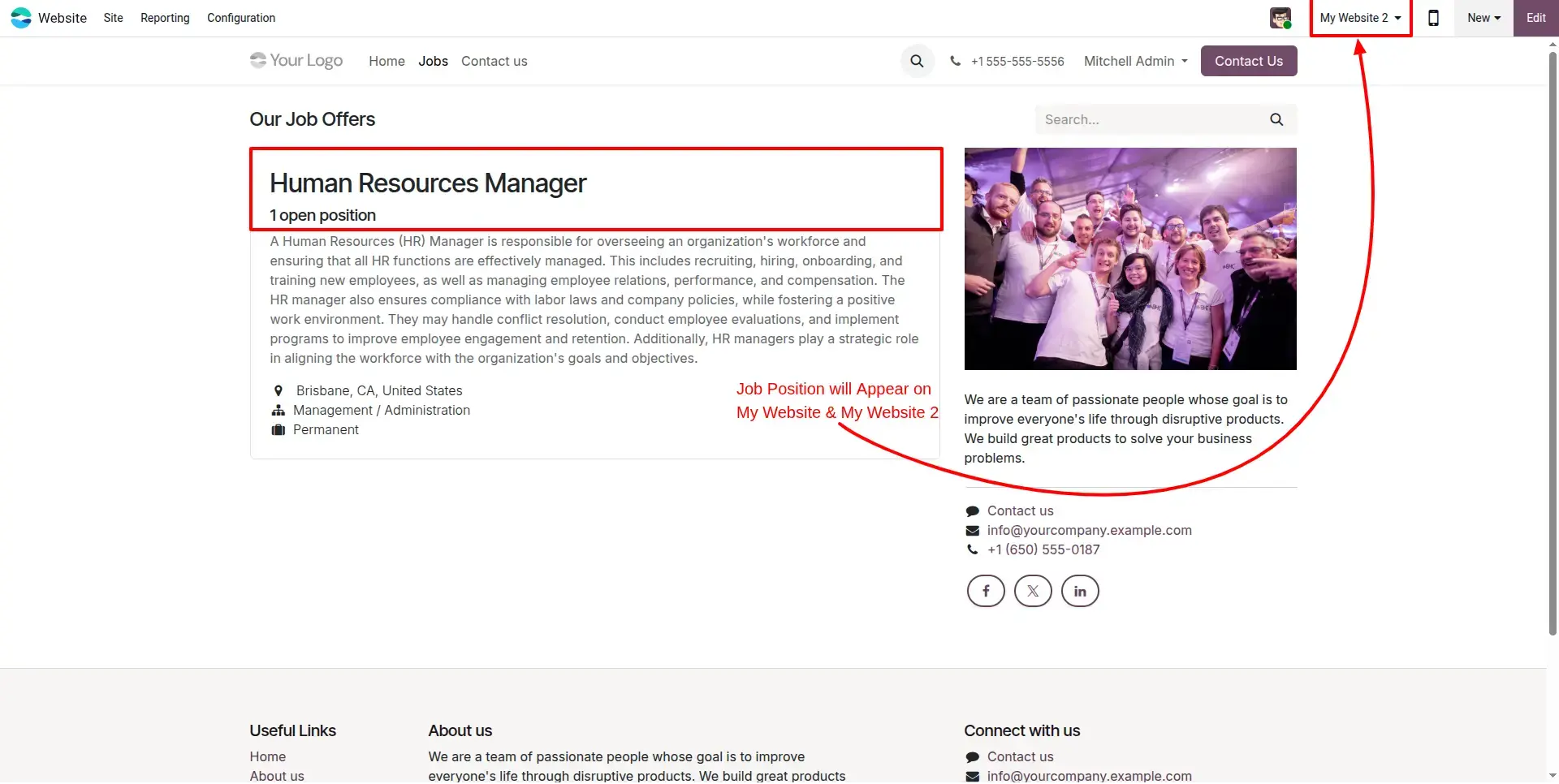
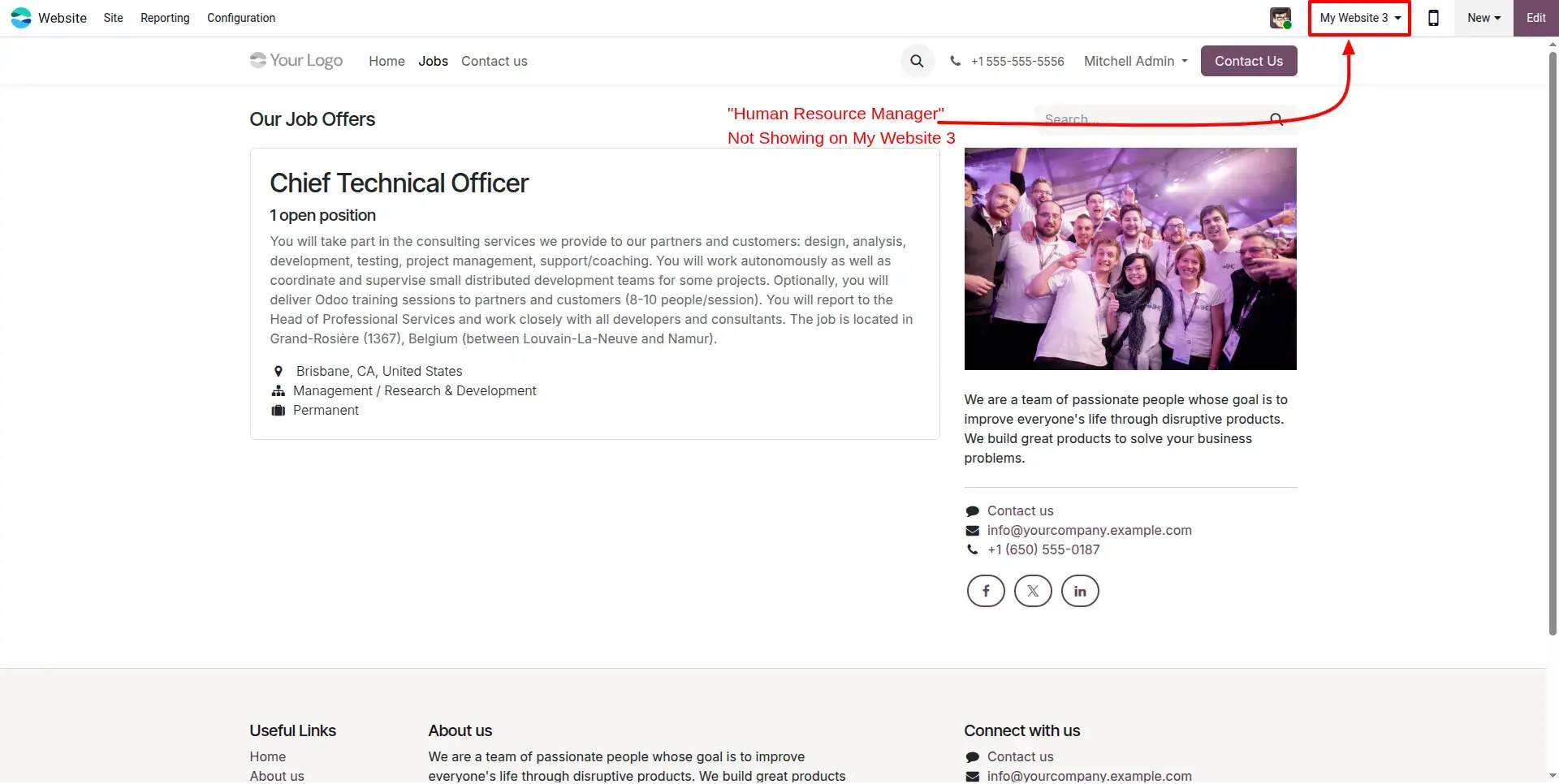
The module controls job position visibility across multiple recruitment websites. When a job position is assigned to selected websites, the vacancy is displayed only on those configured websites. Websites that are not selected will not display the job posting.
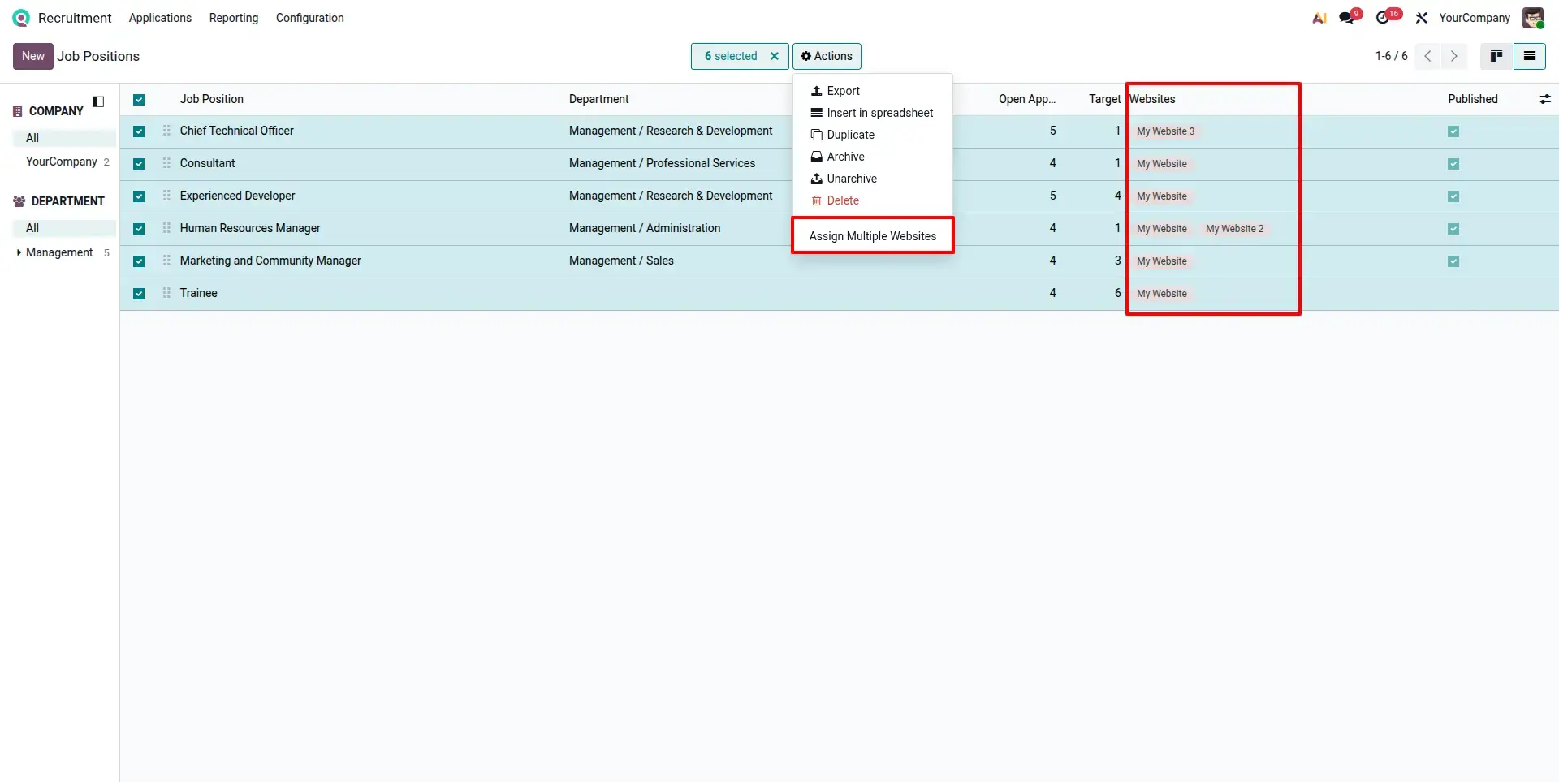
Bulk Website Assignment from List View
The Recruitment Job Positions list view where users can select multiple records and use the Action menu to assign websites in bulk, reducing repetitive manual updates.
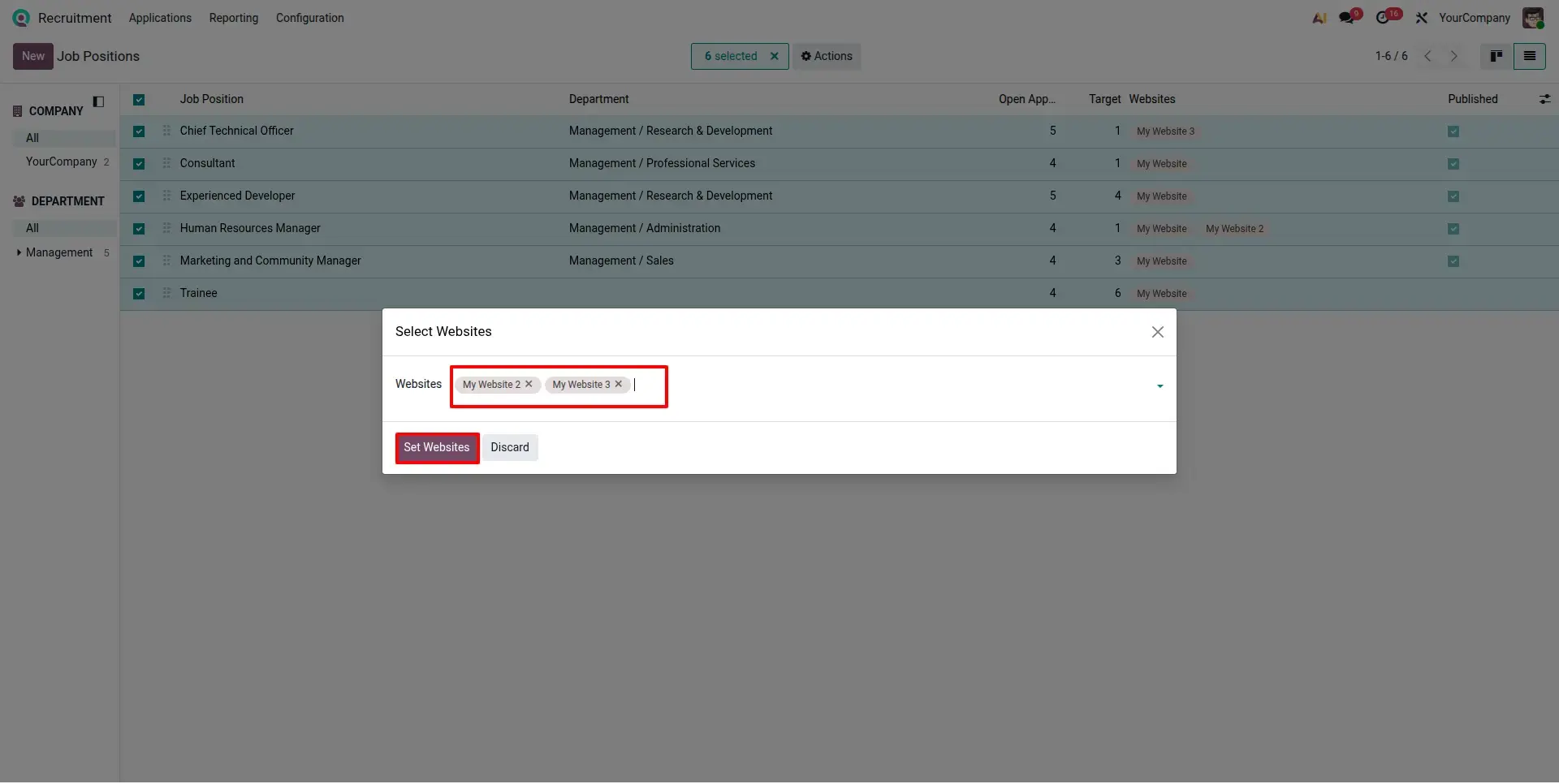
Assign Multiple Websites Wizard
The popup wizard used during bulk configuration. Users simply select the websites they want to assign and confirm the action to update all selected job positions instantly.
Updated Job Positions After Bulk Assignment
This screen shows job positions successfully configured with multiple website assignments, helping HR teams manage website visibility more efficiently from one centralized location.
Frequently Asked Questions
Technical Details
Dependencies
• Employees (hr)
• Online Jobs (website_hr_recruitment)
• Recruitment (hr_recruitment)
• Website (website)
• Discuss (mail)
• Calendar (calendar)
License
OPL-1
Need Assistance?
Email Support
contact@gritxi-tech.comAny Questions?
Have questions about this app?
Fill out the form below and our team will get back to you with more information.
Customer Reviews
Share your experience with this module.
Write a Review
Latest Reviews
No reviews yet. Be the first to share your thoughts!