
Hide Import
Manage Import access for specific users and modules to improve data security, governance, and control while preserving standard Odoo workflows and user permissions.
Hide Import
Restrict Import access for specific users and business modules in Odoo to improve data security, governance, and operational control. Easily hide the Import option without affecting existing workflows or user permissions.
App Overview

Introduction
The Hide Import module gives administrators complete control over
the visibility of the Import option inside Odoo. Instead of relying
on complicated access rights or custom development, administrators can simply
configure which users are allowed to see the Import feature across supported
business applications.
By restricting unauthorized bulk imports, organizations can protect business data,
maintain higher data quality, reduce accidental record creation, and ensure that
critical information enters the system only through approved workflows.
The module integrates seamlessly with Odoo's native security model and works
transparently without affecting existing business operations, menus, or user
permissions.

Purpose
The purpose of the Hide Import module is to strengthen data governance by allowing administrators to control who can perform bulk data imports within Odoo. It helps organizations reduce data inconsistencies, prevent unauthorized imports, enforce standardized business processes, and protect critical modules without requiring technical customization or modifications to Odoo's core functionality.
Business Use Cases

Manufacturing & Supply Chain
Prevent unauthorized Purchase Order imports that may introduce duplicate procurement records, incorrect supplier information, or inventory inconsistencies, ensuring accurate procurement and production planning.

Financial Services & Accounting
Protect accounting records by restricting Invoice imports, reducing the risk of duplicate entries, incorrect financial data, and compliance issues while preserving accurate audit trails.

Retail & Customer Management
Maintain a clean customer database by preventing uncontrolled Contact imports that may create duplicate records, inconsistent formatting, or inaccurate customer information.
Key Features
Granular Import Control
Control the visibility of the Import option independently for Contacts, Sales Orders, Purchase Orders, and Invoices, allowing precise user-level import management.
Centralized Configuration
Configure all Import restrictions directly from Odoo's standard user access settings without additional menus or technical customization.
Improved Data Security
Prevent unauthorized bulk imports and reduce the risk of duplicate, incorrect, or inconsistent business records across critical modules.
User Specific Restrictions
Apply Import visibility rules individually for each user, providing flexible access management based on organizational responsibilities.
Seamless Workflow Integration
Hides only the Import functionality while preserving all existing Odoo workflows, permissions, search tools, filters, exports, and daily operations.
Multi Version Compatibility
Fully compatible with Odoo 16, 17, 18, and 19 across Community, Enterprise, Odoo.sh, Online, and On-Premise deployments.
Better Data Governance
Enforce standardized business processes by ensuring that only authorized personnel can perform bulk data imports into sensitive business modules.
Native Odoo Integration
Built using Odoo's standard framework for reliable operation without modifying core modules or affecting future upgrades.
Lightweight Implementation
Delivers powerful Import access control with minimal performance impact, making it suitable for organizations of every size.
Configuration & Workflow
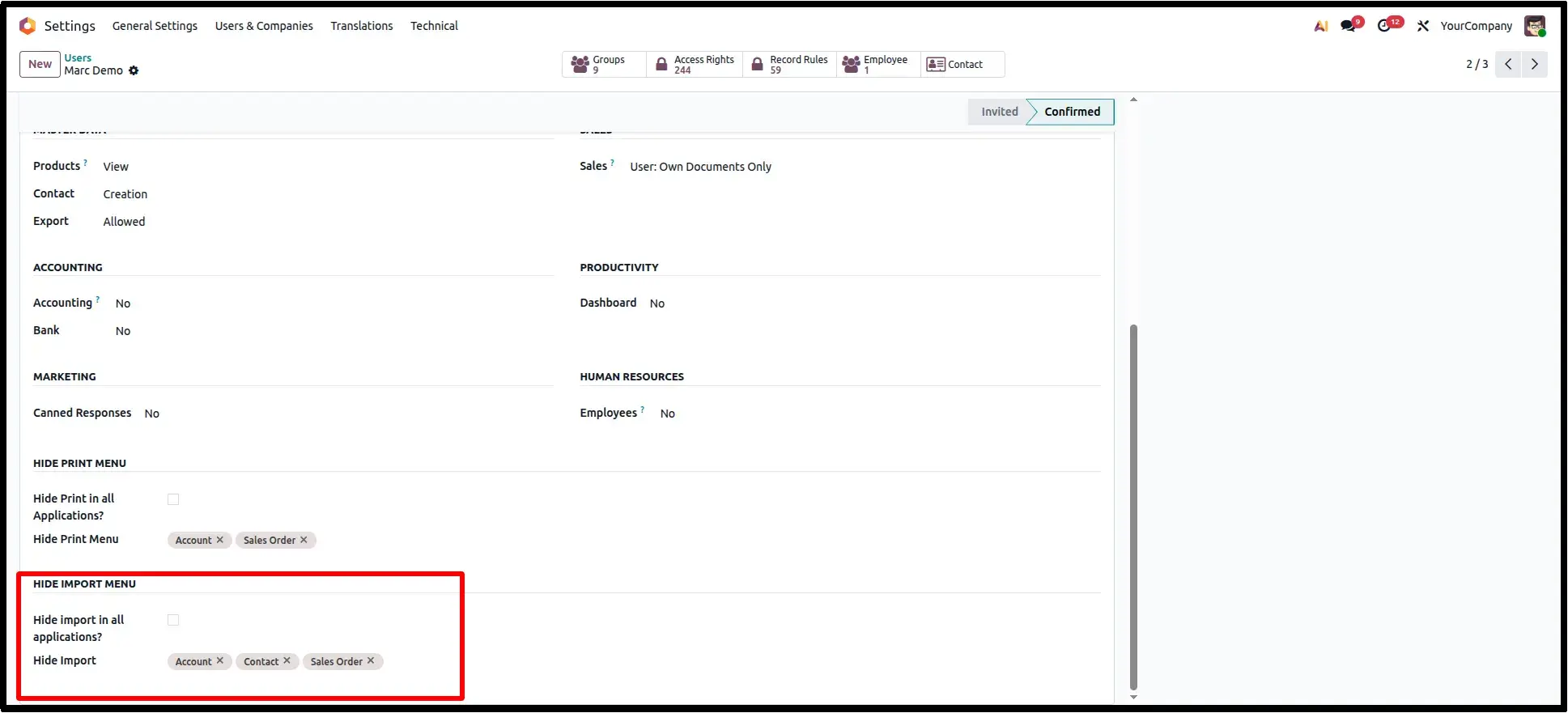
Hide Import Configuration on User Access
Open the desired user from Settings → Users & Companies → Users. Inside the dedicated Hide Import Menu section, administrators can configure whether the Import option should be hidden globally or only for selected business applications such as Contacts, Sales Orders, Purchase Orders, and Invoices. This centralized configuration allows organizations to control bulk import permissions on a per-user basis without modifying access rights or standard workflows.
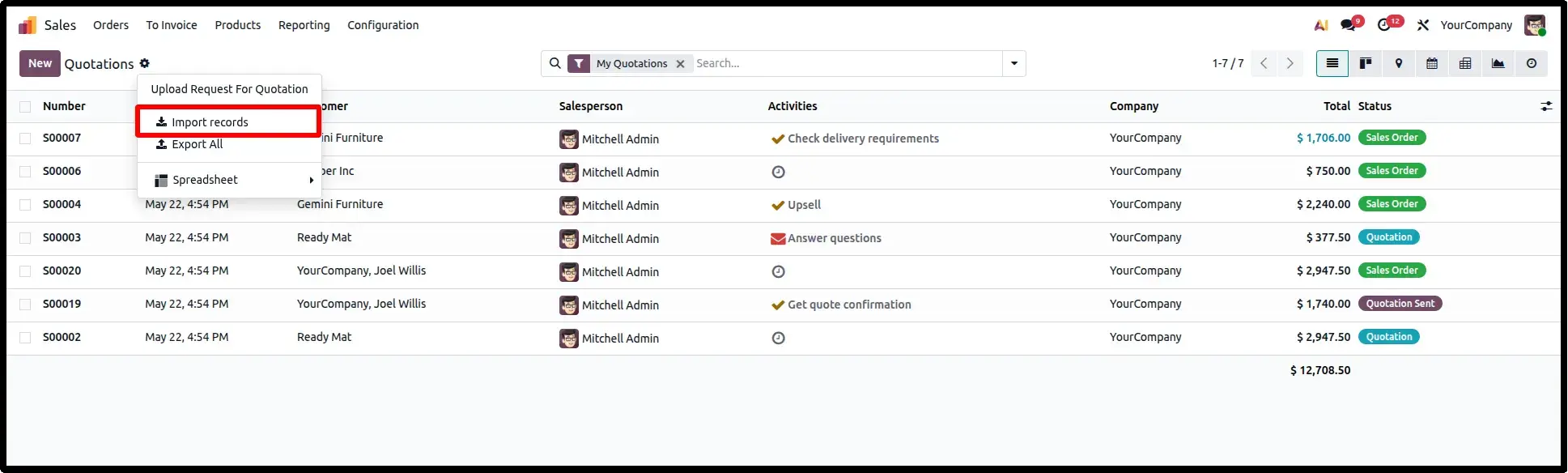
Default List View with Import Option
Before applying any restrictions, Odoo displays the Import Records option inside the Action menu of supported applications. Authorized users can import bulk data directly into the system using this standard Odoo functionality. This screen represents the default behavior before enabling Hide Import restrictions.
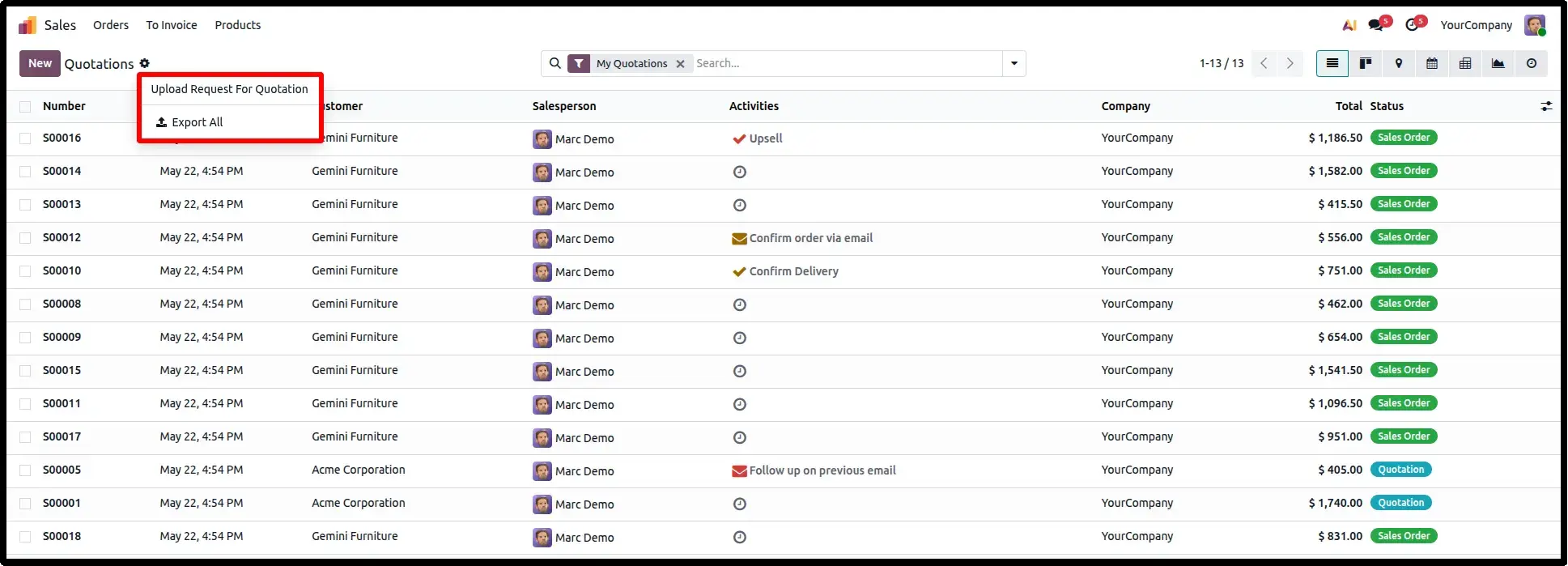
List View After Import Restriction Applied
Once the Hide Import configuration has been applied for the selected user, the Import Records option is automatically removed from the Action menu. All remaining functionality including Export, Filters, Search, Group By, Favorites, and list operations continues to work exactly as before. This ensures that only the Import feature is restricted while preserving the standard Odoo user experience and business workflows.
Frequently Asked Questions
Technical Details
Dependencies
• Base Import (base_import)
License
OPL-1
Need Assistance?
Email Support
contact@gritxi-tech.comAny Questions?
Have questions about this app?
Fill out the form below and our team will get back to you with more information.
Customer Reviews
Share your experience with this module.
Write a Review
Latest Reviews
No reviews yet. Be the first to share your thoughts!