Advance Helpdesk Quotation

Advance Helpdesk Quotation Based on Product Quantity Added on Sales Order

(0 reviews)
Helpdesk

$45.0

One-time payment
Community Enterprise

Advance Helpdesk Quotation

Generate Sales Quotations directly from Helpdesk tickets with Product Catalog integration, automated customer data transfer and seamless sales workflow management.


App Overview

Introduction

The Advance Helpdesk Quotation module extends Odoo Helpdesk by enabling support teams to create Sales Quotations directly from Helpdesk tickets using Odoo's Product Catalog. It integrates seamlessly with Helpdesk, Sales, Projects and Discuss modules, ensuring the entire customer journey remains connected within a single workflow.

By default, Odoo Helpdesk does not provide a built-in mechanism for generating Sales Quotations from support tickets. Support agents must switch to the Sales module, manually create quotations, re-enter customer information and maintain links between support and sales records. This process increases administrative effort and interrupts the support workflow.

With Advance Helpdesk Quotation, support agents can open the Product Catalog directly from the Helpdesk ticket using the Products button, select products and automatically generate a Sales Quotation without leaving the ticket. Customer details are automatically fetched from the Helpdesk ticket, eliminating duplicate data entry and improving efficiency.

Once created, the Sales Quotation or Sales Order is automatically linked back to the originating Helpdesk ticket, providing complete visibility and traceability between customer support requests and sales opportunities. This seamless integration helps organizations respond faster, improve collaboration between support and sales teams and maintain a centralized view of customer interactions.

Purpose

Odoo Helpdesk does not provide a standard way to create Sales Quotations directly from support tickets. Support agents must switch between Helpdesk and Sales, manually create quotations, re-enter customer information and maintain links between support requests and sales documents, which increases administrative work and slows down the customer response process.

This module streamlines the workflow by allowing users to create Sales Quotations directly from Helpdesk tickets using Odoo's Product Catalog. Customer details are automatically transferred from the ticket, products and quantities remain synchronized with the quotation and the resulting Sales Order stays linked to the originating Helpdesk ticket, ensuring complete visibility, traceability and improved collaboration between support and sales teams.

Key Features

🎫

Sales Quotation from Ticket

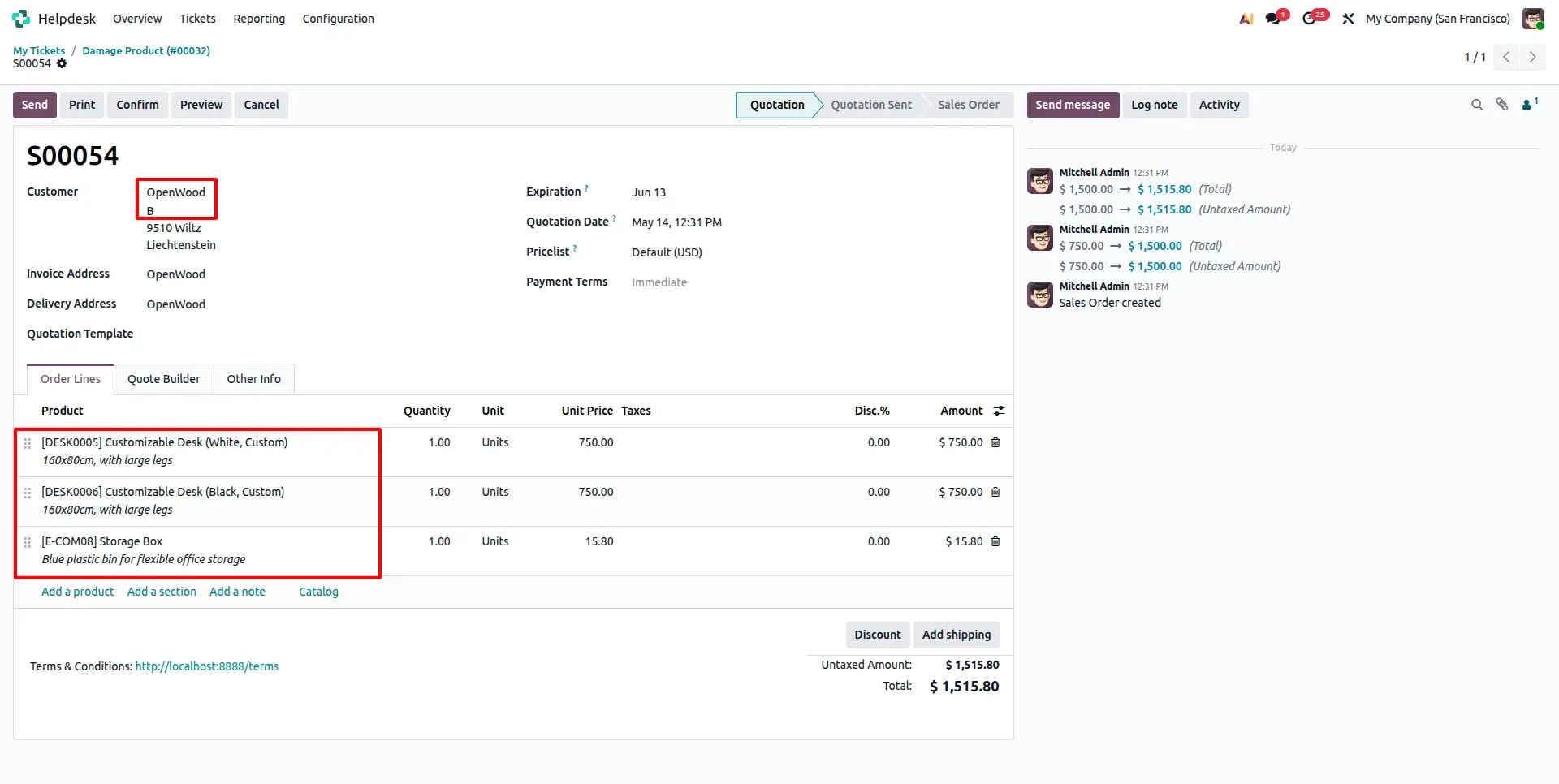
Click the Products button on any Helpdesk ticket to open the product catalog. Adding the first product automatically creates a Sales Quotation with customer details and product lines pre-filled from the ticket.

🛒

Product Catalog Access

Open Odoo’s built-in Product Catalog directly from the Helpdesk ticket. Product additions and quantity updates are automatically synchronized with the related Sales Order lines.

📦

Sales Order Creation

Convert customer support requests into Sales Quotations and Sales Orders directly from Helpdesk, creating a seamless bridge between support and sales processes.

🔗

Linked Records (Smart Buttons)

Dedicated smart buttons provide quick access to linked Sales Quotations/Orders and the Product Catalog directly from the Helpdesk ticket.

📄

Standard Odoo Invoice Flow

Invoicing follows Odoo's standard Sales workflow through the linked Sales Order. No changes are made to the native invoicing process.

💬

Discuss Integration

Chatter messages, internal notes and customer communications remain connected to the Helpdesk ticket for complete visibility.

⚙️

Zero Manual Re-entry

Customer information is automatically transferred from the Helpdesk ticket to the Sales Quotation, eliminating duplicate data entry.

Native Odoo Integration

Works seamlessly with Odoo Helpdesk, Sales, Projects and Discuss modules without requiring any third-party applications.

Configuration Steps

No additional configuration is required after installation. The module is ready to use immediately and applies automatically to all Helpdesk tickets. The steps below describe how to use the module after activation.

1

Open Helpdesk Ticket

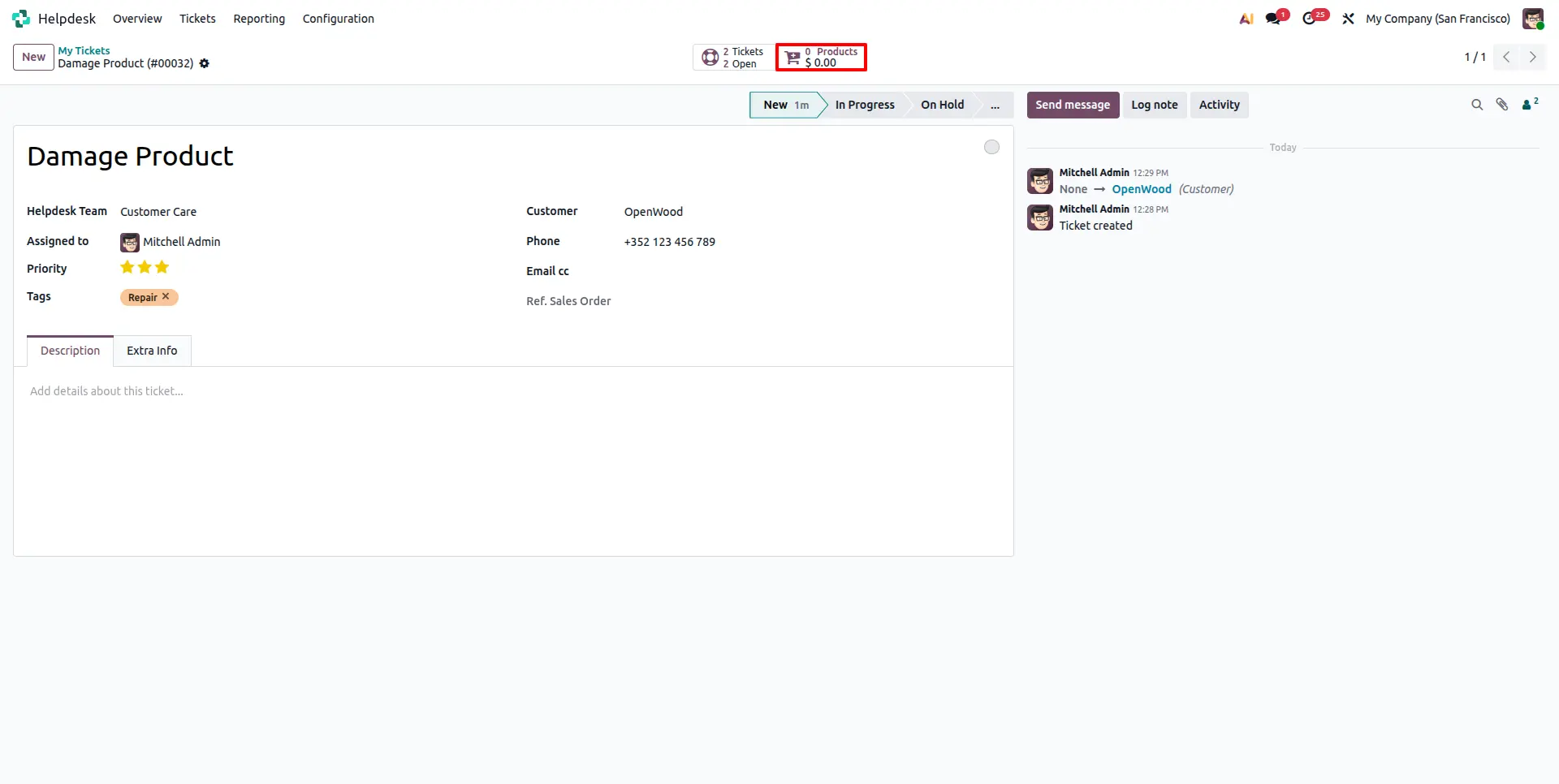
Navigate to Helpdesk → Tickets and open any existing or newly created ticket. The module automatically adds a Sale Order smart button for linked quotations/orders and a Products smart button for opening the Product Catalog directly from the ticket.
2

Open Product Catalog

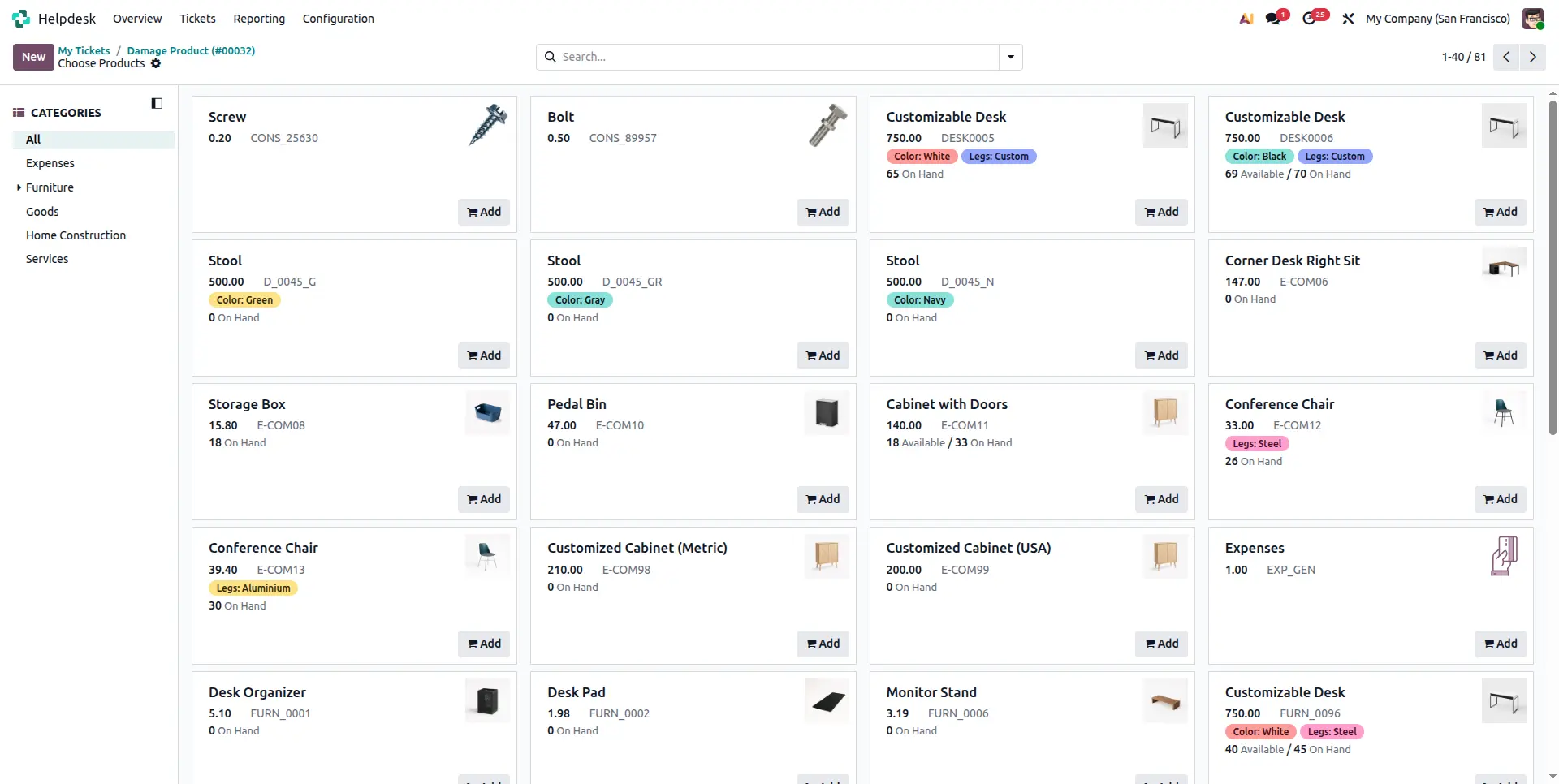
Click the Products smart button from the Helpdesk ticket to open Odoo's Product Catalog. Browse available products and add the required items for the customer.
3

Automatic Sales Quotation Creation

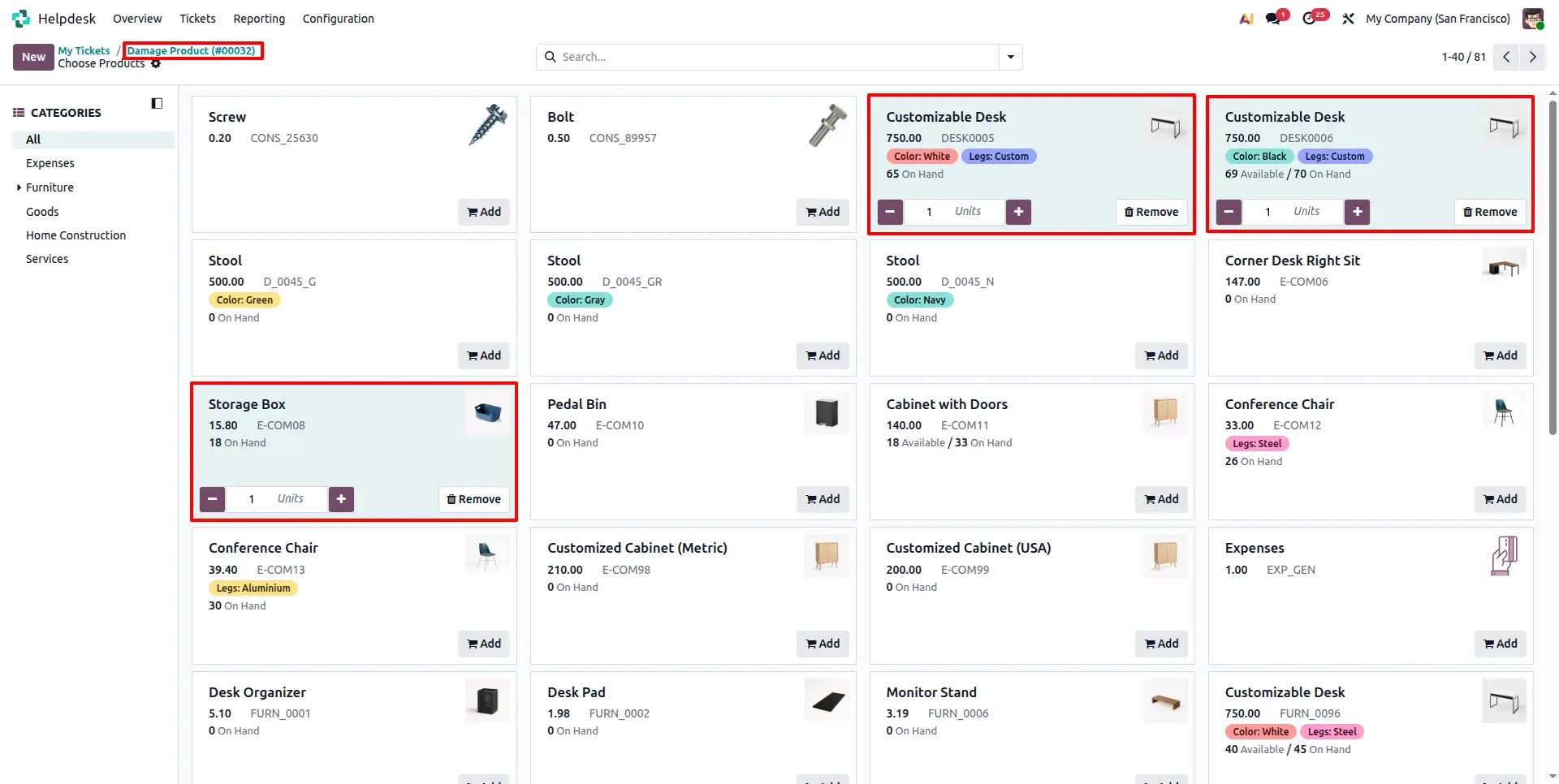
Adding the first product automatically creates a Sales Quotation linked to the Helpdesk ticket. Customer details are automatically fetched from the ticket and selected products are added to the quotation lines. Any further product or quantity updates in the catalog are automatically reflected in the Sales Order lines.
4

Track Linked Quotations and Orders

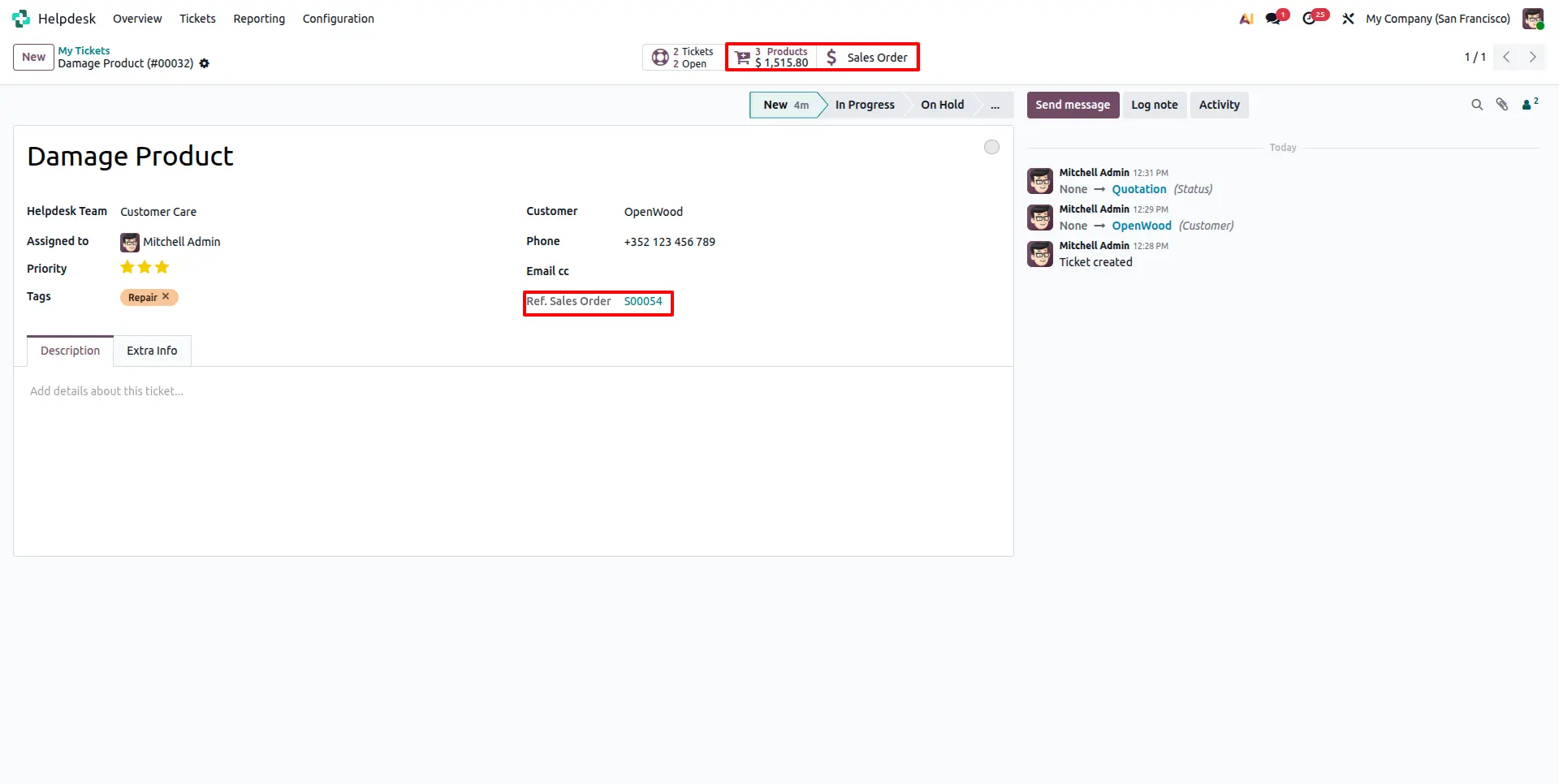
The generated Sales Quotation or Sales Order is automatically linked back to the originating Helpdesk ticket. Use the Sale Order smart button to view and navigate to linked quotations and orders at any time, ensuring complete traceability.
5

Manage Sales Order and Invoicing

The created Sales Quotation follows the standard Odoo sales workflow. Confirm it into a Sales Order, generate invoices and manage payments directly from the Sales Order. The Helpdesk ticket remains linked for easy reference throughout the entire process.
Frequently Asked Questions

This module requires Odoo Enterprise Edition. It is not compatible with Odoo Community Edition.
The module enables creating Sales Quotations directly from Helpdesk tickets via the Products button and Product Catalog. Adding the first product automatically creates a Sales Quotation linked to the ticket. Product or quantity updates in the catalog are reflected in the Sales Order lines. Invoicing follows the standard Odoo Sales Order flow.
Yes. From the Helpdesk ticket, agents click the Products button to open the Product Catalog. Adding the first product automatically creates a Sales Quotation linked to the ticket. Any product or quantity updates made in the catalog are automatically reflected in the Sales Order lines.
No. Once installed, the module automatically adds the Sale Order smart button and catalog-based sale order creation to all Helpdesk tickets. No per-ticket or per-customer configuration is required.
No. The module is compatible with Odoo.sh and On Premise deployments across versions 18.0 and 19.0.
Yes. The Sales Quotation creation feature via the Products button and Product Catalog is available on tickets in any stage, including Open, In Progress, and Resolved tickets.
Yes. The module can be extended to match specific business requirements such as custom approval workflows, additional smart buttons, or specific Sales Quotation templates. Contact the Gritxi team for a customization quote.
Contact Gritxi Technologies Pvt. Ltd. at contact@gritxi-tech.com or (+91) 884-921-7633, or use the support page on the Odoo Apps Store.

Technical Details

Dependencies

• Helpdesk (helpdesk)
• Project (project)
• Sales (sale_management)
• Discuss (mail)
• Invoicing (account)


License

OPL-1

Need Assistance?

Email Support

contact@gritxi-tech.com

Any Questions?

Inquiry

Have questions about this app?

Fill out the form below and our team will get back to you with more information.

Customer Reviews

Share your experience with this module.

Write a Review
Latest Reviews

No reviews yet. Be the first to share your thoughts!