Summary
In enterprise resource planning (ERP) systems engineering, speed of iteration and system reliability are paramount. The Odoo Command Line Interface (CLI) serves as the unified engine driving Odoo 19 server deployments, rapid development cycles and automated systems administration. Rather than operating as a mere server initialization script, the CLI acts as a direct, programmatically accessible bridge connecting the system architect, the underlying Python runtime and the PostgreSQL database cluster.
This master-class guide explores the inner workings of the Odoo 19 CLI. We will cover the mechanical benefits of command line operations, parse structural commands, walk through real-world shell REPL script logic, examine benchmarking protocols and lay out clean workflows for Continuous Integration/Continuous Deployment (CI/CD) environments.
The Ergonomic Advantage: How Odoo CLI Simplifies Operations
Odoo’s design philosophy leverages the CLI to remove administrative friction and reduce development cycle overhead. In traditional enterprise frameworks, simple administrative actions such as installing modules, managing databases, generating template schemas, or neutralizing production data frequently require clicking through multi-layered web menus. The CLI completely eliminates this bottleneck.
1. Developer Ergonomics
-
Bypassing the Web UI Latency: Instead of entering the Web Client, activating developer mode, navigating to the "Apps" store, clicking update app lists and selecting install/upgrade, a developer can run a single command like
./odoo-bin -d dev_db -u custom_module. This immediately compiles assets, modifies relational schemas and updates views. -
Rapid Scaffold Automation: Setting up folder trees, module manifests, access rules (CSVs), routing models and initial XML structures is tedious and error-prone. The
scaffoldsubcommand creates structurally sound, standard-compliant boilerplate architectures in milliseconds. -
Interactive Data Access: The
shellsubcommand starts an interactive Python console with a fully initialized environment. This enables developers to test queries, inspect variables, or run ad-hoc scripts using Odoo's core Object-Relational Mapping (ORM) framework directly inside the terminal.
2. System Administrator Ergonomics
-
Scriptable Deployments (Infrastructure as Code): Configurations can be easily defined in structured configuration files (
odoo.conf) or injected directly via terminal flags. This enables clean multi-worker deployment scripts, container orchestrations and deterministic provisioning. -
Deterministic Database Actions: Large-scale operations such as backing up multi-gigabyte production databases, renaming staging clones, or running database drops often cause HTTP timeouts when executed via a web browser. The
dbCLI subcommand executes these commands directly on the database using native, safe wrappers. -
Operational Safety Boundaries: Deploying a copy of a production database to a staging server can accidentally trigger automated cron jobs, email real clients, or send test data to live payment processors. The
neutralizeandobfuscatesubcommands secure staging clones with a single execution path.
Architecture of Odoo CLI
The Odoo CLI functions as a central controller routing input parameters, resolving system configuration overrides, spawning connection pools and booting Odoo's Werkzeug WSGI server.
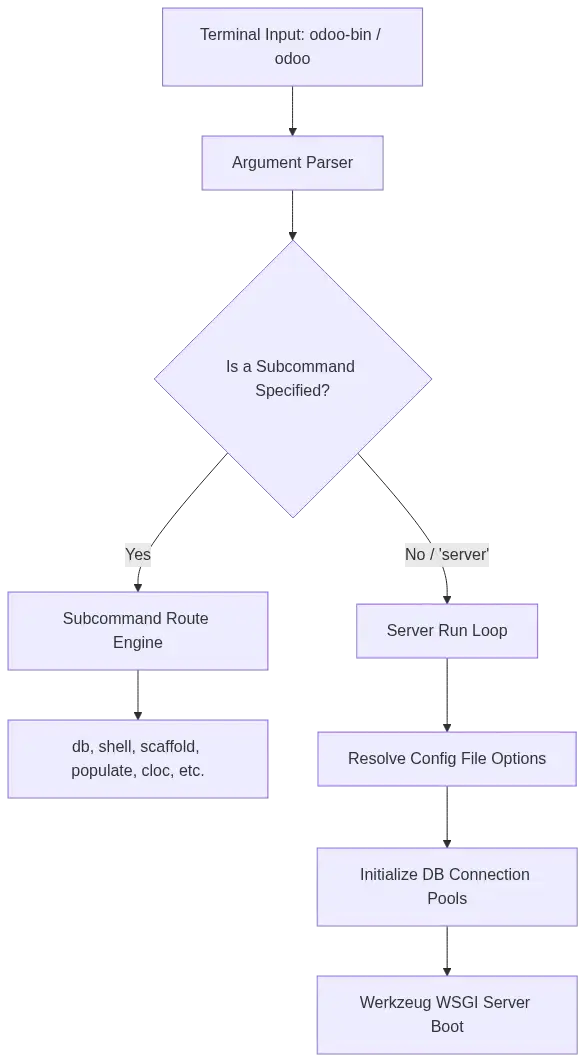
Standard Execution Environment & Configurations
Odoo CLI executions are run either via the local directory source script ./odoo-bin (commonly used in Virtualenv-isolated environments) or through the globally symlinked system path binary odoo (found in Docker containers or Debian packages).
# Source Checkout Executable Directory
$ cd /opt/odoo/src/
$ ./odoo-bin --version

# Packaged Installation Executable
$ odoo --version
The System-wide Configuration file (odoo.conf)
By default, Odoo looks for configuration files at $HOME/.odoorc or the path specified via the -c or --config parameter. CLI command options translate directly into system settings parameters within odoo.conf under the [options] section. In this mapping, double-dashes (--) are omitted and dashes (-) are replaced with underscores (_).
[options]
; Database Configuration Mappings
db_host = 127.0.0.1
db_port = 5432
db_user = odoo_admin
db_password = secure_postgresql_password
dbfilter = ^%h$

; Module Search Addons Paths
addons_path = /opt/odoo/addons,/opt/odoo/custom_addons

; Production Multi-Worker Scaling Configurations
workers = 4
max_cron_threads = 2
limit_memory_soft = 2147483648
limit_memory_hard = 2684354560
limit_time_cpu = 360
limit_time_real = 720
CLI Command References
Starting Odoo without specifying a subcommand defaults to invoking the WSGI daemon wrapper.
- Purpose: Running, updating, or configuring the server runtime.
- Core Flags:
-d, --database: Connects directly to the target database.-i, --init: Installs a list of modules on startup (e.g.,-i sale,purchase).-u, --update: Upgrades a list of modules, compiling XML structural views and updating Postgres tables (e.g.,-u custom_sales). Use-u allto update all modules.--dev=<options>: Enables development tools (e.g.,reloadto restart on Python file edits,xmlto bypass view caching,qwebfor template debugging, orall).--stop-after-init: Terminates the process immediately after completing update, installation, or testing tasks.--skip-auto-install: Prevents the auto-installation of optional, transitively dependent modules.
Code Example: Booting with Custom Updates & Live Reloading
# Start server, target "prod_dev", update custom sales app and auto-reload on Python/XML changes
$ ./odoo-bin -c /etc/odoo.conf -d prod_dev -u custom_sales_module --dev=reload,xml
The db subcommands allow system administrators to run Postgres database maintenance tasks directly from the command line, bypassing the slower web database manager (/web/database/manager).
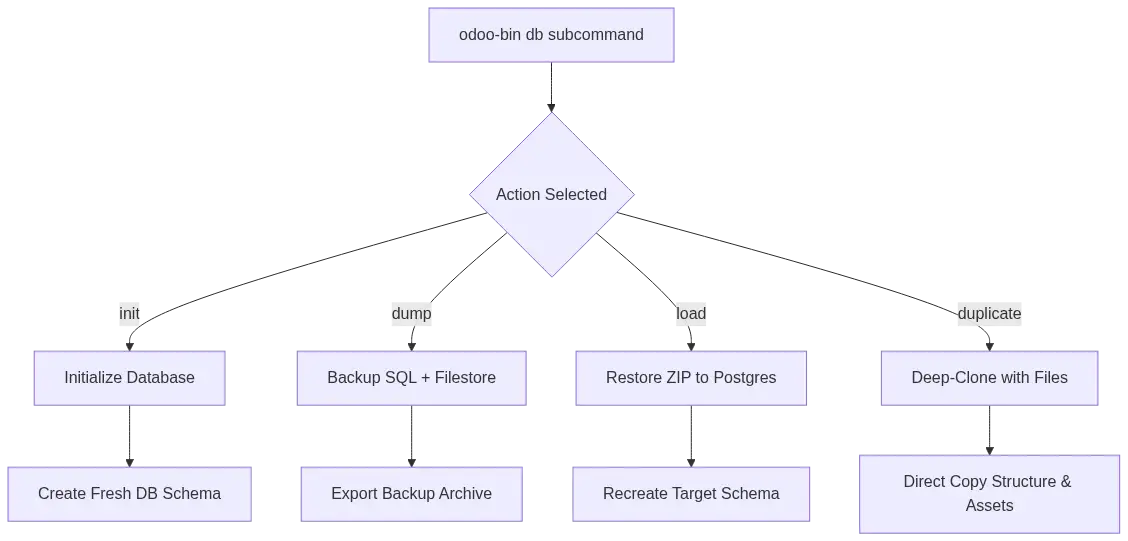
Complete Database Action Commands Registry & Examples:
| Subcommand | Required Parameters | Purpose | Command Example |
|---|---|---|---|
db init |
<database> |
Creates a fresh database, applying core configuration settings. | ./odoo-bin db init stage_demo --with-demo --country=US |
db dump |
<database> <path> |
Creates a complete database dump. Outputs standard SQL or a structured .zip containing database tables and Odoo filestores. | ./odoo-bin db dump stage_demo /backups/stage_backup.zip --format=zip |
db load |
<database> <dump_path> |
Restores a backup file into a target PostgreSQL database. | ./odoo-bin db load restored_db /backups/stage_backup.zip --force |
db duplicate |
<source> <target> |
Clones a database schema and associated binary files. | ./odoo-bin db duplicate target_prod stage_clone --neutralize |
db rename |
<old_name> <new_name> |
Renames an existing database in PostgreSQL. | ./odoo-bin db rename old_dev obsolete_dev --force |
db drop |
<database> |
Deletes a database from the PostgreSQL cluster. | ./odoo-bin db drop obsolete_dev |
Operational Shell Walkthrough: Backing up and Restoring a Database
# Step 1: Backup production database with its filestore
$ ./odoo-bin -c /etc/odoo.conf db dump prod_db /var/backups/prod_backup_$(date +%F).zip --format=zip

# Step 2: Restore backup to a staging database with automatic neutralization
$ ./odoo-bin -c /etc/odoo.conf db load staging_db /var/backups/prod_backup_$(date +%F).zip --force --neutralize
The shell command starts an interactive Python console (using your preferred REPL, like ipython, bpython, or ptpython) with your Odoo environment fully initialized. The active database connection is mapped to the standard framework ORM variable env.
- Purpose: Inspecting records, writing ad-hoc scripts, debugging model relationships and running direct bulk updates.
- Command Syntax:
./odoo-bin shell -d <database_name> [-c <config_file>] [--shell-interface=<interface>]
Walkthrough: Launching Shell and Batch Updating Relational Records
To perform a bulk data update on orphaned CRM Leads:
# Launch command in bash:
# ./odoo-bin shell -d my_dev_db --shell-interface=ipython

# --- Python Shell Interface ---
import logging
_logger = logging.getLogger('odoo.shell')

# Search for leads with an empty country field
leads = env['crm.lead'].search([('country_id', '=', False)])
_logger.info(f"Targeting {len(leads)} orphan leads for bulk update.")

# Load the United States country object (database ID reference or xml_id lookup)
us_country = env.ref('base.us')

# Write directly to the database using Odoo's ORM layer
leads.write({'country_id': us_country.id})

# CRITICAL: Commit the transaction changes (Rolls back by default on exit)
env.cr.commit()

print("Relational records committed successfully!")
The module subcommands allow developers to perform module lifecycle actions directly in the database without starting the web server.
- Purpose: Installing, upgrading, or uninstalling modules inside automated deployment routines.
- Command Syntax:
./odoo-bin -d <database_name> module <action> <modules>
# Install inventory and sales applications directly on a staging database
$ ./odoo-bin -d staging_db module install stock,sale

# Symmetrically upgrade custom account modules and force compile XML configurations
$ ./odoo-bin -d staging_db module upgrade custom_invoice_reports,custom_payment_provider

# Completely uninstall legacy custom modules and delete associated database tables
$ ./odoo-bin -d staging_db module uninstall obsolete_app
Securing databases is critical when copying production data to secondary environments. The neutralize and obfuscate subcommands protect customer data and prevent accidents, like sending staging transactional emails to real clients.
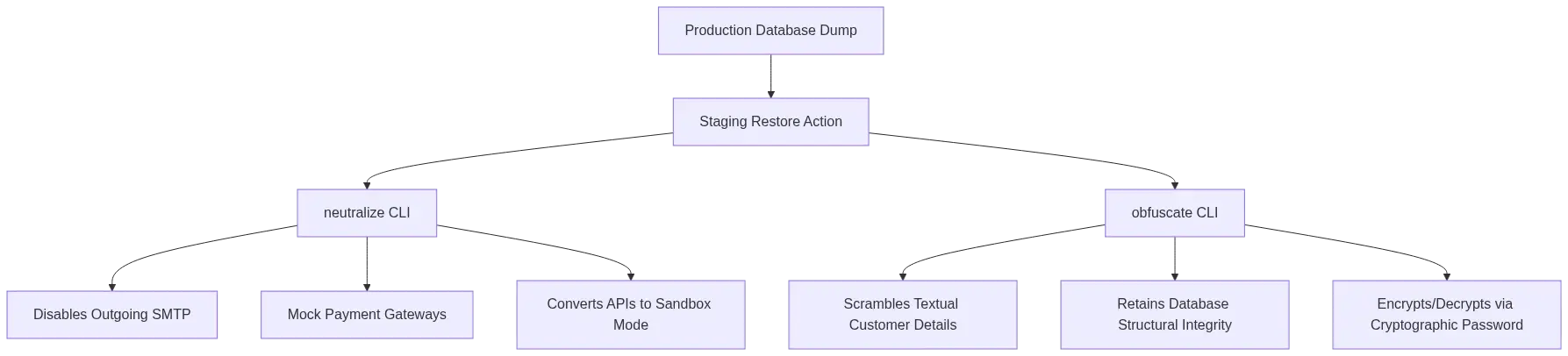
- Neutralize Purpose: Instantly disables outgoing email systems (SMTP), deactivates live payment gateways, switches external warehouse APIs to sandbox testing mode and sets enterprise licenses to testing states.
- Obfuscate Purpose: Scrambles sensitive textual information (customer names, emails, phones) within identified database tables while keeping the structural relational integrity intact.
# Neutralize a recently restored database
$ ./odoo-bin neutralize -d restored_dev_db --config=/etc/odoo.conf

# Symmetrically obfuscate contact records using a shared cryptographic key
$ ./odoo-bin obfuscate -d restored_dev_db --pwd=SecretTeamKeyPhrase --pertablecommit -y
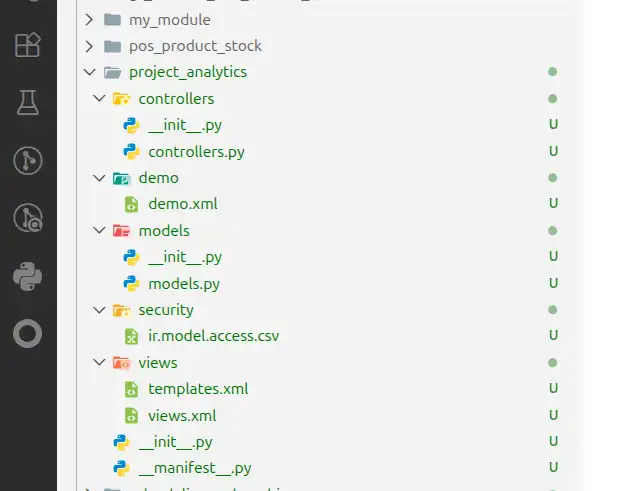
The scaffold command accelerates new feature development by generating structured, standard-compliant boilerplate Odoo module templates.
- Purpose: Creating directories, manifests, base python models, views and security files based on Odoo conventions.
- Command Syntax:
./odoo-bin scaffold <module_name> <target_addons_directory>
Execution Walkthrough:
# Create a tracking module named 'project_analytics' in our custom addons folder
$ ./odoo-bin scaffold project_analytics /opt/odoo/custom_addons
This generates a structured directory layout:
project_analytics/
├── __init__.py
├── __manifest__.py
├── controllers/
│   ├── __init__.py
│   └── controllers.py
├── models/
│   ├── __init__.py
│   └── models.py
├── views/
│   ├── views.xml
│   └── templates.xml
├── security/
│   └── ir.model.access.csv
└── demo/
    └── demo.xml
outcome:
These subcommands help teams test performance and estimate code footprint overhead.
- Populate: Generates massive volumes of valid mock database records using predefined model generators. This allows developers to test database query speeds, index usage and custom reports under realistic workloads.
- Cloc (Count Lines of Code): Scans directories or databases to count custom lines of code. It automatically filters out white space, documentation comments, test suites and third-party libraries to provide accurate metrics for custom developments.
# Populate the database with mock records (100x scaling factor for partners)
$ ./odoo-bin populate -d performance_db --models=res.partner --factors=100

# Audit custom lines of code inside the custom addons folder
$ ./odoo-bin cloc --path=/opt/odoo/custom_addons --verboseThese commands manage language translations and automate code syntax upgrades during major version migrations.
# Load French translation tables into the database
$ ./odoo-bin -d sandbox_db i18n loadlang fr_FR

# Export translation templates to a standard PO file
$ ./odoo-bin -d sandbox_db i18n export project_analytics -l fr_FR -o /tmp/analytics_fr.po

# Rewrite codebase schemas and Python views to upgrade from Odoo 18.0 to 19.0
$ ./odoo-bin upgrade_code --from=18.0 --to=19.0 --addons-path=/opt/odoo/custom_addons
High-Performance Production Configurations (Multi-processing)
In production environments, Odoo must be configured to run in multi-worker mode to effectively distribute client requests across multiple CPU cores. Setting the --workers option greater than 0 forks Odoo into a multi-process supervisor that manages worker life-cycles.
Sizing Formula for Production Workers
To calculate your production worker sizing, use this standard system formula:
Workers = (Number of CPU Cores * 2) + 1
Memory Soft Limit = Workers * 0.8 * 1GB | Memory Hard Limit = Workers * 1GB
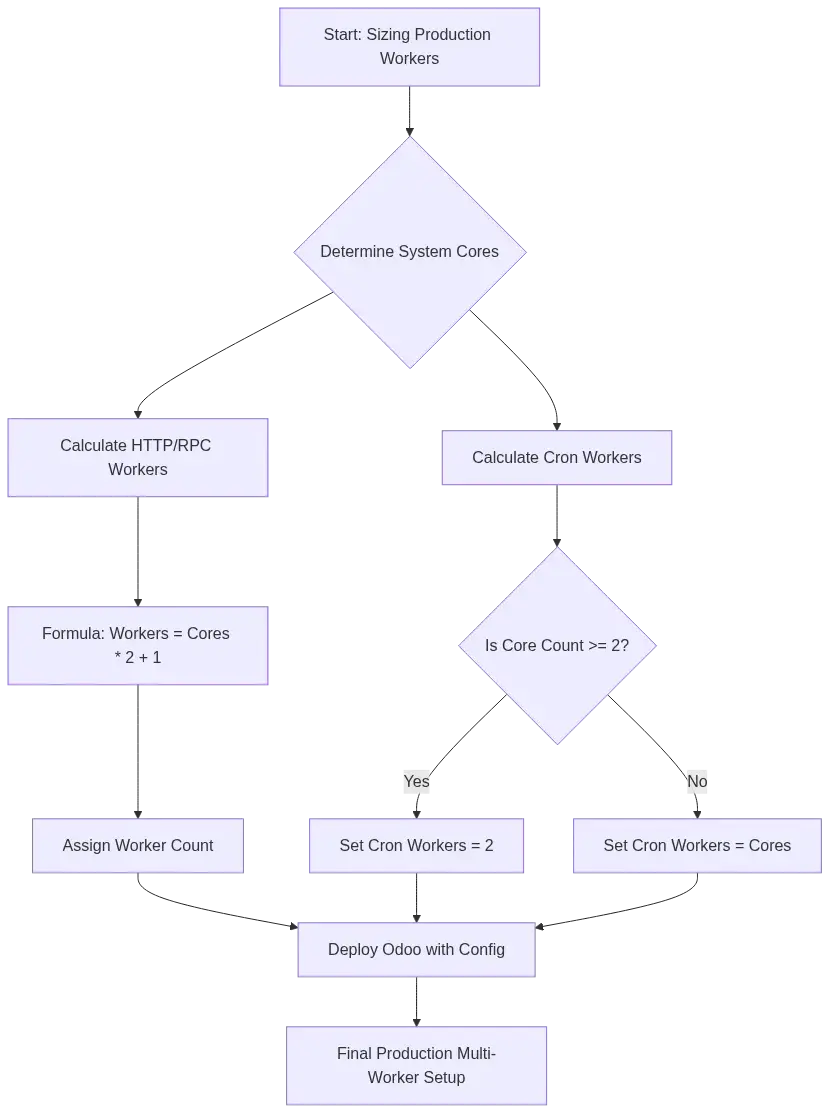
Real-World Production Startup Shell Execution:
# Run server in multi-processing mode with custom system limits
$ ./odoo-bin -c /etc/odoo.conf \
   --workers=9 \
   --max-cron-threads=2 \
   --limit-memory-soft=2147483648 \
   --limit-memory-hard=2684354560 \
   --limit-time-cpu=360 \
   --limit-time-real=720 \
   --proxy-mode \
   --logfile=/var/log/odoo/odoo_prod.log
Step-by-Step Developer Workflow Integration
Follow this end-to-end command-line workflow to build, debug, test, secure and deploy an Odoo module:

$ ./odoo-bin scaffold asset_tracker /opt/odoo/custom_addons$ ./odoo-bin -d test_sandbox --addons-path=/opt/odoo/custom_addons -i asset_tracker --dev=reload,xml# $ ./odoo-bin shell -d test_sandbox
>>> env['asset.tracker.item'].create({'name': 'Server Rack A1', 'cost': 1200.0})
>>> env.cr.commit()$ ./odoo-bin db duplicate test_sandbox test_staging --neutralize$ ./odoo-bin -d test_staging --addons-path=/opt/odoo/custom_addons -u asset_tracker --test-enable --stop-after-init$ ./odoo-bin db dump test_sandbox /tmp/backup.zip --format=zip
$ ./odoo-bin db load staging_diagnostic /tmp/backup.zip --force
$ ./odoo-bin obfuscate -d staging_diagnostic --pwd=SharedSecretKey --pertablecommit -yTroubleshooting Matrix: Common CLI Errors & Resolutions
| CLI Output Error Code | Root Cause | Solution Directive |
|---|---|---|
Address already in use |
Another system process is already listening on port 8069. | Find and kill the process using port 8069, or rebind Odoo using --http-port=8070. |
Database does not exist |
The database specified via -d does not exist in PostgreSQL. |
Check database spelling, or create it first using the db init subcommand. |
Module not found: <name> |
The module path is missing from your configuration. | Verify that the module's parent directory is included in your --addons-path configuration. |
Connection refused |
PostgreSQL is stopped, or database credentials in odoo.conf are incorrect. |
Start PostgreSQL and check db_host, db_user and db_password settings in your configuration file. |
Soft limit exceeded |
A worker process has exceeded the virtual memory threshold (limit-memory-soft). |
Optimize database queries or code block logic, or increase memory thresholds in odoo.conf. |
FAQ
Q1: Can I run database backups using the CLI without starting the HTTP web server?
Yes. The db dump command connects directly to PostgreSQL and exports SQL and binary databases without starting the Werkzeug web server or binding to network ports.
Q2: Why do changes to my Python code take effect immediately while XML changes require a server restart or module upgrade?
By default, Odoo caches XML views in the database. To bypass this cache in development and see XML changes instantly, start your server with the --dev=xml option (or --dev=all).
Q3: What is the difference between -u and -i?
• -i (or --init) installs a module and its dependencies for the first time.
• -u (or --update) upgrades an already-installed module, rebuilding XML structures, running Python migration paths and adjusting PostgreSQL tables.
Q4: How do I rollback database modifications made during an interactive shell session?
By default, Odoo shell sessions run within a transaction. Any modifications you make will roll back automatically when you exit the shell. To persist your changes, you must explicitly run env.cr.commit() before closing the session.
Q5: Is the Odoo neutralize subcommand safe to run on production databases?
No. Never run neutralize on a production database. It permanently disables email servers, payment processors and other connectors. Only run it on development, staging, or testing databases.
Conclusion
The Odoo CLI is a comprehensive suite of tools that simplifies development, automates deployments and makes system maintenance predictable. From module scaffolding and interactive shell debugging to database backups and automated testing, mastering the CLI will greatly improve your daily productivity.
By using configuration files (odoo.conf) and standardizing your CLI commands, you can automate repetitive tasks, catch errors early in CI/CD pipelines and maintain consistency across development, staging and production environments.
Reference: https://www.odoo.com/documentation/19.0/developer/reference/cli.html
Odoo 19 CLI Guide: Command Line Interface, Commands & Usage