
Section/Line in Delivery Slip
Automatically carry Sales Order Section and Note lines into Delivery Slip and Backorder Delivery Slip reports, creating structured, professional documents while preserving the standard Odoo Inventory workflow.
Section in Delivery Slip
Display Sales Order sections and note lines directly inside Delivery Slips and Backorder Delivery Slips, creating organized, professional, and easy-to-read delivery documents without changing the standard Odoo Inventory workflow.
App Overview

Introduction
The Section in Delivery Slip module extends Odoo Sales and Inventory by carrying Sales Order section headers and note lines into Delivery Orders and printed Delivery Slip reports.
By default, Odoo Delivery Slips display only product lines, making it difficult to identify grouped products when Sales Orders are organized using sections such as Electronics, Furniture, Accessories, or Installation Services.
This module preserves the complete Sales Order structure by automatically displaying section headers, grouped products, and note lines inside Delivery Slips and Backorder Delivery Slips, resulting in clear, organized, and professional delivery documents.
The module integrates seamlessly with Odoo Sales, Inventory, and Delivery Slip PDF reports without modifying the standard delivery workflow, making warehouse operations easier while improving customer-facing documents.

Purpose
The purpose of this module is to enhance Delivery Slip reports by
preserving the logical structure created in Sales Orders.
It helps businesses organize products using section headers,
display important note lines, improve warehouse readability,
simplify packing operations, and provide customers with
well-structured delivery documents.
By automatically carrying Sales Order sections into Delivery Slip
and Backorder reports, the module improves delivery accuracy,
warehouse efficiency, and document presentation without requiring
any additional manual configuration.
Targeted Business Types
Manufacturing Companies
Organize raw materials, finished goods, and production deliveries using section-wise grouping for better warehouse handling and accurate dispatch.
Furniture Businesses
Group products by room, collection, or category, making delivery slips easier for warehouse staff and customers to understand.
Electronics Stores
Clearly separate electronic devices, accessories, and installation items inside Delivery Slips for accurate order fulfillment.
Wholesale Businesses
Simplify bulk deliveries by organizing products into structured sections, improving picking, packing, and shipment accuracy.
Retail Chains
Improve warehouse operations and customer deliveries by printing organized Delivery Slips with section headers and note lines.
Business Use Cases
Furniture Delivery Management
Context:
A furniture company delivers Bedroom Sets, Office Furniture,
and Dining Products together in a single shipment. The sales
team organizes products using section lines so warehouse
staff can easily identify each product category.
Workflow
- Create a Sales Order using multiple section lines.
- Add products under their respective furniture categories.
- Confirm the Sales Order and validate the delivery.
- Print the Delivery Slip.
- The report displays section headers, grouped products, and note lines automatically.
Warehouse teams can pack products category-wise, reducing dispatch errors while providing customers with organized and professional delivery documents.
Electronics Distributor Operations
Context:
An electronics retailer adds personalized note lines for
specific products, such as gift messages or installation
instructions, that must appear on the printed Delivery Slip.
Workflow
- Create a Sales Order with section lines.
- Add note lines beneath the related products.
- Confirm the Sales Order.
- Validate the Delivery Order.
- Print the Delivery Slip with section headers and notes.
Warehouse staff can easily identify product groups and customer instructions, ensuring accurate packing while improving the overall customer delivery experience.
Key Features
Delivery Slip Sections
Display products in structured section-wise groups inside printed Delivery Slip and Backorder Delivery Slip reports.
Carry Forward Sales Sections
Automatically transfers Sales Order section headers into Delivery Slips without requiring any manual configuration.
Note Line Support
Preserves informational note lines from Sales Orders so important instructions remain visible in delivery reports.
Structured PDF Layout
Generates clean, professional, and easy-to-read Delivery Slip PDFs with organized product sections.
Better Warehouse Clarity
Warehouse teams can quickly identify grouped products, making picking, packing, and dispatch more efficient.
Customer Friendly Reports
Provides customers with organized delivery documents that clearly separate product groups and related information.
Automatic Workflow Integration
Works seamlessly with standard Odoo Sales and Inventory workflows without requiring additional setup or manual intervention.
Backorder Report Support
Preserves section headers and note lines in Backorder Delivery Slips, ensuring consistent document formatting even for partial deliveries.
Configuration & Workflow
The Section in Delivery Slip module works automatically with Odoo Sales and Inventory. Once Sales Orders contain section or note lines, the module carries them into Delivery Slips and Backorder Delivery Slips, creating well-structured and professional delivery documents without changing the standard warehouse workflow.
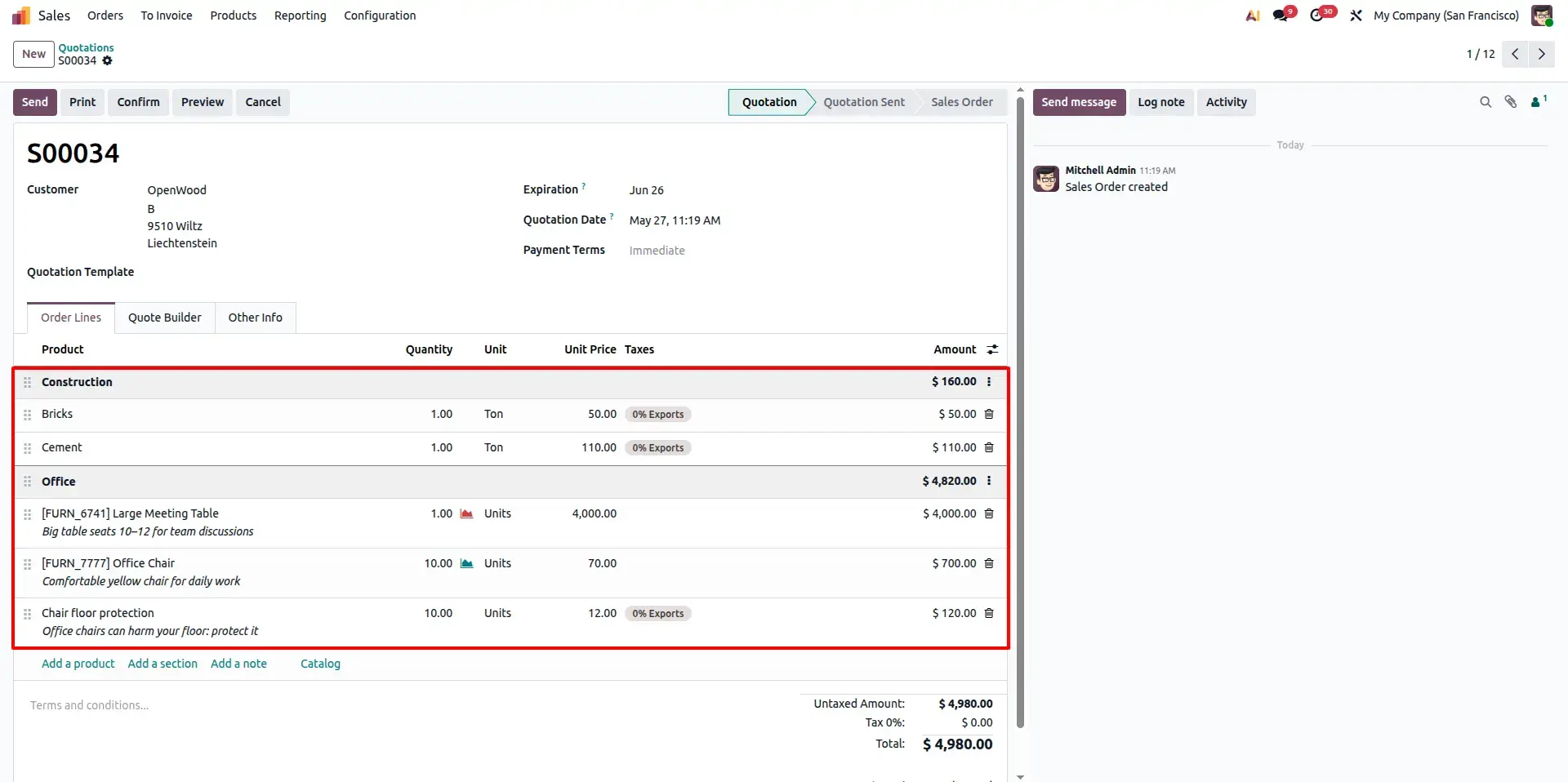
Sales Order with Section Lines
Create a Sales Order using Section, Note, and Product lines to organize products into logical categories before confirming the order. This structured layout improves order management and prepares the information for the Delivery Slip.
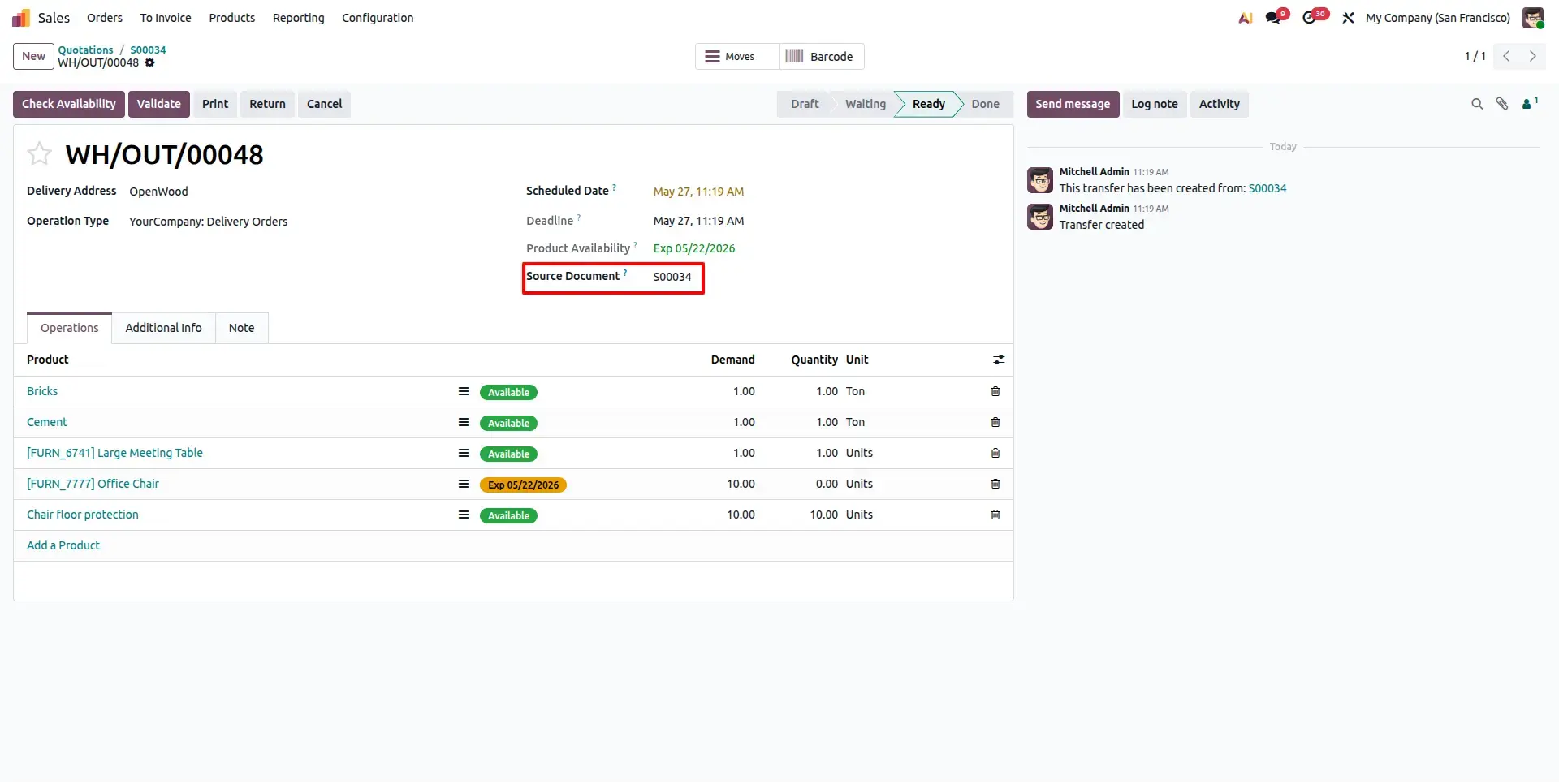
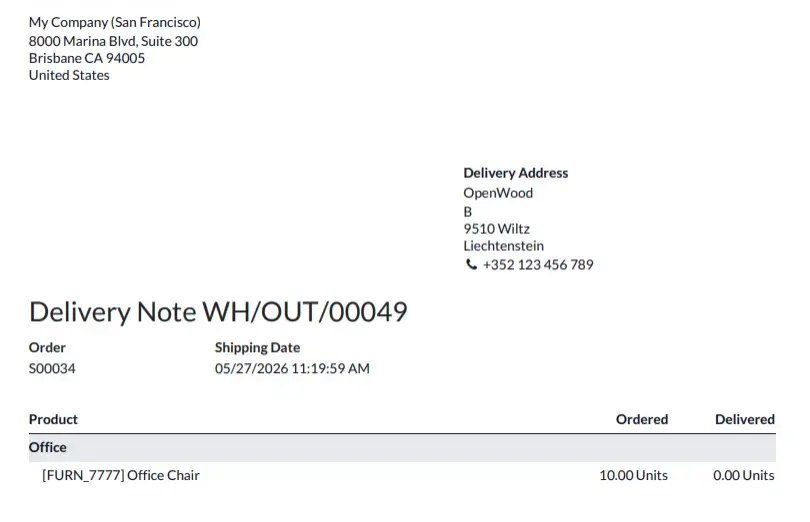
Delivery Slip with Sections and Notes
After confirming the Sales Order and validating the Delivery Order, the module automatically transfers all section headers and note lines into the printed Delivery Slip, keeping the same organized structure created in the Sales Order.
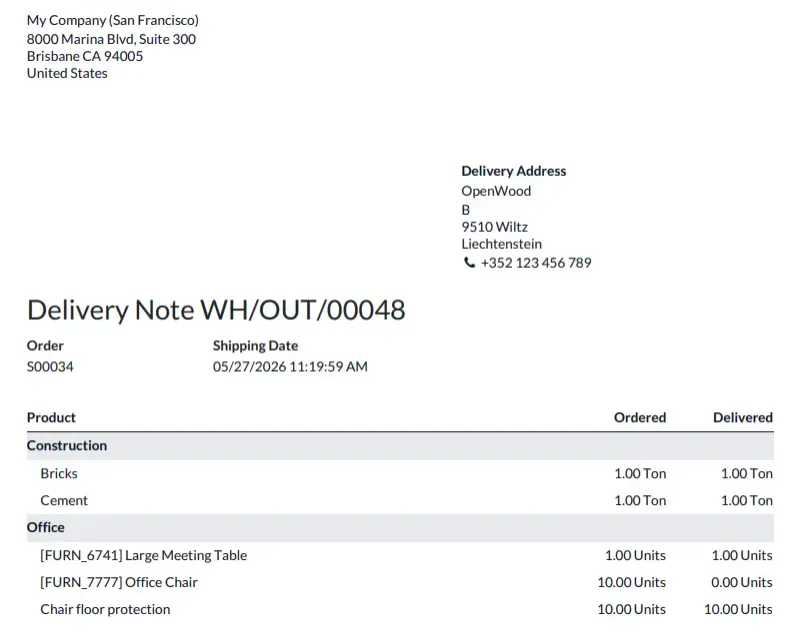
Delivery Slip Report with Sections and Notes
Print the Delivery Slip to view a professional report containing section headers, grouped products, and note lines. The organized layout helps warehouse teams identify items quickly while providing customers with a cleaner and more readable delivery document.
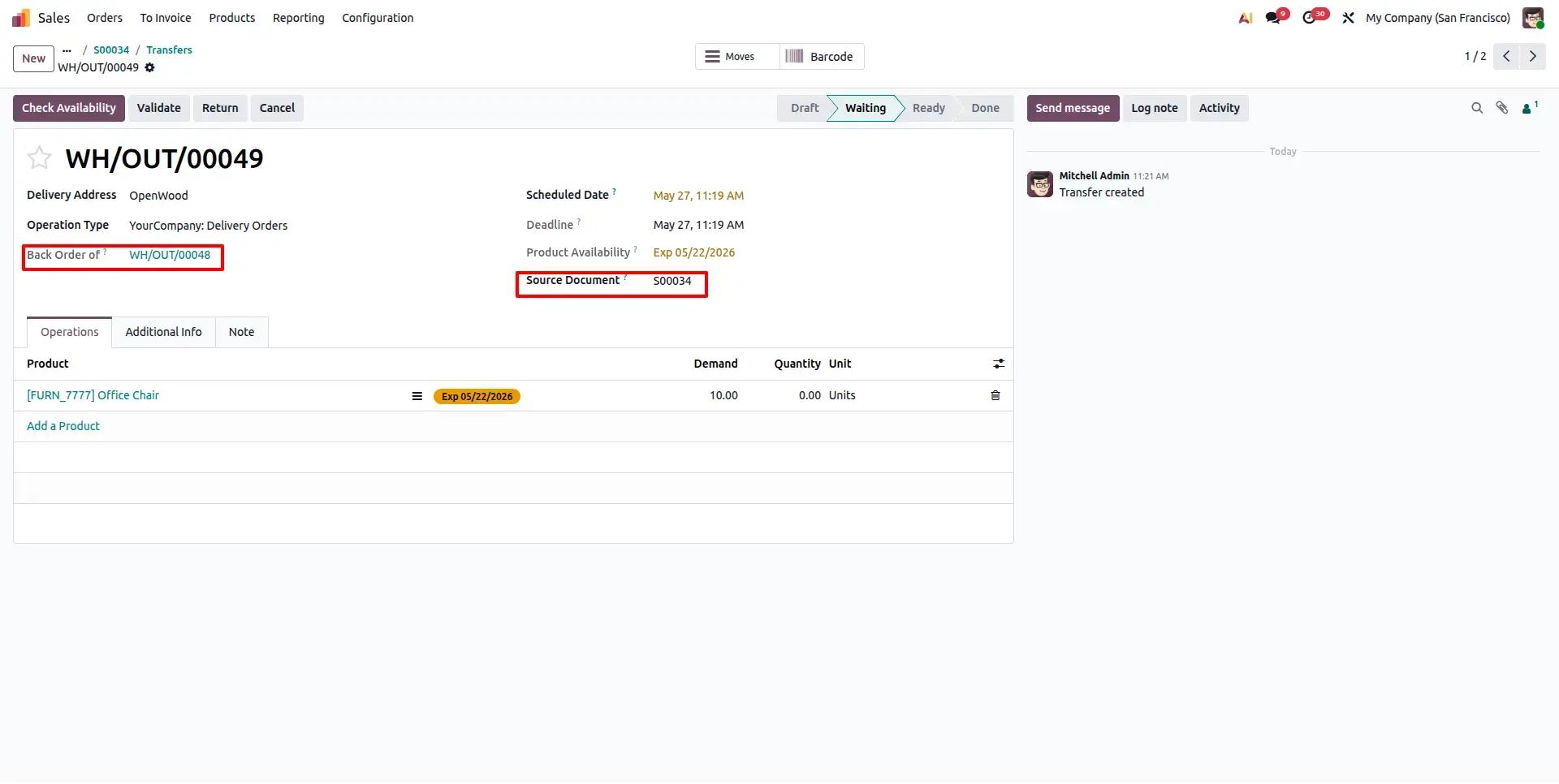
Backorder Generated from Confirmed Delivery Order
When only part of the ordered quantity is delivered, Odoo creates a Backorder automatically. The module preserves the original Sales Order structure, ensuring section headers, grouped products, and note lines remain available for the pending delivery.
Backorder Delivery Slip with Sections and Notes
Print the Backorder Delivery Slip to view pending quantities in the same structured format. The report preserves section headers, note lines, grouped products, and backordered quantities, making it easy for warehouse teams and customers to distinguish delivered and remaining items.
Frequently Asked Questions
Technical Details
Dependencies
• Sales (sale_management)
• Inventory (stock)
License
OPL-1
Need Assistance?
Email Support
contact@gritxi-tech.comAny Questions?
Have questions about this app?
Fill out the form below and our team will get back to you with more information.
Customer Reviews
Share your experience with this module.
Write a Review
Latest Reviews
No reviews yet. Be the first to share your thoughts!