
Print Lot Range Delivery Slip
Display lot/serial numbers as clean ranges on Delivery Order slips
Print Lot Range Delivery Slip
Generate clean and professional Delivery Slips by automatically grouping consecutive Lot and Serial Numbers into compact ranges. Improve warehouse efficiency with package wise grouping, accurate quantities, and easy to read delivery documents without changing Odoo's standard delivery workflow.
App Overview

Introduction
The Print Lot Range Delivery Slip module
enhances Odoo's standard Delivery Slip by replacing lengthy
lists of individual Lot and Serial Numbers with compact,
easy to read ranges. Consecutive serial numbers are
automatically combined into a single range, while
non consecutive numbers are displayed in a clean comma separated
format.
The module also organizes serial numbers package wise,
allowing warehouse teams to verify products box by box or
pallet by pallet with greater accuracy. Instead of producing
large reports containing dozens of serial number lines,
Delivery Slips become cleaner, shorter, and significantly
easier to read.
Fully integrated with Odoo Inventory, the module replaces
the standard Delivery Slip layout automatically without
changing stock operations, serial tracking, or delivery
workflows.

Purpose
The purpose of this module is to simplify Delivery Slip reports by presenting Lot and Serial Numbers in a concise, professional format. It reduces report length, improves warehouse verification, minimizes paperwork, supports package wise deliveries, and makes customer-facing delivery documents easier to understand. By automatically grouping consecutive serial numbers into readable ranges, businesses can improve operational efficiency while maintaining complete product traceability.
Business Use Cases
High Volume Warehouse Deliveries
Warehouses shipping hundreds of serialized products can dramatically reduce Delivery Slip length by displaying serial numbers as compact ranges, making loading and verification much faster.
Package Based Shipments
Businesses shipping products in multiple boxes or pallets can group serial numbers package wise, allowing warehouse teams to verify one package at a time with complete accuracy.
Manufacturing Dispatch
Manufacturers delivering serialized finished goods can provide compact Delivery Slips that remain fully traceable while improving warehouse efficiency and reducing paperwork.
Electronics & Device Distribution
Electronics distributors handling thousands of serial number tracked products can print clean Delivery Slips that are easier for customers and logistics teams to verify during delivery.
Customer Friendly Delivery Documents
Provide customers with professional Delivery Slips that summarize serial numbers into readable ranges while preserving complete product traceability and improving document presentation.
Key Features
Automatic Serial Number Ranges
Automatically detects consecutive Lot and Serial Numbers and combines them into compact ranges while displaying non-consecutive numbers in a clean comma-separated format.
Package Wise Grouping
Organizes serial numbers according to their assigned packages, making warehouse verification faster and easier during packing and delivery.
Accurate Quantity & UoM
Automatically calculates delivered quantities and displays them together with the correct Unit of Measure for every product line.
Automatic Report Replacement
Seamlessly replaces Odoo's default Delivery Slip layout so the improved report is used automatically without additional buttons or manual actions.
Supports Multiple Serial Formats
Compatible with serial numbers such as LOT_001, ABS-001, ABC123, numeric values, and other common numbering formats.
Cleaner Delivery Slips
Produces professional, compact Delivery Slips that are easier for warehouse teams, transport staff, and customers to read.
Zero Configuration
Works immediately after installation without requiring any additional configuration or report customization.
Native Odoo Integration
Fully integrated with Odoo Inventory and Delivery Orders while preserving standard stock operations and serial tracking.
Professional Report Formatting
Improves document readability by reducing repetitive serial number lines while maintaining complete product traceability.
Configuration & Workflow
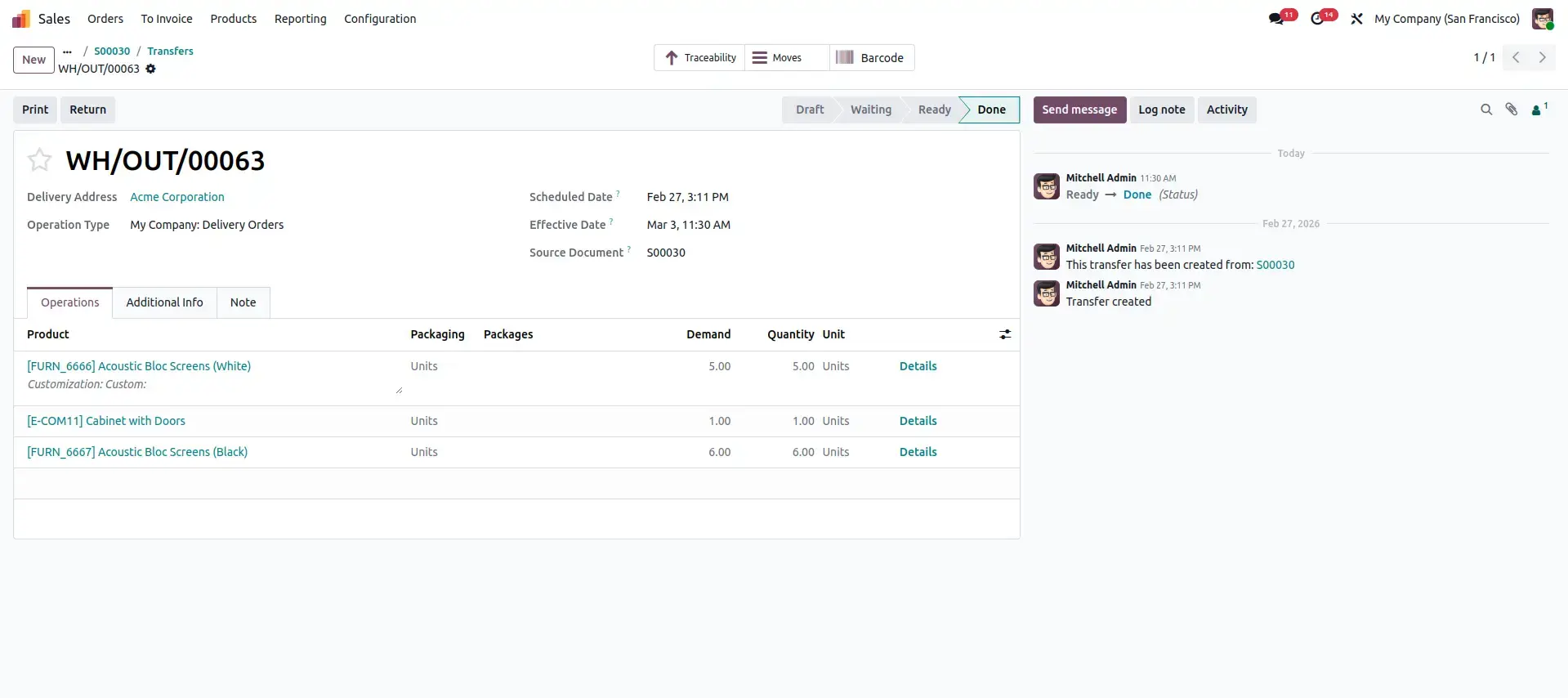
Stock Picking View
Open a Delivery Order from the Inventory module. Warehouse users process deliveries using the standard Stock Picking workflow without any changes. The module works seamlessly with existing delivery operations while preparing tracked products for optimized Delivery Slip printing.
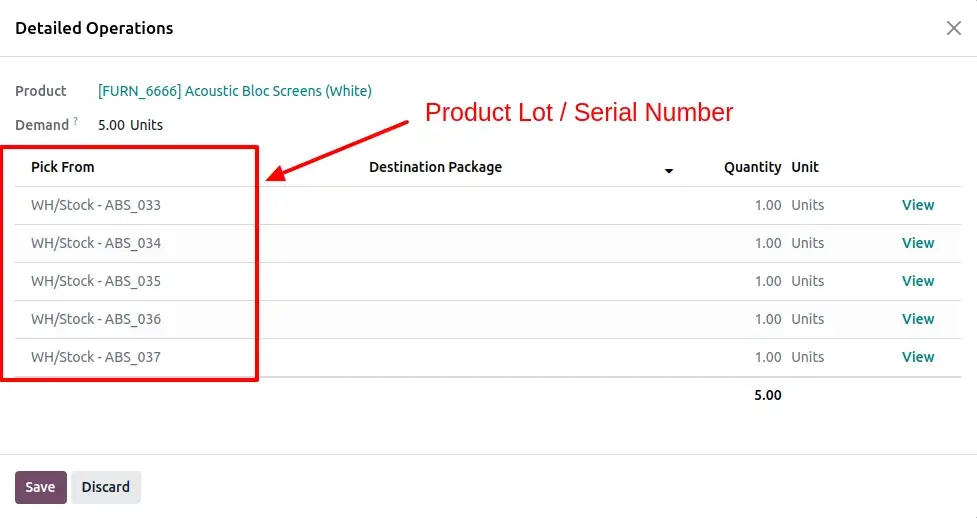
Detailed Operations View (Serial Tracking)
Open the Detailed Operations window to assign or verify individual Lot and Serial Numbers in the Pick From section. The module fully supports both packaged and non-packaged products while preserving Odoo's native serial tracking workflow.
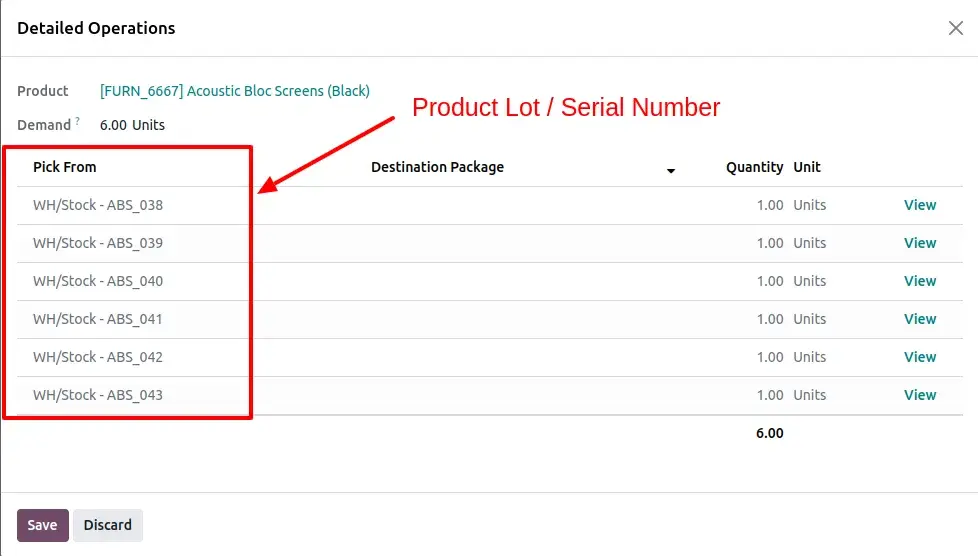
Detailed Operations Review
Review all assigned Lot and Serial Numbers before validating the delivery. The module preserves Odoo's standard serial management, ensuring every tracked product is accurately recorded before generating the Delivery Slip.
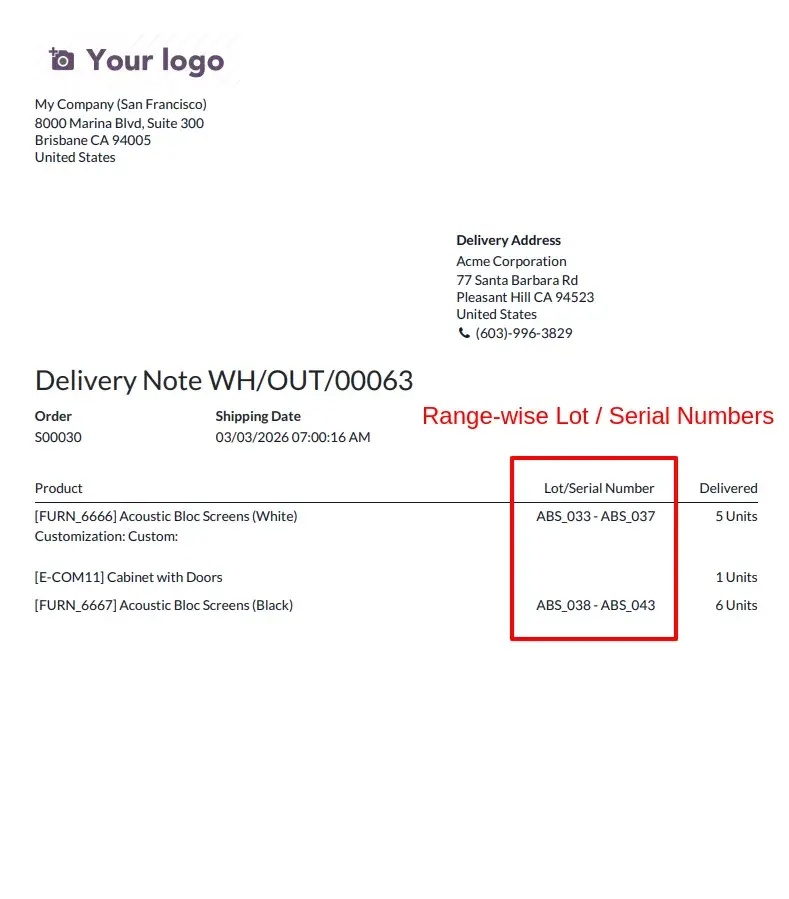
Automatic Serial Number Range Formatting
During report generation, the module automatically detects consecutive serial numbers and combines them into compact ranges such as ABS_033 – ABS_037. Non-consecutive serial numbers are displayed as comma-separated values while delivered quantities and Units of Measure are calculated automatically.
Stock Picking with Package wise Serial Numbers
When destination packages are used, the Stock Picking form clearly displays assigned packages together with their related serial numbers, helping warehouse teams organize products package by package.
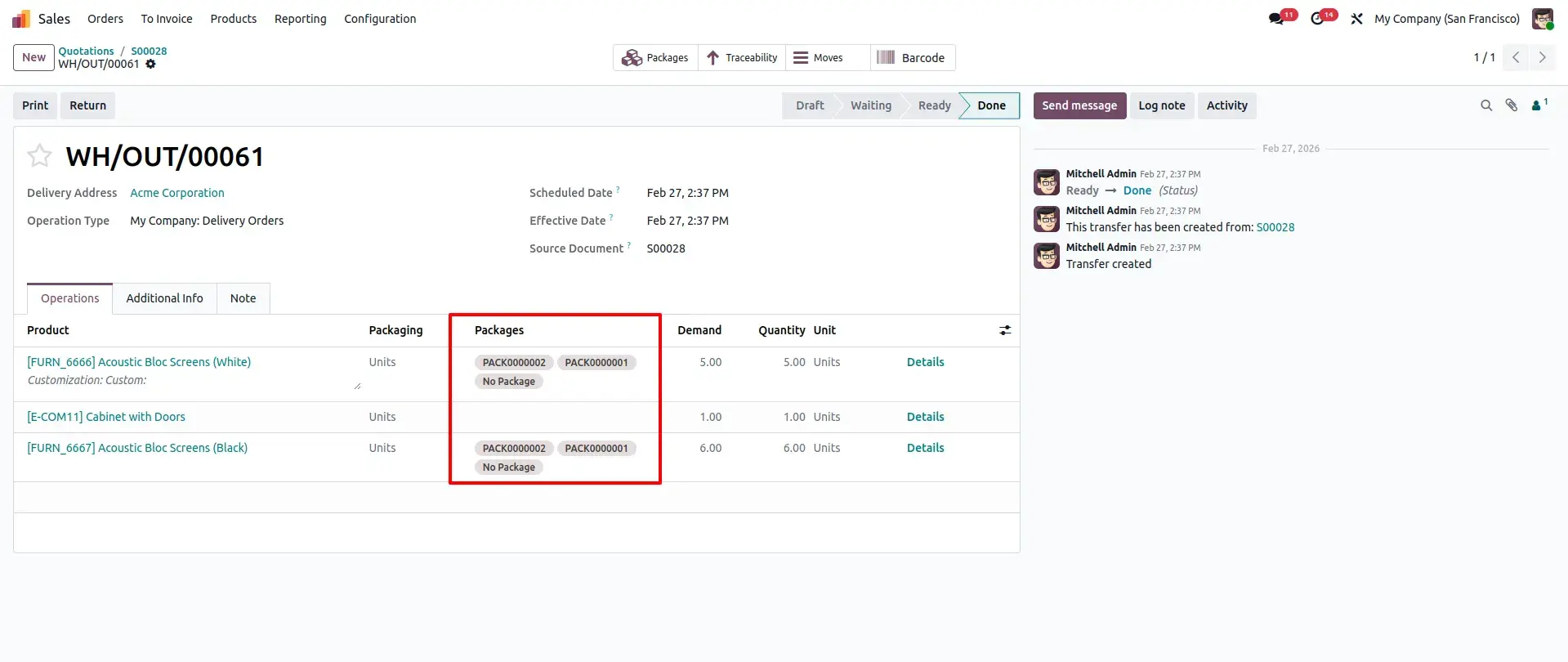
Product Lot/Serial Numbers with Assigned Packages
Every Lot and Serial Number remains linked to its assigned package, maintaining complete traceability between products and destination packages while preserving Odoo's standard inventory tracking.
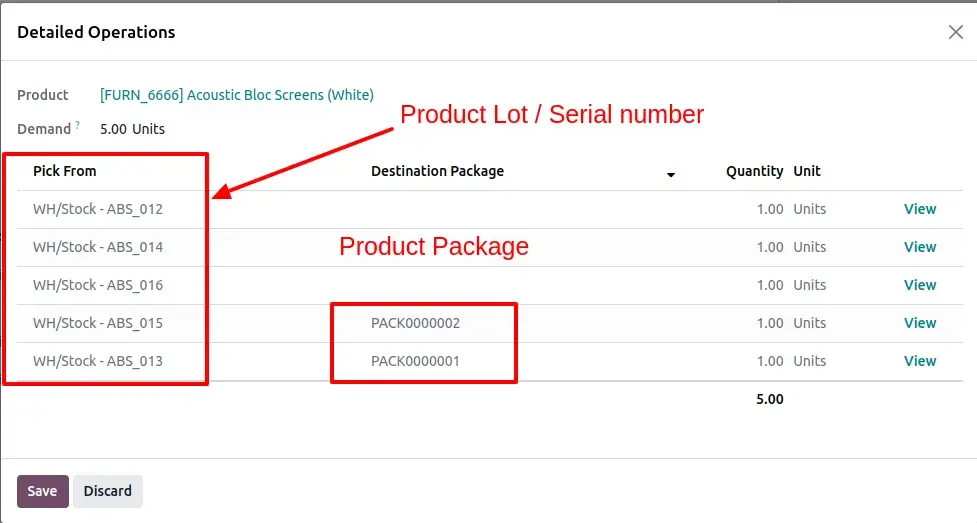
Final Detailed Operations Verification
Before printing the Delivery Slip, users can verify all serial numbers, package assignments, and delivered quantities directly from Detailed Operations, ensuring complete delivery accuracy.
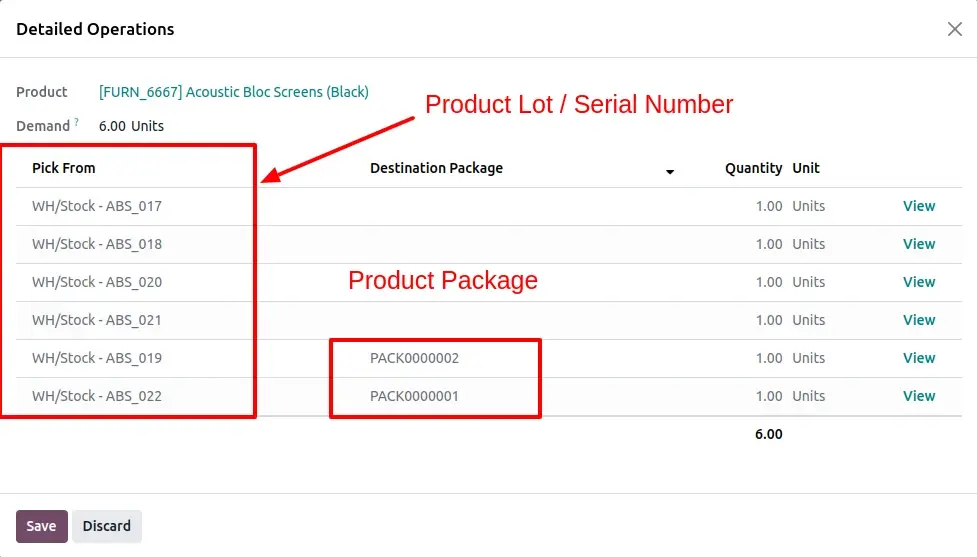
Package wise Serial Number Grouping
The printed Delivery Slip automatically groups serial numbers by their assigned packages. Each package displays its corresponding serial number ranges, while products without packages are listed separately. Delivered quantities are calculated automatically and displayed with the correct Unit of Measure, resulting in a clean, organized, and professional Delivery Slip.
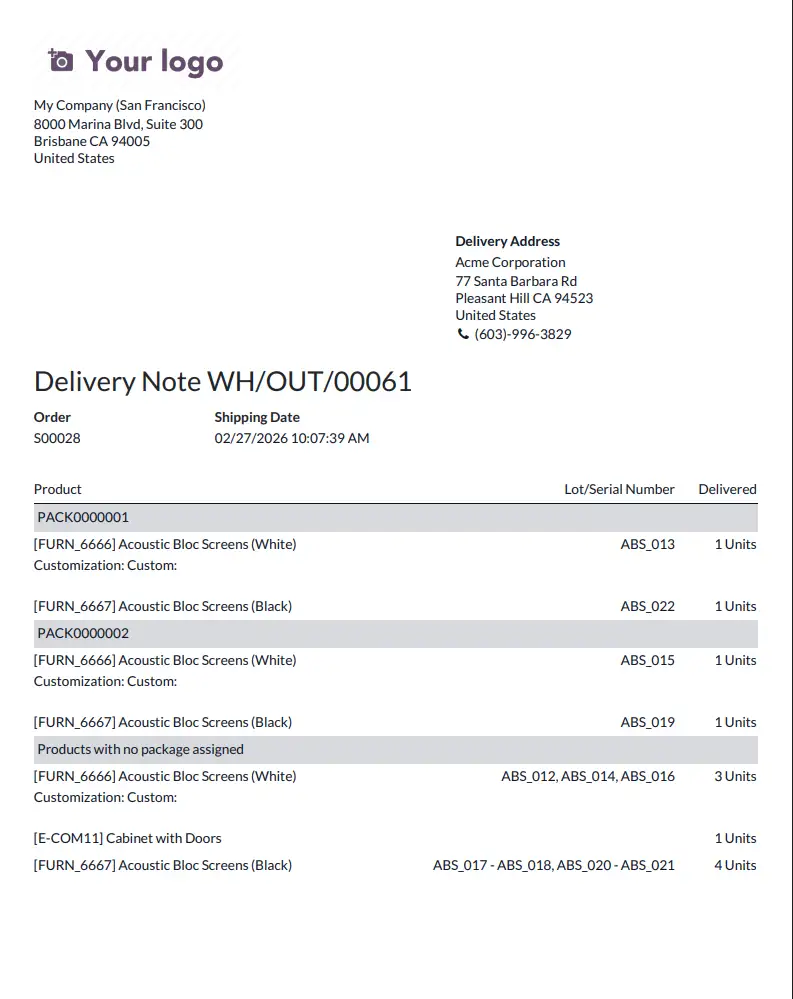
Frequently Asked Questions
Technical Details
Dependencies
• Inventory (stock)
License
OPL-1
Need Assistance?
Email Support
contact@gritxi-tech.comAny Questions?
Have questions about this app?
Fill out the form below and our team will get back to you with more information.
Customer Reviews
Share your experience with this module.
Write a Review
Latest Reviews
No reviews yet. Be the first to share your thoughts!