
Multi Discount on Sale & Invoice
Add multiple discount fields with automatic discount calculation on Sales Orders and Invoices.
Multi Discount on Sale & Invoice
Advanced multi discount management for Odoo Sales Orders and Customer Invoices with automatic trade discount calculation, tax computation, pricing transparency and seamless invoice integration.
App Overview

Introduction
The Multi Discount on Sale & Invoice app helps businesses apply cascading, multiple or successive discounts directly on Sales Orders and Customer Invoices in Odoo.
Using this module, internal users can apply multiple percentage-based discounts on individual sale order lines and invoice lines for products. The application automatically calculates discounted prices, taxes, untaxed amounts and total amounts without requiring manual adjustments.
It also automatically carries over discounts from Sales Orders to Invoices, ensuring consistency throughout the sales process.
The app ensures that all discount details are accurately reflected in printed reports and documents, providing better pricing transparency and improving overall business workflow management.
This module is especially useful for companies that use layered discount strategies such as seasonal discounts, partner discounts, promotional offers, reseller pricing or customer-specific pricing policies.

Purpose
The purpose of the Multi Discount on Sale & Invoice app is to simplify and automate complex discount management in Odoo Sales and Invoicing workflows while helping businesses increase sales.
The app reduces manual work, minimizes calculation errors, and enhances overall operational efficiency for businesses using advanced trade discount strategies.

Target Users

Sales Teams
Manage trade discounts and promotional pricing directly in Sales Orders.

Accounting Teams
Ensure invoice accuracy with automatic discount and tax calculations.

Retail Businesses
Handle seasonal, reseller and customer-specific discount strategies easily.
Key Features

Chaining Discount
Sequential Trade Discount
Discounts are applied sequentially to the product’s list price instead of being combined into a single percentage.
Example:
- Product Price = $100
- Discounts = 20% + 10%
| First 20% Discount | $100 → $80 |
| Then 10% Discount | $80 → $72 |

Automatic Calculation
After applying multiple discounts, the system automatically calculates the final price, taxes, untaxed amount and totals based on the trade discount sequence.

Simple Implementation
Easy to implement with minimal configuration required while keeping standard Odoo workflow functionality intact.

Transparency
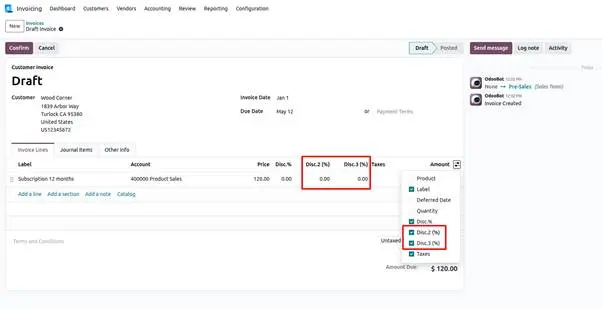
Multi discount details are shown only on Customer Invoices and Customer Credit Notes, ensuring clean vendor-side accounting documents.
Configuration Steps
Enable discount functionality in Odoo and configure the application in just a few simple steps. The setup process is lightweight, fast, and designed to work seamlessly with the standard Odoo workflow.
Open Sales Settings
Navigate to the Sales configuration panel.
Go to: Sales → Configuration → Settings
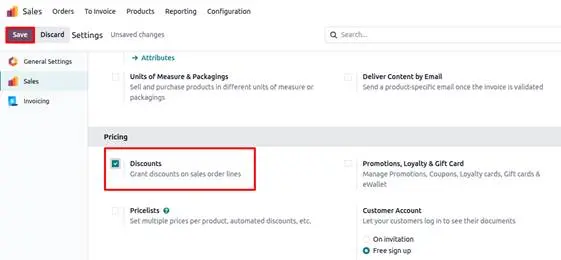
Enable Discount Option
Activate the standard Odoo discount feature.
Enable the Discount checkbox and click Save to apply.
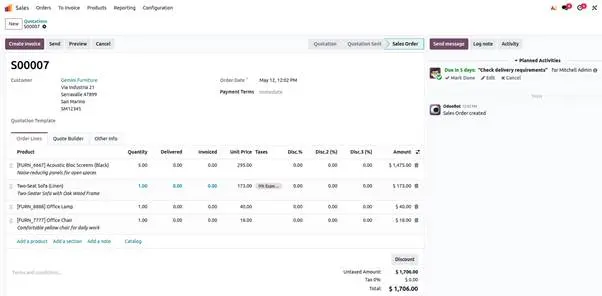
Ready to Use
The application automatically calculates sequential discounts, taxes, and totals and carries them to Customer Invoices.
Frequently Asked Questions
Technical Details
Dependencies
• Sale
• Invoice (Account)
License
OPL-1
Need Assistance?
Email Support
contact@gritxi-tech.comAny Questions?
Have questions about this app?
Fill out the form below and our team will get back to you with more information.
Customer Reviews
Share your experience with this module.
Write a Review
Latest Reviews
No reviews yet. Be the first to share your thoughts!