
CRM Sale Order Lines
Generate sale quotation from CRM Lead
CRM Sale Order Lines
Directly add products inside CRM Leads/Opportunities and automatically transfer them into Sales Quotations.

Introduction
The CRM Sale Order Lines app enhances the CRM-to-Sales workflow in Odoo by allowing users to directly add products and quantities inside CRM Leads and Opportunities, and automatically transfer them into Sales Quotation order lines.
Using this module, sales teams can define required products, quantities, and pricing information at the CRM stage itself. When a quotation is created from the lead/opportunity, the system automatically populates all CRM order line data into the Sales Quotation, eliminating the need for manual re-entry.
This ensures a smooth transition from lead qualification to quotation creation, improves data accuracy, reduces sales effort, and accelerates the overall sales process by keeping CRM and Sales modules tightly connected.

Purpose
The purpose of the CRM Sale Order Lines app is to streamline the CRM-to-Sales process in Odoo by allowing users to define products and quantities directly in CRM Leads and Opportunities and automatically transfer them to Sales Quotation order lines.
This reduces manual data entry during quotation creation, improves accuracy, ensures consistency between CRM and Sales modules, and helps sales teams quickly convert opportunities into structured quotations.

Target Users

Sales Teams
Directly manage product lines inside CRM to save time during conversions.

Sales Managers
Ensure data consistency and professionalism across customer quotations.

Business Owners
Accelerate sales processes and reduce manual data entry overhead.
Key Features

Add Products in CRM
Add products directamente in Leads and Opportunities.

Auto-Populate Data
Lines flow automatically from CRM to Sales Quotations.

Seamless Integration
Tightly connect CRM and Sales modules in Odoo.

Zero Manual Entry
Save time by removing the need to re-enter data.
Improved Accuracy
Ensure data consistency between CRM and Sales orders.

Accelerated Workflow
Convert opportunities to quotations faster than ever.

Multi-Product Support
Supports adding multiple products per lead/opportunity.
Reliable Sync
Ensures consistent product transfer across your workflow.

Simple Conversion
Simplifies the entire lead-to-quotation conversion process.
Configuration Steps
Lead Order Items
Go to CRM App → Leads. Open your lead and navigate to the Order Items tab to add products and quantities.
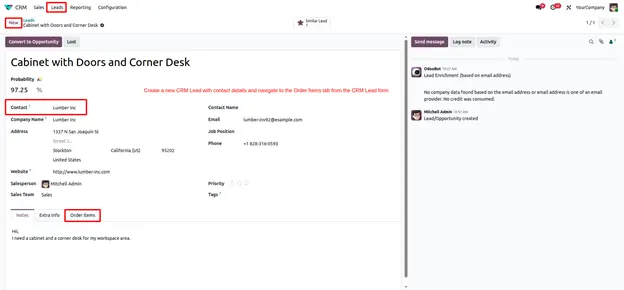
Initialize Conversion
Once order items are added, simply click the Convert to Opportunity button in the top left corner.
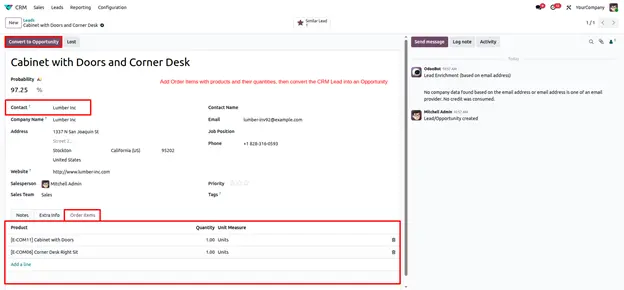
Conversion Wizard
An Odoo wizard will appear. Configure your conversion preferences and click Create Opportunity.
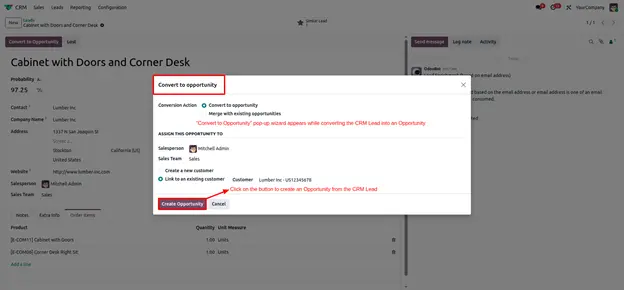
Create Quotation
The items are now synced to the Opportunity. Click New Quotation to generate your sales document.
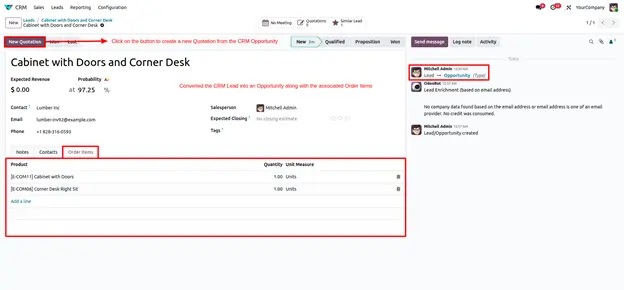
Quotation Generation
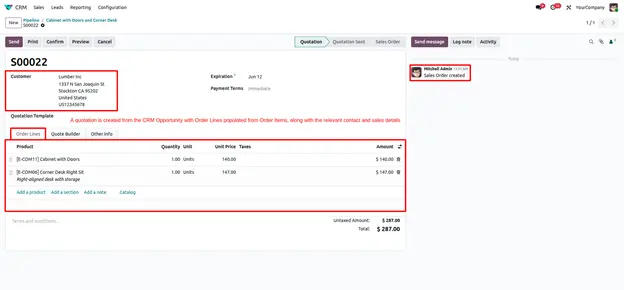
A new Sales Quotation opens automatically with all CRM Order Lines already populated.
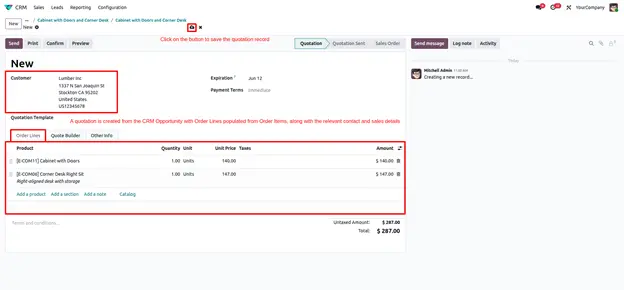
Finalized Record
Save the quotation to finalize the record. Your CRM items are now professional Sales order lines.
Frequently Asked
Technical Details
Dependencies
• CRM (crm)
• Sales (sale_management)
• Calendar (calendar)
• Contacts (contacts)
• Discuss (mail)
• Invoicing (account)
License
OPL-1
Need Assistance?
Email Support
career@gritxi-tech.comAny Questions?
Have questions about this app?
Fill out the form below and our team will get back to you with more information.
Customer Reviews
Share your experience with this module.
Write a Review
Latest Reviews
No reviews yet. Be the first to share your thoughts!